Google Messages is introducing a redesigned long-press menu aimed at enhancing one-handed usability. This update, initially tested in January, is now being expanded to more beta users.
Previously, when users long-pressed a message, a toolbar appeared at the top of the screen, displaying three primary actions, with additional options accessible via a three-dot overflow menu. This setup also included a pill-shaped emoji reaction bar.
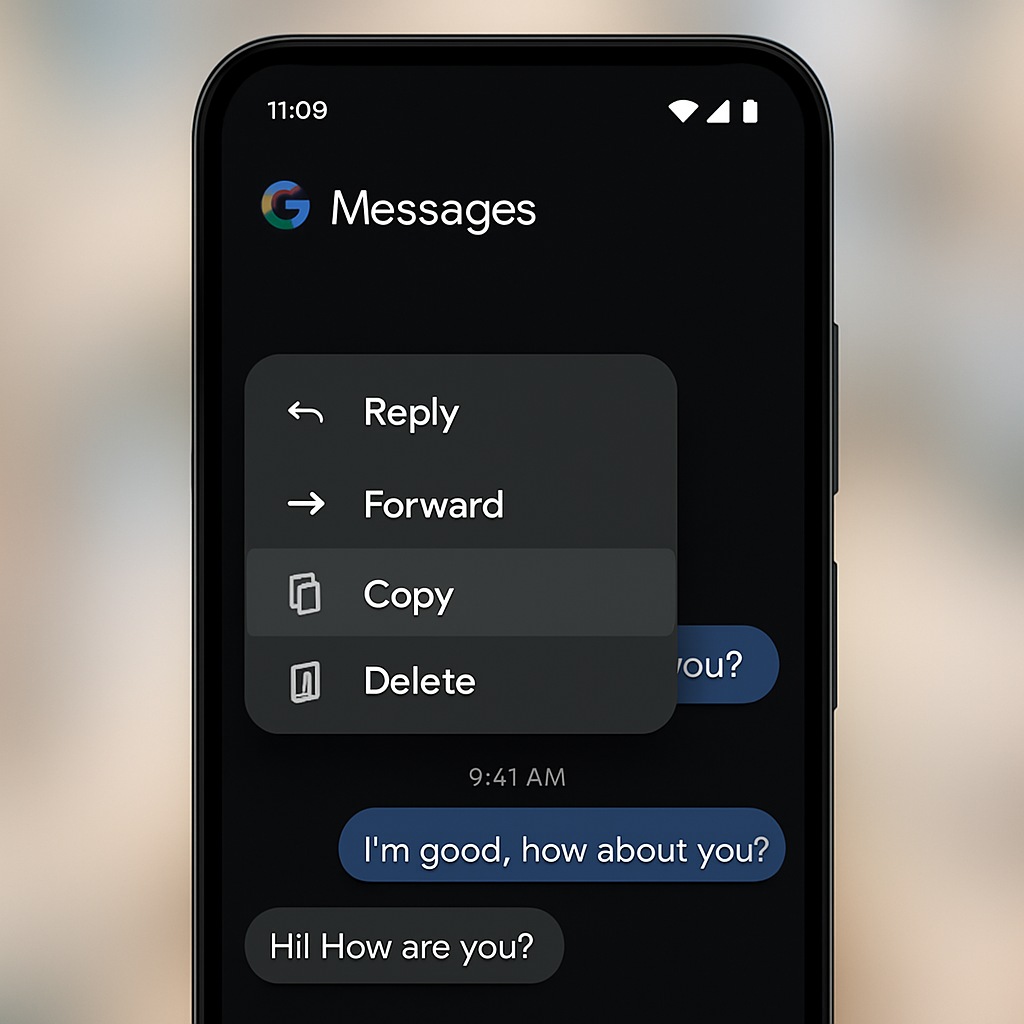
In the new design, the background blurs upon long-pressing a message. The emoji reaction bar remains unchanged above the selected message. Below the message, a new menu appears, offering options such as Reply, Forward, Copy, Star, Delete, Select more, Info, and Save (for media). If screen space is limited, the selected item is repositioned higher on the screen, accompanied by a bouncy animation.
An additional feature allows users to perform a second long-press on text to copy specific portions of a message, addressing the previous limitation of copying entire messages.
This menu redesign is rolling out with the latest version of the Google Messages beta (20260731_00_RC00) as part of a server-side update. Users not yet seeing the update live can try force-stopping Google Messages from the App info settings.
These enhancements reflect Google’s ongoing commitment to refining user experience in its messaging platform. By streamlining message interactions and introducing more precise text selection, Google Messages is becoming more intuitive and user-friendly. Users can anticipate further updates as Google continues to evolve its messaging services.