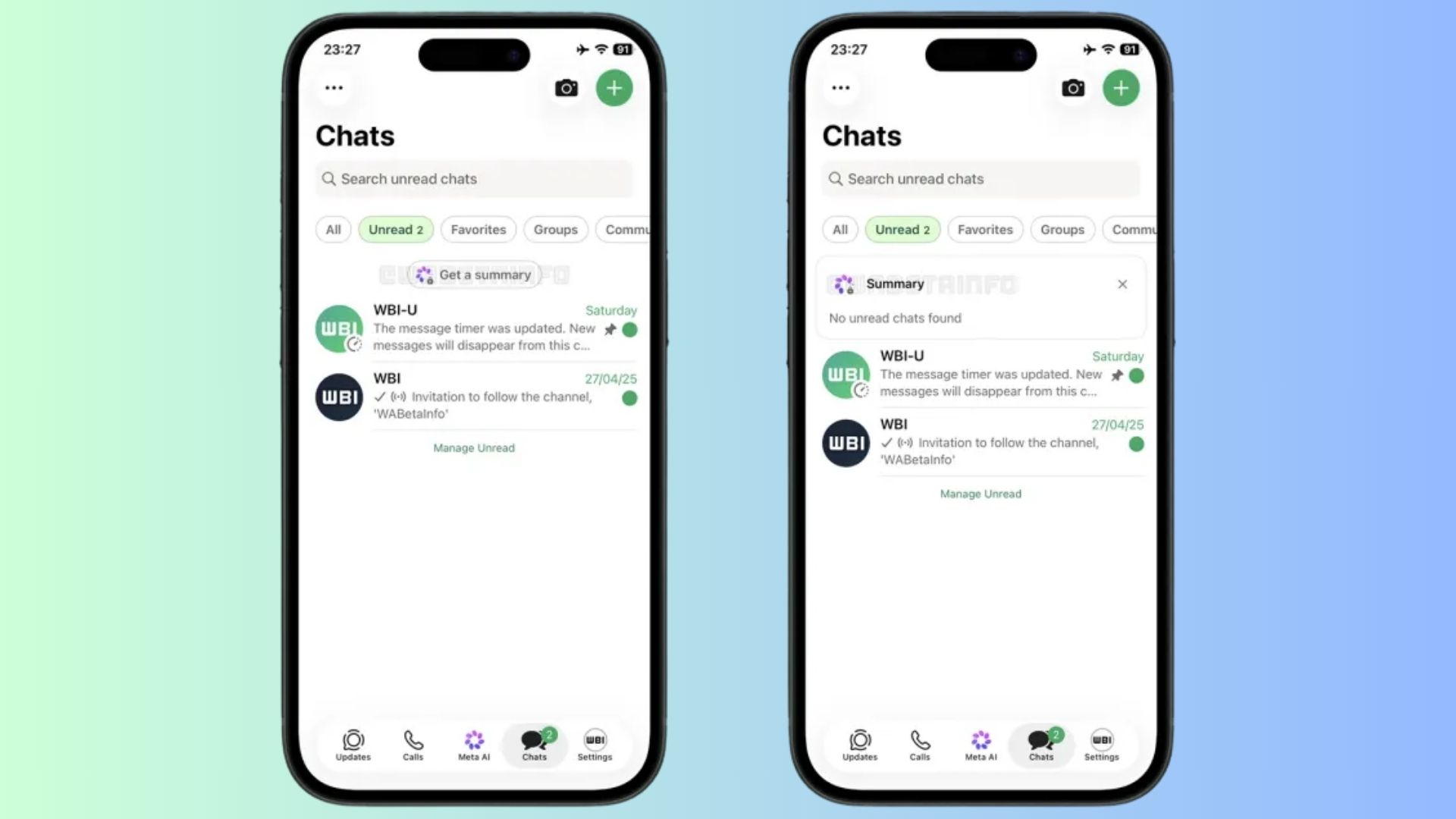
WhatsApp is currently developing a new feature that leverages artificial intelligence to generate concise summaries of multiple unread conversations simultaneously. This innovation aims to help users efficiently catch up on missed messages without the need to open each individual chat thread.
Introducing the Unified AI Summarization Feature
In a recent TestFlight beta build, WhatsApp introduced a Get a summary button located at the top of the Chats tab when the unread filter is active. By tapping this button, users can prompt the system to analyze recent messages across various conversations and produce a consolidated recap. This approach is designed to reduce notification fatigue by condensing extensive chat volumes into clear and easily digestible summaries.
Ensuring User Privacy with Private Processing
To address privacy concerns, Meta, WhatsApp’s parent company, processes these summaries through its Private Processing architecture. This isolated cloud environment ensures that personal data remains inaccessible to Meta. The platform analyzes the text to deliver the core points and then immediately discards the temporary data without storing anything externally. This method builds upon an earlier update where WhatsApp introduced individual chat summaries, now expanding to a unified approach that prevents users from manually opening each busy group chat to understand the context.
Development and Future Availability
The unified AI summarization feature is currently under active development for both iOS and Android platforms. WhatsApp plans to release it to a broader testing group soon, aiming to enhance user experience by streamlining the process of catching up on multiple unread messages.
Additional AI-Powered Features in Development
WhatsApp’s commitment to integrating AI into its platform is evident through several other features in development:
– Writing Help: This tool allows users to refine messages with AI-generated suggestions before sending them. Users can choose improvements related to clarity, tone, or grammar, making it easier to adjust a message without rewriting it from scratch. The system works through a new pen icon that replaces the sticker symbol in the chat bar once Private Processing is enabled in settings. Tapping it lets users select from five tones: Rephrase, Professional, Funny, Supportive, and Proofread. After reviewing results, users can send either the original message or a suggested version. WhatsApp ensures that recipients will not know when AI assistance was used. This feature is currently available to a limited number of iOS beta users through TestFlight, with plans for gradual expansion.
– Chat History Sharing for New Group Members: WhatsApp is testing a feature that allows groups to share recent messages when a new member joins, instead of starting them at a blank chat. Group admins or members can share up to 100 recent messages from the past 14 days, helping new members catch up quickly. Shared messages appear in a different color to distinguish them from regular chats. WhatsApp posts a system message in the group chat that shows who shared the messages with the new member. The transfer uses the sender’s device and encryption key, ensuring that the messages remain protected by end-to-end encryption. This feature is currently limited to select beta testers on iOS and Android, with a wider rollout expected soon.
– Spoiler Formatting for Messages: WhatsApp is preparing a new formatting option that lets users hide parts of their messages as spoilers. Recipients will need to tap the text to reveal it, providing more control when sharing sensitive details or plot points in group chats. The feature appears in the latest WhatsApp beta for iOS and focuses on text messages only. Once released, users will find the Spoiler option next to existing tools such as Bold, Italic, and Strikethrough. Selecting it will cover the chosen words with a gray overlay that hides the content until someone taps it.
Enhancing Group Chat Experience
WhatsApp has also introduced features aimed at improving the group chat experience:
– Group Message History: This feature helps new members catch up on recent conversations without feeling lost. Admins and members can choose to send recent messages to new members, ranging from 25 to 100 messages. This approach ensures that new members receive only the most relevant context instead of the entire conversation history. Message history is not shared automatically; users must actively choose to send it. Admins also have the option to disable Group Message History entirely for their groups, which is useful for sensitive discussions. Even when disabled, admins retain the ability to share message history themselves. For transparency, WhatsApp notifies everyone in the group when history is shared. The shared messages appear visually distinct from regular chats and include clear timestamps and sender information. WhatsApp has started rolling out this feature gradually across devices, reinforcing its focus on private and secure group communication.
– New Group Chat Features: WhatsApp announced three new group chat features to make conversations more organized and expressive:
– Member Tags: Allow users to label themselves differently in each group chat, helping others understand their role at a glance. For example, a user can appear as Coach in a sports group and Dad in a family chat. Each tag stays specific to that group, so it does not affect how the user appears elsewhere. This feature is particularly useful in large groups where not everyone knows each other personally.
– Text Stickers: Enable users to convert typed words into stickers. By typing text into Sticker Search, the app turns it into a sticker-style graphic. Users can also save these text stickers directly to their sticker packs without needing to send them in a chat first. This feature helps messages stand out, especially in busy group conversations.
– Event Reminders: Assist in planning inside group chats by allowing users to set early custom reminders for everyone invited to an event. This helps people remember important details, such as when to leave for a party or when to join a scheduled call. The reminder timing depends on the type of event created.
These updates reflect WhatsApp’s ongoing focus on making group chats easier to manage and more useful for everyday communication.
Conclusion
WhatsApp’s development of AI-powered features like unified chat summaries, Writing Help, and spoiler formatting demonstrates the platform’s commitment to enhancing user experience and addressing common communication challenges. By integrating these tools, WhatsApp aims to streamline conversations, reduce notification fatigue, and provide users with more control over their messaging interactions.