Satechi’s ChargeView 140W Desktop Charger: A Game-Changer for Efficient Charging
In the ever-evolving landscape of technology, the demand for efficient and versatile charging solutions has never been higher. Satechi, a renowned name in tech accessories, has risen to the occasion with its latest innovation: the ChargeView 140W Desktop Charger. This cutting-edge device is designed to cater to the diverse charging needs of modern users, offering a blend of power, adaptability, and user-friendly features.
Design and Build
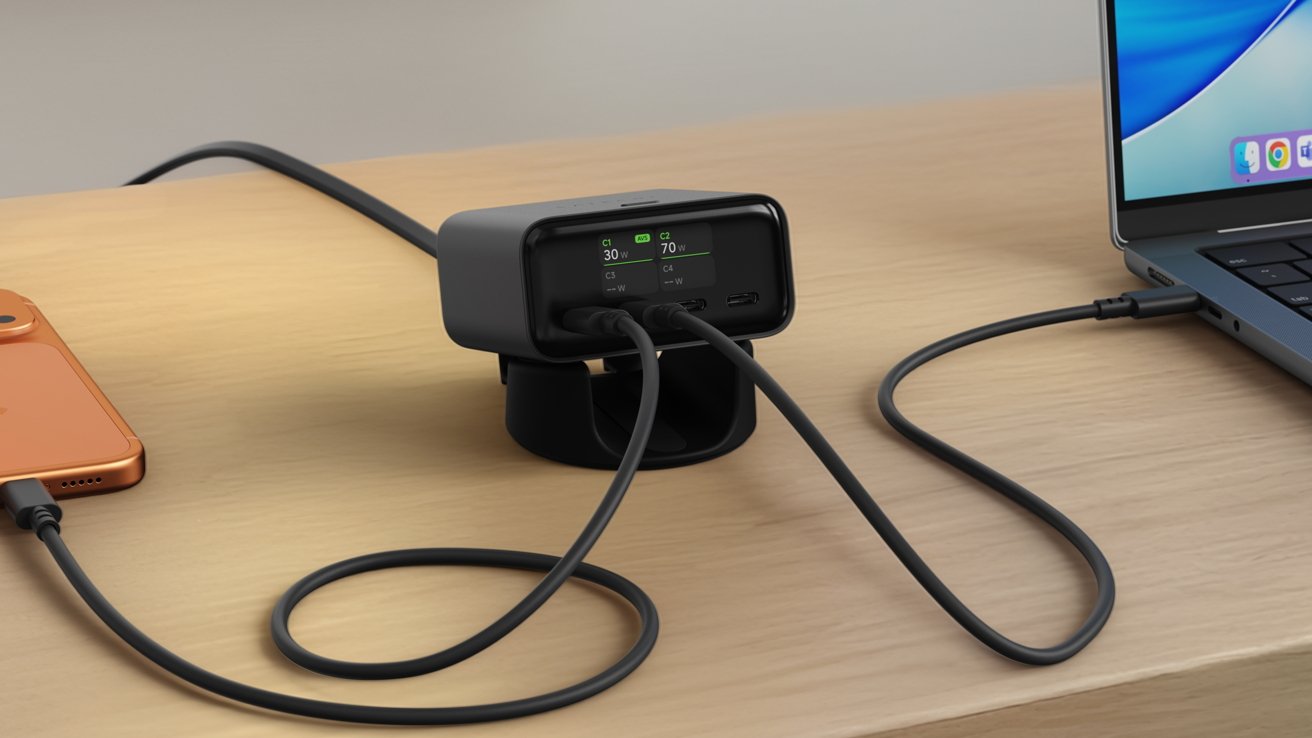
The ChargeView 140W Desktop Charger boasts a sleek, space-black aluminum design that seamlessly complements contemporary workspaces. Its compact form factor ensures it occupies minimal desk space, making it an ideal addition to both home and office environments. The charger comes equipped with a modular stand, allowing users to position it either vertically or horizontally based on their preference and space constraints. ([support.satechi.com](https://support.satechi.com/hc/en-us/articles/47702005319707-Quick-Start-Guide-ChargeView-140W-Desktop-Charger-ST-C4CV140C-US?utm_source=openai))
Port Configuration and Power Output
At the heart of the ChargeView are four USB-C ports, each engineered to deliver optimal charging performance:
– Port C1: Supports USB Power Delivery (PD) 3.2 with Adjustable Voltage Supply (AVS) technology, capable of delivering up to 140W.
– Ports C2, C3, and C4: Support USB PD 3.1 with Programmable Power Supply (PPS) technology, each offering varying power outputs to accommodate a range of devices.
This configuration ensures that users can simultaneously charge multiple devices, from high-powered laptops to smartphones and tablets, without compromising on speed or efficiency. ([support.satechi.com](https://support.satechi.com/hc/en-us/articles/47701968267419-Technical-Specifications-ChargeView-140W-Desktop-Charger-ST-C4CV140C-US?utm_source=openai))
Real-Time Power Monitoring
A standout feature of the ChargeView is its integrated LCD display, which provides real-time feedback on the power output of each port. This transparency allows users to monitor and manage their devices’ charging status effectively, ensuring optimal performance and preventing overcharging. ([appleinsider.com](https://appleinsider.com/articles/26/04/21/satechis-chargeview-140w-desktop-charger-shows-how-much-power-youre-using?utm_source=openai))
Advanced Charging Technologies
The incorporation of GaN (Gallium Nitride) technology sets the ChargeView apart from traditional chargers. GaN allows for higher efficiency and faster charging speeds while maintaining a compact size. Additionally, the charger employs adaptive charging intelligence, dynamically distributing power based on each connected device’s requirements. This ensures that devices receive the appropriate amount of power, enhancing battery longevity and performance. ([forbes.com](https://www.forbes.com/sites/marksparrow/2026/04/21/satechis-new-chargeview-140w-desktop-gan-charger-with-real-time-display/?utm_source=openai))
Safety and Compliance
Safety is paramount in charging devices, and Satechi has integrated multiple protective features into the ChargeView:
– Over-Voltage Protection: Prevents devices from receiving excessive voltage.
– Over-Current Protection: Safeguards against current surges that could damage devices.
– Over-Temperature Protection: Monitors and regulates temperature to prevent overheating.
– Short-Circuit Protection: Detects and mitigates short circuits to protect both the charger and connected devices.
These features collectively ensure a safe and reliable charging experience. ([support.satechi.com](https://support.satechi.com/hc/en-us/articles/47701968267419-Technical-Specifications-ChargeView-140W-Desktop-Charger-ST-C4CV140C-US?utm_source=openai))
Device Compatibility
The ChargeView 140W Desktop Charger is compatible with a wide array of devices, including:
– Apple Mac: MacBook Air (2018 – 2019, M1 – M5), MacBook Neo (13-inch, 2026), MacBook Pro (13-inch, 14-inch, 16-inch models from 2020 and later).
– Apple iPad: iPad Pro (11-inch and 12.9/13-inch), iPad Air (M1, M2, M3 and later), iPad Mini (6th generation and later), iPad (10th generation and later).
– Apple iPhone: iPhone 15 series through iPhone 17 series, including iPhone Air.
– Other Devices: Apple Watch (with USB-C charging cable), AirPods Pro (USB-C case), AirPods 4 (USB-C case), Apple Vision Pro, various Windows and Chromebook laptops, Android smartphones and tablets, and gaming devices like Nintendo Switch, Steam Deck, and ASUS ROG Ally. ([support.satechi.com](https://support.satechi.com/hc/en-us/articles/47701977911195-Device-Compatibility-ChargeView-140W-Desktop-Charger-ST-C4CV140C-US?utm_source=openai))
Power Distribution Dynamics
Understanding the power distribution is crucial for maximizing the charger’s efficiency:
– Single Device Connection: Provides maximum output to the connected port.
– Multiple Devices Connection: The total 140W is dynamically shared across active ports. For instance:
– Dual Port Usage: Connecting devices to Port C1 and C2 results in each receiving 70W.
– Triple Port Usage: Connecting devices to Ports C1, C2, and C3 results in outputs of 65W, 45W, and 30W, respectively.
– Quad Port Usage: Utilizing all four ports distributes power as 65W to C1, 40W to C2, 20W to C3, and 15W to C4.
This intelligent power allocation ensures that each device receives adequate power based on its requirements. ([support.satechi.com](https://support.satechi.com/hc/en-us/articles/47049097099419-Power-Distribution-ChargeView-140W-Desktop-Charger-ST-C4CV140C-US?utm_source=openai))
User Experience and Setup
Setting up the ChargeView is straightforward:
1. Assemble the Stand: Attach the modular stand in the desired orientation.
2. Connect Power: Plug the AC power cable into the charger and connect it to a wall outlet.
3. Connect Devices: Use USB-C cables to connect devices to the appropriate ports.
4. Monitor Charging: Utilize the LCD display to monitor real-time power output for each port.
For optimal performance, it’s recommended to use USB-IF certified USB-C PD cables and ensure the charger has adequate ventilation. ([support.satechi.com](https://support.satechi.com/hc/en-us/articles/47702005319707-Quick-Start-Guide-ChargeView-140W-Desktop-Charger-ST-C4CV140C-US?utm_source=openai))
Conclusion
Satechi’s ChargeView 140W Desktop Charger is a testament to the company’s commitment to innovation and user-centric design. By combining high power output, advanced charging technologies, real-time monitoring, and a sleek design, it addresses the multifaceted charging needs of today’s tech-savvy users. Whether for professional or personal use, the ChargeView stands out as a reliable and efficient charging solution.