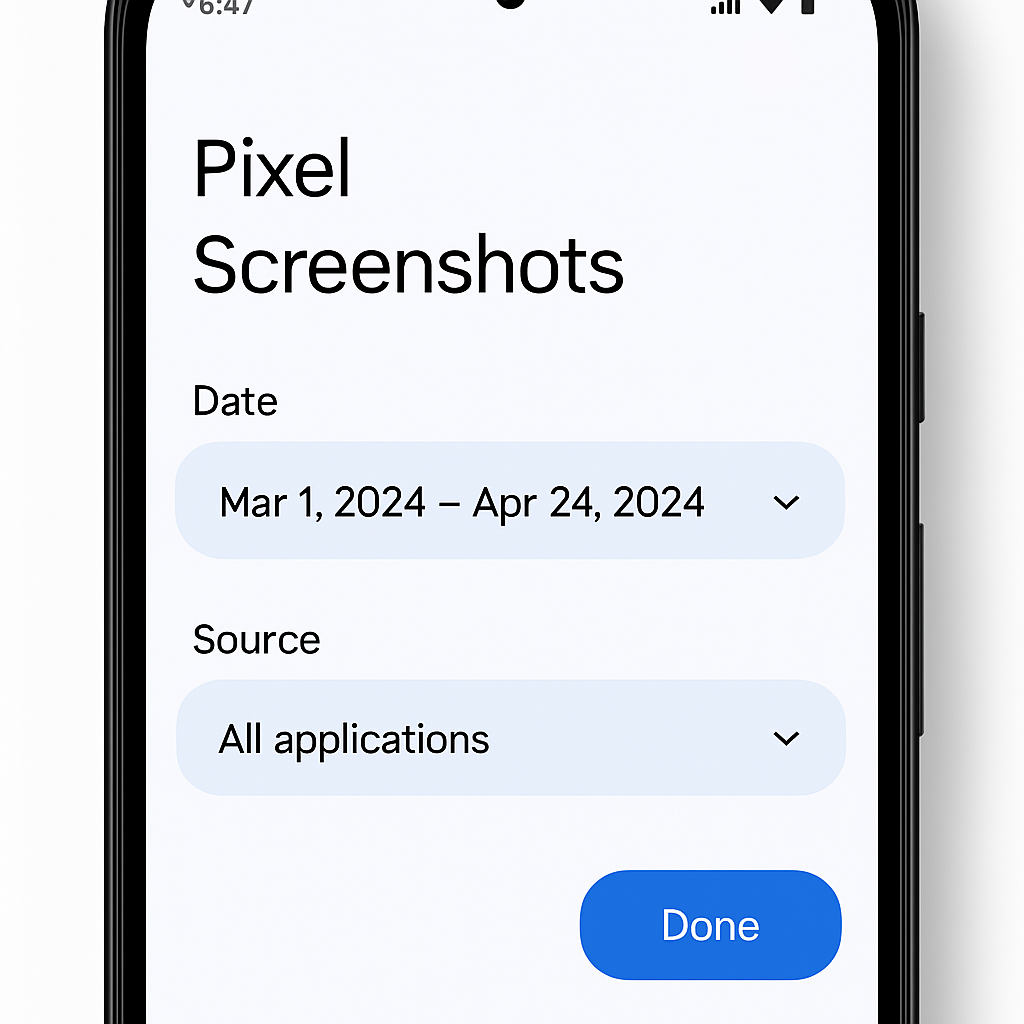
Google’s Pixel Screenshots app has received a significant update alongside the Pixel 11 series, introducing enhanced filtering capabilities that allow users to sort their screenshots by date range and source application.
Previously, the app’s filtering options were limited to tags such as Places, Articles, Events, Notes, Receipts, and Tracking info. With the latest update, users can now refine their screenshot collections using the following criteria:
- Date Range: Options include 24 hours, 7 days, 30 days, 6 months, 1 year, and a customizable range.
- Collections: Users can view screenshots grouped into specific collections without navigating to each one individually.
- Sources: Screenshots can be filtered based on the originating application, leveraging metadata that Google already associates with each capture.
These new filtering options enhance the app’s usability, making it easier for users to locate specific screenshots amidst extensive libraries. The filters are also accessible within individual collections, providing a consistent and streamlined experience.
In addition to these filtering enhancements, the update includes a new setting that allows users to enable or disable the use of mobile data when processing screenshots. This feature offers greater control over data usage, particularly for those mindful of their mobile data consumption.
It’s worth noting that in June 2026, the Pixel Screenshots app transitioned from exclusively on-device AI processing to incorporating cloud-based Private AI Compute. This shift aims to deliver more intelligent AI experiences while maintaining user data privacy. The current update builds upon this foundation by offering more refined organizational tools.
Version 1.26.281.05 of the Pixel Screenshots app is now available for download via the Google Play Store and is compatible with Pixel 10 devices and newer models.
These enhancements reflect Google’s ongoing commitment to improving user experience through thoughtful software updates. By providing more granular control over screenshot organization and data usage, the Pixel Screenshots app becomes an even more valuable tool for users who rely on it for capturing and managing information.