iOS 27 Introduces Extra-Large Widgets for Enhanced Home Screen Customization
Apple’s latest operating system, iOS 27, brings a host of new features designed to enhance user experience and device functionality. Among these innovations is the introduction of extra-large widgets, offering users greater flexibility and customization options for their Home Screen and Today View.
Understanding the New Widget Sizes
Prior to iOS 27, users had access to three widget sizes:
– Small Widgets: Occupying a 2×2 grid space.
– Medium Widgets: Spanning a 4×2 grid.
– Large Widgets: Covering a 4×4 grid.
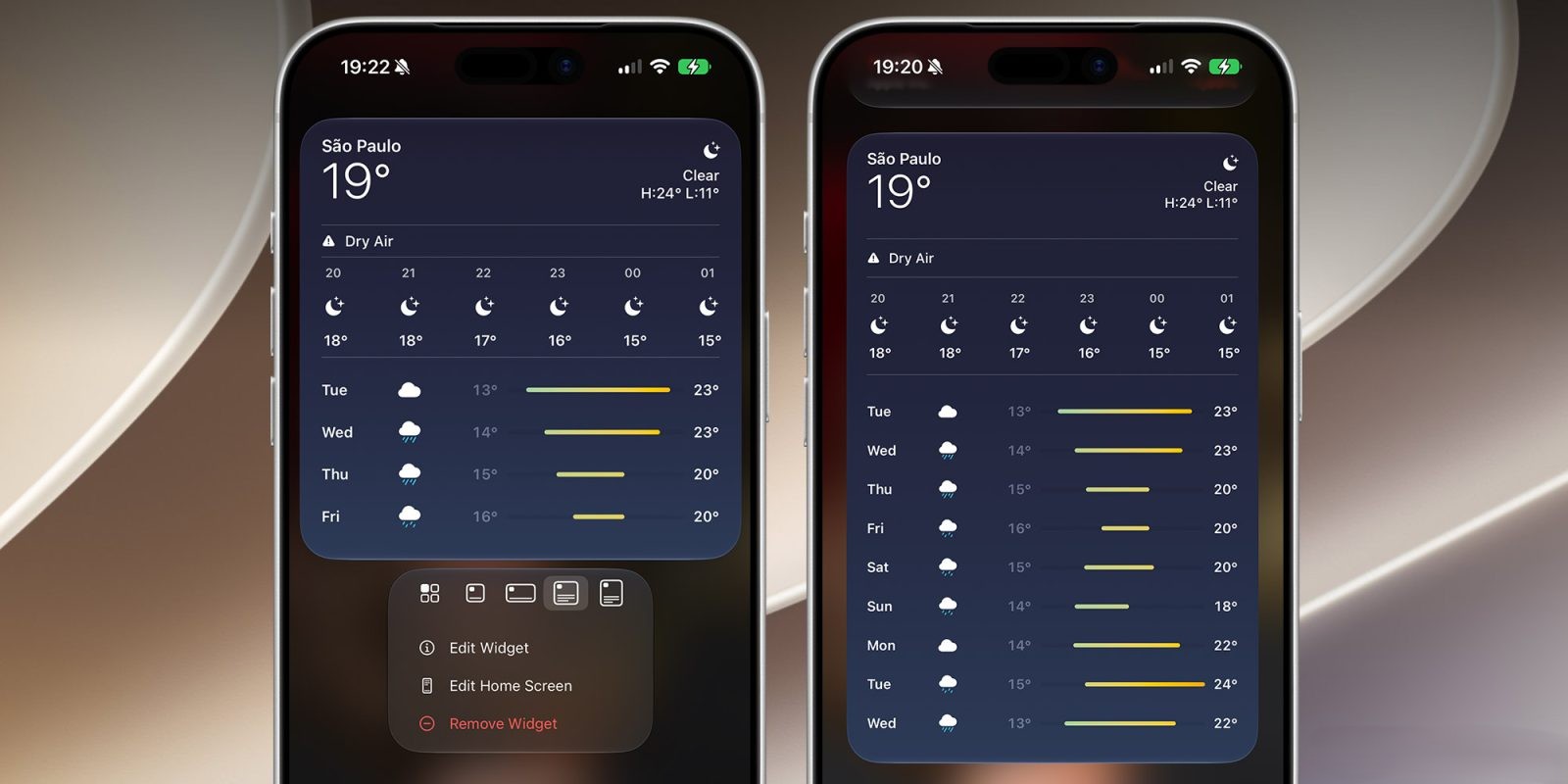
With the advent of iOS 27, Apple has introduced an extra-large widget size that utilizes a 4×6 grid. This expanded canvas allows applications to display more comprehensive information at a glance, enhancing the utility and aesthetics of the Home Screen.
Customizing Widgets in iOS 27
The process of adding and resizing widgets has been streamlined in iOS 27:
1. Adding Widgets: Users can add widgets by entering the ‘Edit’ mode on the Home Screen, tapping the ‘+’ icon, and selecting their desired widget from the list.
2. Resizing Widgets: To adjust the size of a widget, users can tap and hold the widget until it enters ‘jiggle’ mode. A drag handle appears at the bottom-right corner, allowing the widget to be resized to the preferred dimensions, including the new extra-large format.
Current Support and Future Expansion
At launch, the extra-large widget size is supported by a select number of Apple’s native applications. These include:
– Calendar: Displays a comprehensive view of upcoming events and appointments.
– Weather: Provides detailed forecasts, including hourly and weekly outlooks.
– News: Showcases top headlines and stories from preferred news sources.
Apple has encouraged third-party developers to adopt this new widget size. As developers update their applications, users can expect a broader range of extra-large widgets, further enhancing the customization and functionality of their devices.
Additional Features in iOS 27
Beyond the introduction of extra-large widgets, iOS 27 encompasses several other noteworthy features:
– Siri AI Enhancements: The integration of advanced artificial intelligence capabilities into Siri offers more accurate responses and a more natural conversational experience.
– Improved Search Functionality: The search feature has been refined to deliver faster and more relevant results, streamlining information retrieval.
– Apple Intelligence Integration: System-wide enhancements leverage machine learning to provide personalized suggestions and automate routine tasks.
– Independent Volume Controls: Users can now set separate volume levels for alarms, timers, alerts, and system sounds, offering greater control over audio settings.
User Experience and Feedback
Early adopters of iOS 27 have expressed appreciation for the extra-large widgets, noting their ability to display more information without the need to open individual apps. This feature is particularly beneficial for users who rely on their devices for scheduling, news updates, and weather forecasts.
The flexibility to resize widgets allows users to tailor their Home Screen to their specific needs, creating a more personalized and efficient interface.
Looking Ahead
As iOS 27 continues to roll out, Apple remains committed to enhancing user experience through continuous updates and feature expansions. The introduction of extra-large widgets marks a significant step in providing users with more control over their device interfaces.
Users are encouraged to explore the new widget options and provide feedback, as Apple values user input in shaping future updates.