Enhance Your iPhone Experience with iOS 26.4’s New Ambient Music Widgets
Apple’s latest iOS 26.4 update introduces innovative Ambient Music widgets, transforming how users interact with music on their iPhone Home Screens. These widgets offer seamless, one-tap access to playlists tailored to specific moods, enhancing the personalization and convenience of your device.
Introducing Ambient Music Widgets
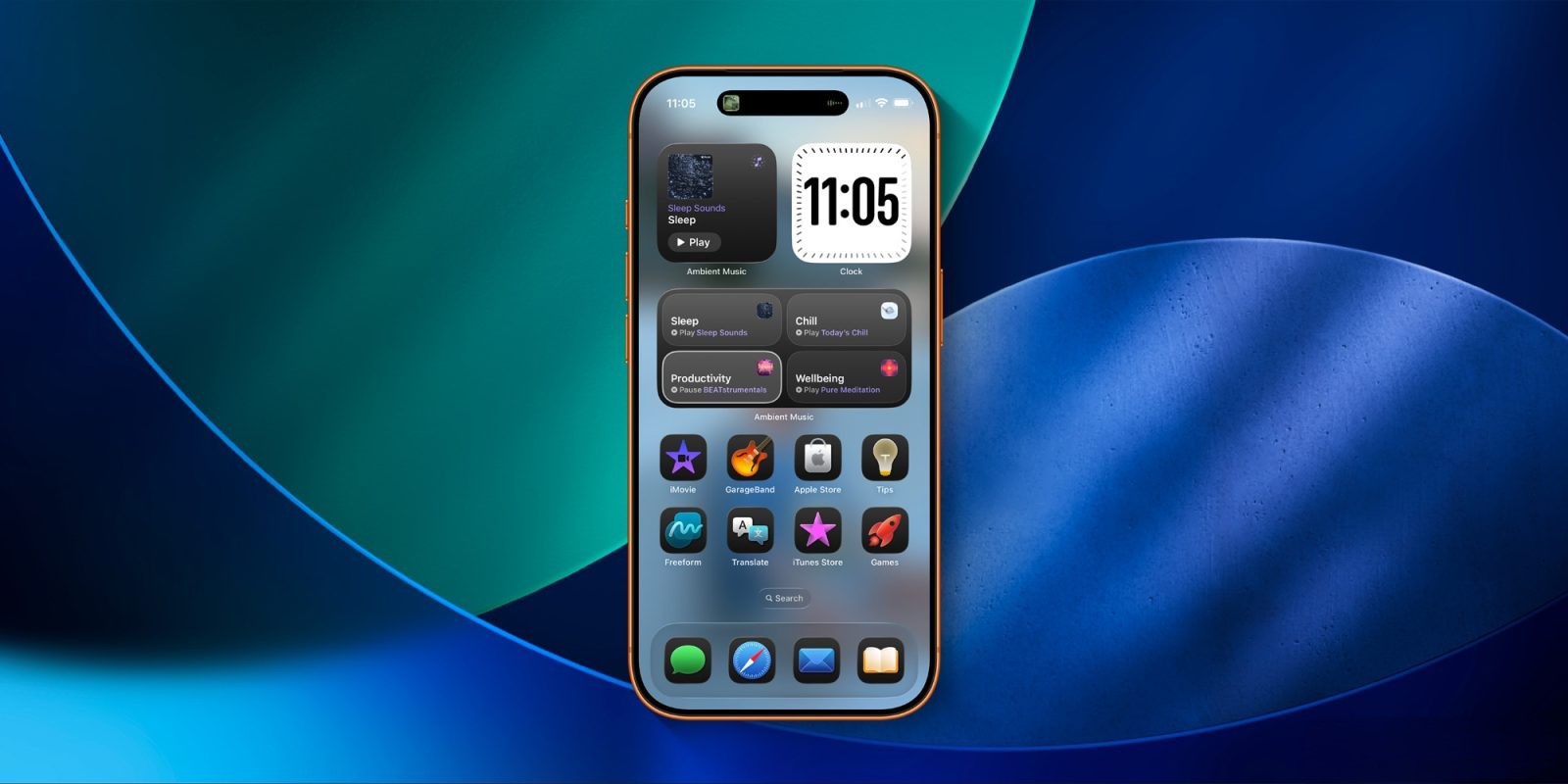
The new Ambient Music widgets in iOS 26.4 are designed to provide quick access to mood-based playlists directly from your Home Screen. Available in two sizes, these widgets cater to different user preferences:
– Small Widget: Displays a single playlist, customizable to one of the following moods:
– Chill
– Productivity
– Sleep
– Wellbeing
– Large Widget: Offers access to all four mood playlists simultaneously, each with its own one-tap play button.
These widgets build upon the Ambient Music feature introduced in the Control Center in a previous update, now bringing this functionality to the forefront of your iPhone experience.
Customization and Personalization
Apple provides built-in playlists for each mood to help users get started:
– Sleep: Options include Sleep Sounds, Bedtime Beats, Sound Bath, and Piano Sleep.
For those who prefer a more personalized touch, the widgets allow customization with your own playlists. By long-pressing the widget and selecting ‘Edit Widget,’ you can assign your preferred music to each mood, tailoring the experience to your liking.
Integration with Apple Music
Currently, the Ambient Music widgets are integrated exclusively with Apple Music, ensuring a seamless experience for subscribers. This integration allows for a cohesive and intuitive user interface, though it does mean that users of other music streaming services, such as Spotify, will not have access to these widgets at this time.
Enhancing User Experience
The introduction of Ambient Music widgets in iOS 26.4 reflects Apple’s commitment to enhancing user experience through personalization and convenience. By providing quick access to mood-based playlists, these widgets encourage users to engage with their music in a more intuitive and enjoyable manner.
Getting Started with Ambient Music Widgets
To add the Ambient Music widgets to your Home Screen:
1. Press and hold on an empty area of your Home Screen until the apps jiggle.
2. Tap the ‘+’ button in the top-left corner.
3. Scroll through the widget options and select ‘Ambient Music.’
4. Choose the desired widget size (small or large).
5. Tap ‘Add Widget’ and position it on your Home Screen.
6. To customize the playlist associated with each mood, long-press the widget, select ‘Edit Widget,’ and choose your preferred playlist.
Subscription Information
Apple Music is available for $10.99 per month, offering access to a vast library of songs, curated playlists, and exclusive content. Alternatively, it can be accessed as part of the Apple One bundle, which combines multiple Apple services into a single subscription plan.
Conclusion
The Ambient Music widgets introduced in iOS 26.4 offer a significant enhancement to the iPhone’s Home Screen, providing users with personalized, mood-based music experiences at their fingertips. This update underscores Apple’s dedication to integrating user-friendly features that cater to individual preferences, making everyday interactions with technology more enjoyable and efficient.