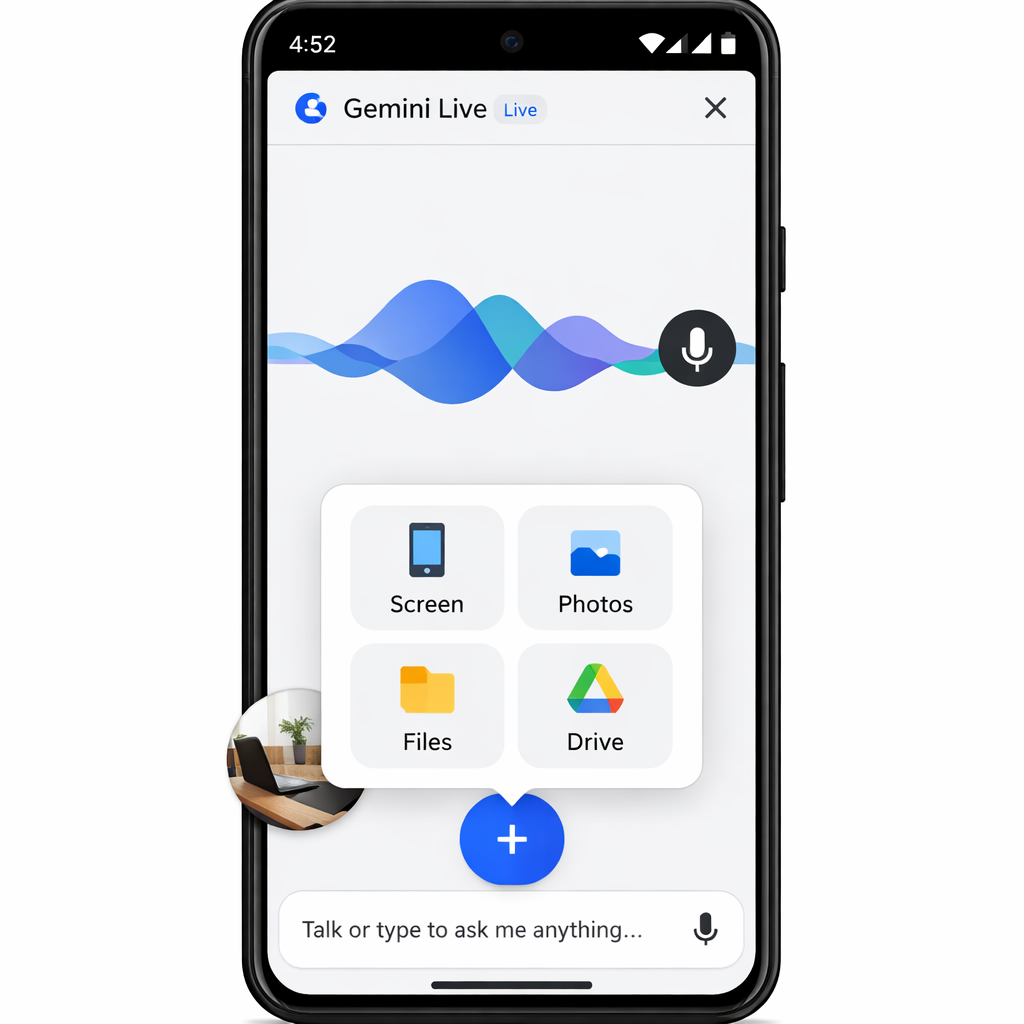
Google is rolling out a new design tweak to Gemini Live on Android that makes it easier to share photos, files, or your screen while chatting. The change introduces a “plus” button within the Live mode, replacing the previous workflow that required participants to manually add items to the Gemini overlay before going Live. The update aims to streamline how context is shared during conversations.
What’s Changed?
Inside Gemini Live, the new “+” icon appears on the left when the Live session starts. Tapping it calls up a familiar carousel of options: Share screen, Photos, Files, and Drive. In the former version, users had to add content via the overlay first and then launch Live mode. Now, content can be shared more directly once you’re Live.
Other layout shifts include moving the camera button closer to the waveform and making screen sharing an extra step within the new plus menu. The microphone mute toggle and the close button remain on the far right, just as before. One limitation: the plus menu isn’t available if you start Live from the Gemini overlay.
Availability & Platform Notes
This redesign is now live for Android users running the Google app stable version 17.68. However, iOS users have yet to receive the update. Android rollout status suggests it’s being tested gradually, so not everyone may see the change immediately.
Ruby-level context tools—such as sharing files and photos—are becoming more important in chat-driven interactions like those in Gemini Live. Delivering them up front saves steps and could lead to more natural, productive live interactions.
Why this matters: In real-time conversations—whether for support, collaboration, or casual sharing—being able to toss in a screenshot or a file without breaking flow makes a difference. With competitors pushing richer media sharing inline, Google needs to keep up, and small UI refinements like this can significantly impact user experience.