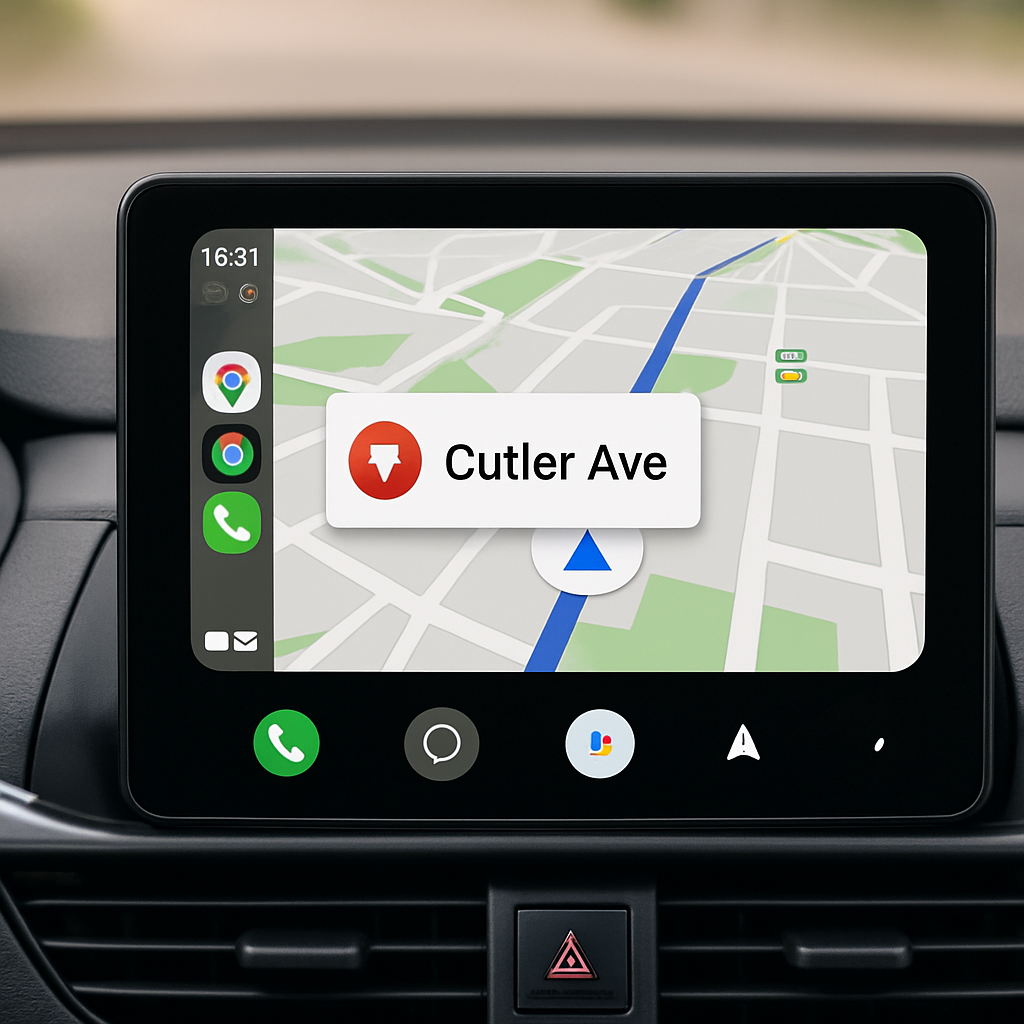
Google has rolled out a smart enhancement for Maps on Android Auto, making it easier to anticipate intersections. Rather than showing traffic lights and stop signs as static icons on the map, the update introduces a floating pop-up that signals what’s coming at your next turn—either a traffic light or a stop sign. The change already appears consistently on Android Auto and is also visible on phones, hinting at a similar rollout for CarPlay.
For a long time, Google Maps included traffic lights and stop signs in its map view across all platforms. The visual markers, however, offered no information about whether any gave relevance to where you were headed—they simply decorated the map. What’s new now is the contextual alert: at decision points in your route, a small indicator shows whether you’ll need to watch for a light or completely stop. This helps drivers know what to expect before arriving at an intersection.
More Clarity at Glance, Less Distraction
The new feature places the traffic signal or stop icon alongside the name of the street for your next turn. It’s designed to be clearly visible while driving without overwhelming the screen. On Android Auto, this means the driver no longer needs to interpret static map symbols just to know the layout of an upcoming turn. When driving through unfamiliar areas, this glanceable information can enhance safety and reduce stress.
This adjustment appears to be a server-side update—Google Maps users don’t need to update the app manually. The feature has already been spotted in real-world use on Android Auto displays and on phones. Its visibility on phones suggests that iPhones may start seeing the same behavior in CarPlay mode.
Why This Matters in Map UX Trends
Navigation tools have long sought to reduce driver workload by presenting only the most crucial information at critical moments. Static icons served some value, but when all traffic lights and stop signs along the route look equally important, none stand out. By signaling the one immediately ahead, Google cuts through visual noise and delivers what matters most in the moment.
Over the past few years, Google Maps has also added a speedometer and speed limit overlay, among other road-sign prompts—even when navigation isn’t active. These kinds of subtle enhancements are shaping up as a larger effort to make GPS tools more predictive and less reactive.
In short, what you’ll notice while driving now is a little more peace of mind: seeing whether you’ll stop or wait—not just turn—is useful, especially when rushing or distracted. What to watch for next: whether this behavior shows on CarPlay, whether more intersection cues are coming, and how reliably this updates worldwide.