Google Integrates Gemini Live into Chrome Beta for iPhone
Google has introduced Gemini Live, its voice-based AI assistant, directly into the Chrome Beta browser for iPhone users. This integration allows users to engage in live voice conversations without needing to open the standalone Gemini app.
Seamless Integration within Chrome
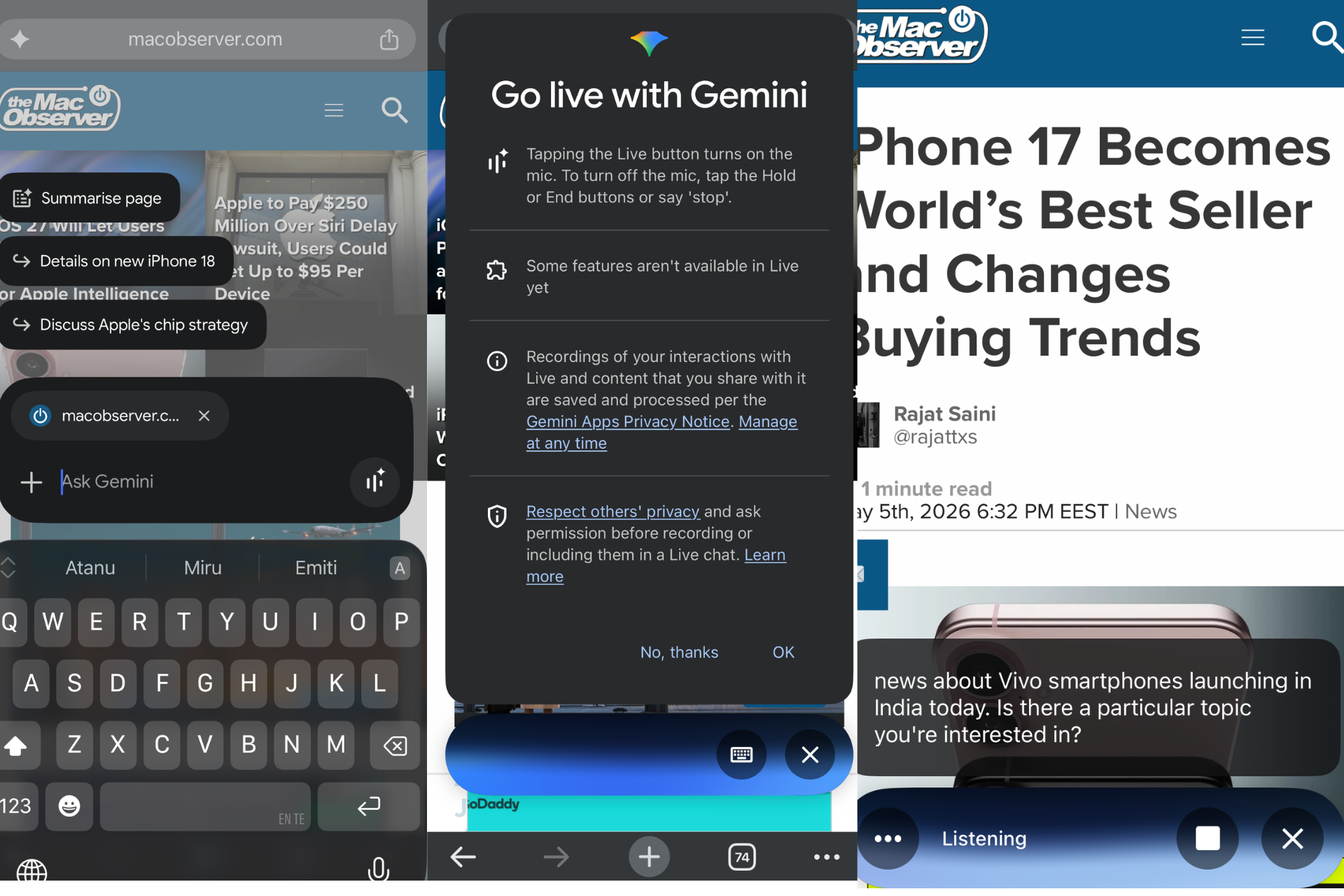
In the latest TestFlight builds of Chrome Beta, a Gemini button appears in the address bar. Tapping this button opens a floating interface with a dedicated shortcut to Gemini Live. Upon activation, a compact Live window overlays the current webpage, enabling users to interact with Gemini without leaving their browsing session.
User Consent and Privacy
Before initiating Gemini Live, Chrome presents a consent screen detailing microphone access, recording policies, and privacy practices as outlined in the Gemini Apps Privacy Notice. Users must approve these terms to proceed, ensuring transparency and control over personal data.
Optimized User Interface
The Gemini Live interface is designed for mobile screens, occupying minimal display space even with live captions enabled. This design choice ensures that users can continue browsing without significant visual disruption. If the session becomes inactive, Chrome displays a Gemini on hold message, indicating the assistant’s status.
Enhanced Browsing Experience
Once a Gemini Live session is active, the behavior of the Gemini button in the address bar changes. Instead of reopening the standard Gemini interface, tapping the button returns users to the ongoing conversation. Users can switch back to the regular Gemini interface via the pause control within the Live panel. Notably, the floating Live bar remains visible across different webpages and tabs, allowing for continuous interaction.
Practical Applications
During testing by The Mac Observer, Gemini Live effectively responded to voice queries on current news topics and recent smartphone releases. The conversation seamlessly continued across various webpages without reverting to the standard Gemini view. The panel includes features such as live captions, pause controls, a hold state, and access to Gemini settings within Chrome.
Current Limitations and Availability
While a voice selection option is present, it was non-responsive during testing. Additionally, the onboarding screen indicates that some Gemini Live capabilities are currently unavailable. Gemini Live is accessible in Chrome 149 Beta for iOS through TestFlight builds. Users may need to enable specific experimental flags for Gemini Live to appear. Chromium code changes have already referenced Gemini Live controls in Chrome’s address bar on iPhone.
Broader Context
Chrome on iOS has been progressively integrating Gemini features, including webpage summaries and contextual prompts. Google is also testing Gemini explanations for selected text and image remix functionalities within the browser. The addition of Gemini Live brings voice conversations directly into the browser, eliminating the need for the standalone Gemini app.