Security researchers have uncovered a sophisticated, multi-stage attack involving rogue ScreenConnect clients deploying a Visual Basic Script (VBScript) chain that automatically spreads to any newly connected systems. The campaign was observed in three separate incidents during August 2026, each using different delivery methods but sharing the same four-stage VBScript workflow. ConnectWise has since issued mitigation guidance for users of ScreenConnect in response.
Delivery Methods and Rogue ScreenConnect Setup
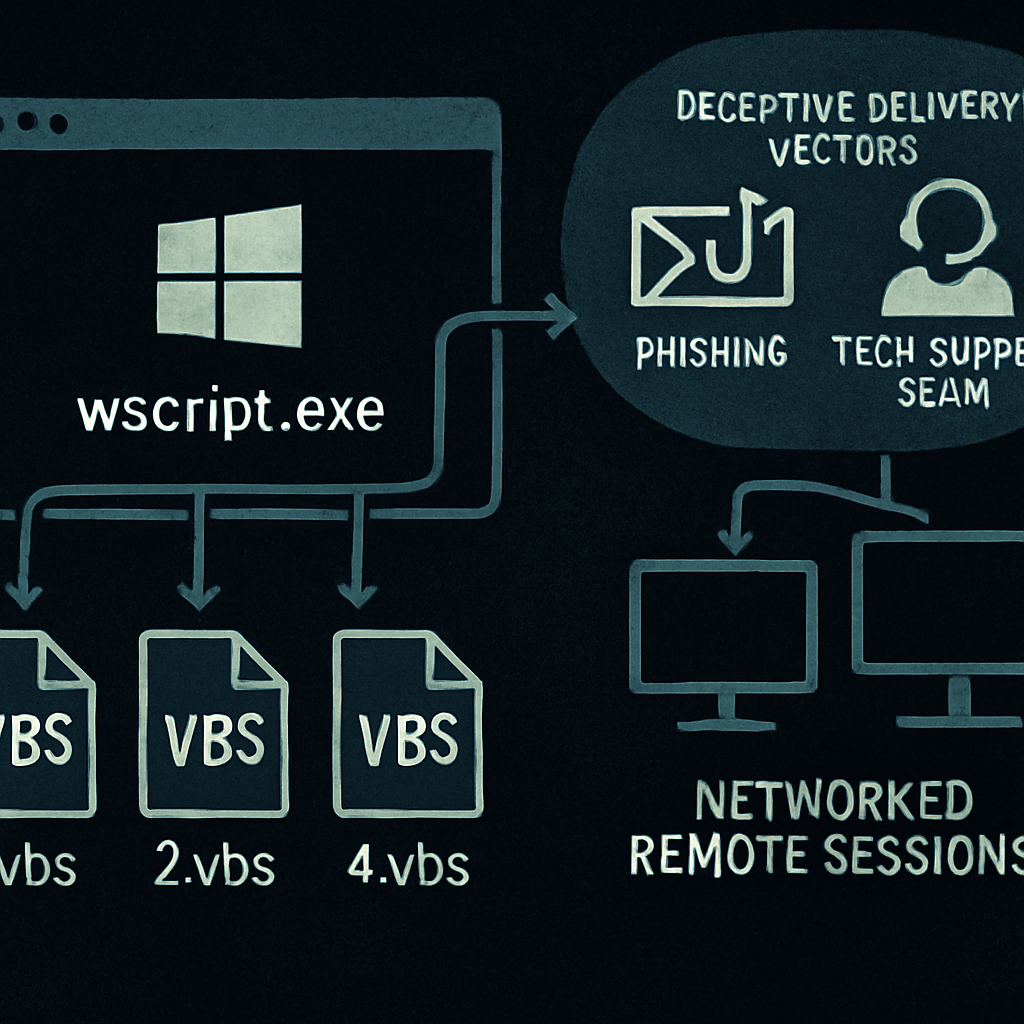
In one case, attackers used a tech-support scam that tricked a victim into launching Microsoft Quick Assist. Doing so allowed a malicious ScreenConnect remote-access client to be installed, which then reached out to a command-and-control server at 45.13.237[.]190. The VBScript chain was hosted in a RAR archive retrieved from that location.
Another incident involved a phishing email delivering an MSI installer named ScreenConnect.ClientSetup.msi. That installer deployed the rogue client, configured it to connect to 131.123.40[.]98 over port 8041, and immediately launched the VBScript sequence from the ScreenConnect temporary directory.
A third attack impersonated a Geek Squad refund form, leading to deployment of ScreenConnect.Client.exe and eventual execution of the four VBScript files via wscript.exe from the user’s Temp folder; the client communicated with a host at borertors92.anondns[.]net.
Four-Stage VBScript Chain Exploits New Connections
Once ScreenConnect is installed, it repeatedly triggers wscript.exe to run four scripts—1.vbs through 4.vbs—in sequence. The stages perform system profiling, conditional payload selection, downloading secondary payloads, and final execution via PowerShell.
Specifically, 1.vbs checks hardware specs (like if RAM exceeds 5 GB), whether security tools are running (including Cisco AMP, CrowdStrike, Malwarebytes, Sophos, SentinelOne, Symantec), and whether ScreenConnect is already installed. It sets a state value in a file, “value.txt,” indicating conditions like absence/presence of protections or existing ScreenConnect clients.
Then 2.vbs waits for that state file, and if it finds no “abort” flag, downloads and decodes another file into “map.txt.” 3.vbs waits for that map, then fetches a payload per the state value and writes it as “out.enc.” Finally, 4.vbs waits for that encrypted payload, decrypts and unpacks it into a zipped archive under %APPDATA%, and runs “PyTorchFix.ps1.”
Payloads, Infection Persistence, and Worm-like Behavior
Depending on the state value created in stage one, different payloads are deployed: a ScreenConnect backdoor for basic state values; privilege escalation tools if UAC bypass is needed; or, in systems with only Microsoft Defender and no ScreenConnect client, disabling Defender reporting, turning off Windows memory integrity, and running an XMRig cryptocurrency miner.
To avoid detection or recurrence, the scripts kill wscript.exe or cscript.exe processes and delete temporary staging directories after execution. If certain conditions are met, the VBScript files are also dropped into a public libraries path. That setup allows the compromised host to serve as a delivery vector—new ScreenConnect connections can catch the same VBScript chain and get infected automatically.
Additionally, the malware tracks each ScreenConnect session via ConnectionID so that it won’t re-infect the same session during its duration. However, once disconnected, the identifier is cleared, meaning re-connection triggers a fresh infection cycle.
Response & Mitigation
Security firm advice stresses that affected systems be wiped and rebuilt from trusted media, or completely reinstalled with a clean operating system. ConnectWise has issued an advisory acknowledging a flaw in ScreenConnect’s file transfer feature that’s linked to both cloud and on-premise versions.
As an interim safeguard, users are urged to disable technicians’ file transfer permissions. That requires administrators to edit role permissions under Security > Roles in the ScreenConnect settings, specifically removing “TransferFiles” (or “TransferFilesInSession” in older versions) from any session groups that hold those rights.
Analytically, this campaign underscores how tools designed for legitimate remote access can be hijacked to build self-propagating malware with contextual payloads. The four-stage VBScript system is especially troubling because it adapts based on environment, enabling stealth, persistence, and versatile threat responses. Watch for updates to ScreenConnect’s patch schedule, whether this pattern emerges in other RMM or remote-access platforms, and how incident responders manage recovery—wiping and rebuilding may become the norm for breaches of this type.