Spotify Introduces Podcast Clips: Save and Share Your Favorite Moments
Spotify has unveiled a new feature called Podcast Clips, designed to enhance user engagement by allowing listeners to capture, save, and share specific segments of podcast episodes. This innovation aims to make it easier for users to revisit memorable moments and share them with others, fostering a more interactive podcast experience.
Capturing and Sharing Clips
With Podcast Clips, users can now highlight and share impactful moments from their favorite podcasts. Whether it’s a thought-provoking insight, a humorous exchange, or a segment that resonates personally, this feature enables listeners to:
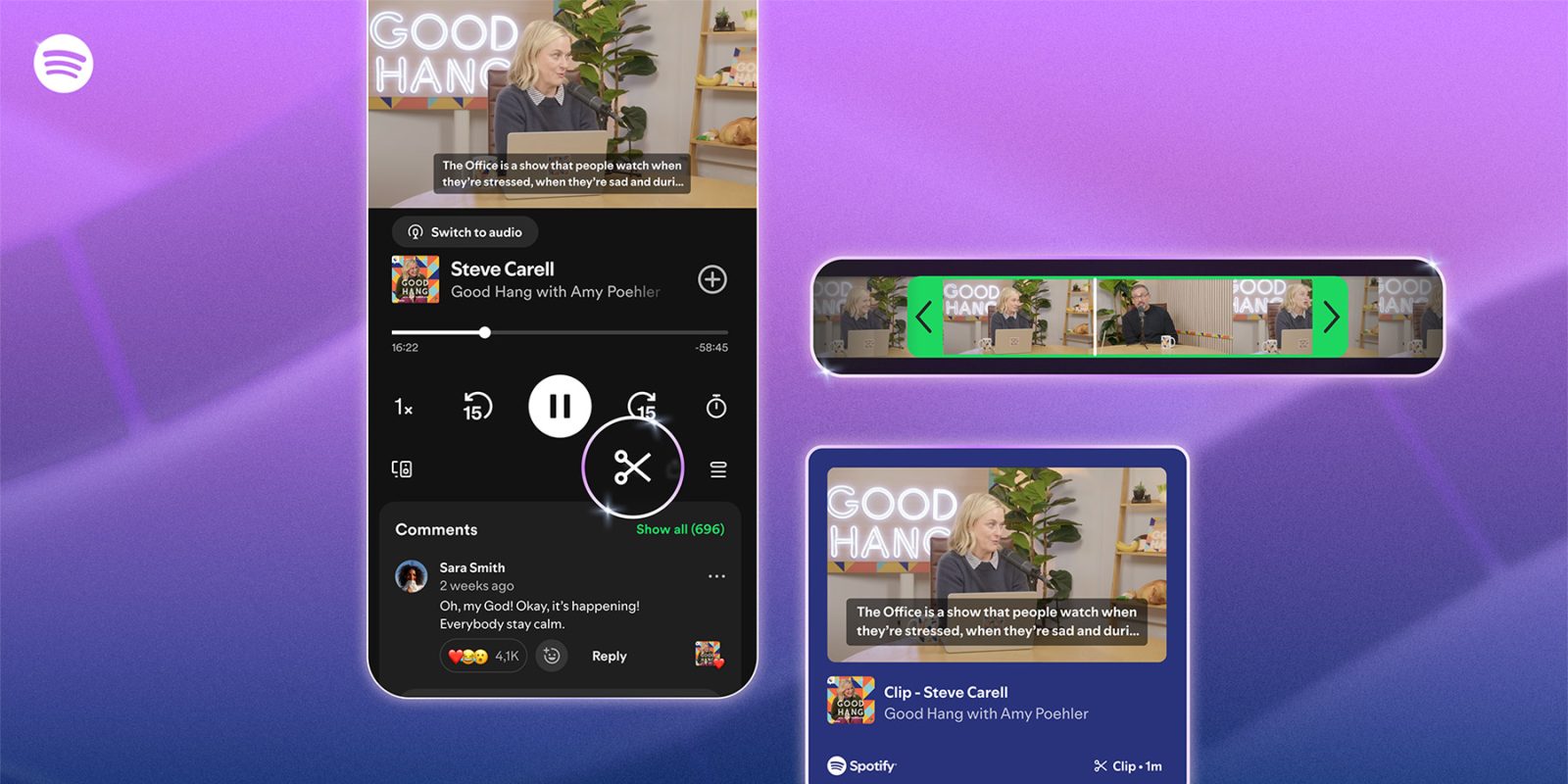
– Capture Specific Segments: While listening to a podcast, users can tap the scissors icon in the Now Playing view to select and trim a particular segment they wish to save or share. This functionality ensures that users can pinpoint the exact moments that matter most to them.
– Save for Later: Once a clip is created, it is automatically saved to a dedicated Your Clips folder within the user’s library. This organization allows for easy access and management of saved moments, ensuring that favorite segments are never lost.
– Share Across Platforms: The updated sharing menu provides multiple options for distributing clips. Users can share their selected segments directly through Spotify Messages or via other supported platforms, including social media channels. This versatility ensures that memorable podcast moments can reach a broader audience.
Enhanced User Experience
The introduction of Podcast Clips is part of Spotify’s broader initiative to improve user interaction and content discoverability. By enabling listeners to save and share specific podcast moments, Spotify aims to:
– Increase Engagement: Allowing users to highlight and share their favorite segments encourages deeper engagement with podcast content. This feature transforms passive listening into an interactive experience, fostering a stronger connection between listeners and creators.
– Facilitate Content Discovery: Shared clips can serve as entry points for new listeners, introducing them to podcasts they might not have discovered otherwise. This organic sharing mechanism can expand the reach of podcasts and attract a wider audience.
– Support Content Creators: For podcast creators, the ability for listeners to share specific segments can lead to increased visibility and audience growth. Shared clips can act as teasers, enticing new listeners to explore full episodes and subscribe to shows.
How to Use Podcast Clips
To utilize the Podcast Clips feature:
1. While Listening: During playback of a podcast episode, tap the scissors icon located in the Now Playing view.
2. Select Segment: Use the trimming tool to choose the exact start and end points of the segment you wish to capture.
3. Save or Share: After selecting the desired segment, you can either save it to your Your Clips folder for future reference or share it immediately through Spotify Messages or other supported platforms.
Availability
Podcast Clips is rolling out globally to both Free and Premium Spotify users on mobile devices. The feature will become available across more shows over time, ensuring a wide range of podcasts can be clipped and shared. Users are encouraged to look for the scissors icon in the Now Playing view to start capturing and sharing their favorite podcast moments.
Conclusion
Spotify’s introduction of Podcast Clips marks a significant step in enhancing the podcast listening experience. By empowering users to capture, save, and share specific segments, Spotify not only enriches user engagement but also supports content creators in reaching new audiences. This feature underscores Spotify’s commitment to innovation and its dedication to fostering a more interactive and connected podcast community.