SpeakOn’s Dictation Device: A Promising Concept Hindered by Platform Constraints
In the realm of digital communication, dictation applications have become indispensable tools for many users. Popular apps like Wispr Flow, Willow, and Typeless have streamlined the process of composing messages and emails through voice input on both Mac and iPhone devices. However, these applications often rely on the device’s built-in microphone or accessories like AirPods, which can sometimes fail to accurately capture speech, leading to user frustration.
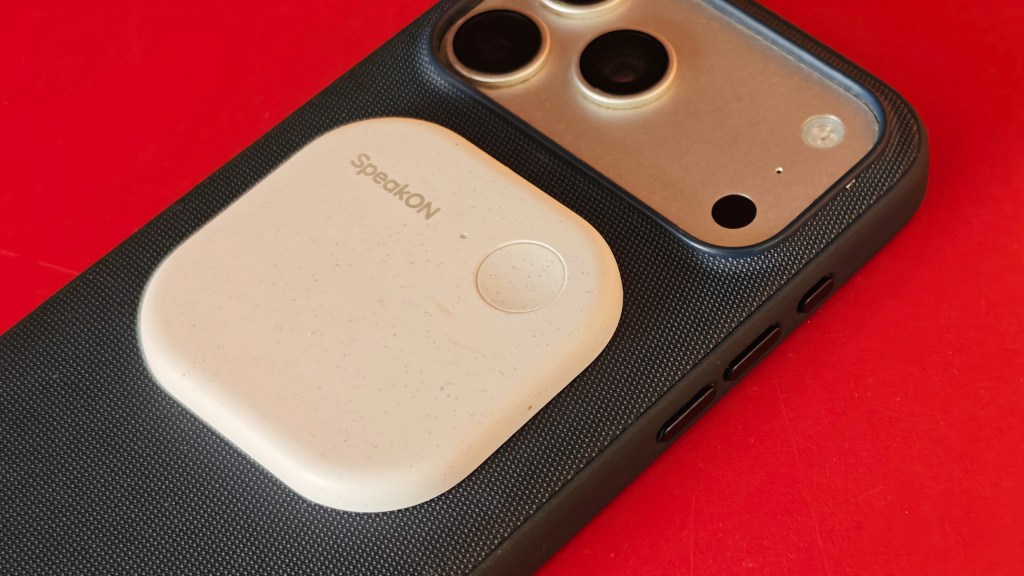
Enter SpeakOn, a dedicated dictation device developed by Notta, designed to address these challenges. This compact, pebble-shaped gadget attaches to the back of an iPhone via MagSafe, reminiscent of Plaud’s AI meeting notetaker. Weighing a mere 25 grams, SpeakOn is virtually unnoticeable, even when carried separately in a pocket.
The device pairs with a companion iOS app that functions as a keyboard, similar to other dictation applications. Notably, the app can operate independently of the device if necessary. To initiate dictation, users simply press and hold the button on SpeakOn, speaking their message, and release the button upon completion. Equipped with a single microphone, the device claims to capture audio effectively within a two-foot radius. It integrates seamlessly with any application where the software keyboard is active, automatically filtering out filler words and offering formatting options such as list creation.
A significant advantage of SpeakOn is its reliance on its own microphone, bypassing the need to activate the iPhone’s mic during dictation sessions—a common requirement for other dictation apps. This feature aims to enhance user convenience and potentially improve audio capture quality.
However, the device is not without its shortcomings. Despite its dedicated microphone, SpeakOn struggles to capture audio accurately unless the device is held within approximately two feet of the user’s mouth. Even within this range, performance can be compromised by ambient noise, suggesting a need for higher-quality microphones in future iterations.
Another limitation is the device’s integration with the iOS system. For instance, double-tapping the record button does not bring the SpeakOn keyboard to the forefront if a different keyboard is in use. Additionally, initiating speech without manually switching keyboards is not possible, likely due to system-level constraints that are challenging to overcome.
The app also features an AI-driven editing and tone adjustment function that adapts based on the application in use. While this feature is intended to enhance the user experience, it can sometimes produce edits that feel forced or unnecessary. For example, the phrase Does this app work automatically? was altered to Does this application operate automatically? Similarly, complex was changed to tricky, and Sure, no worries became There is no need to be concerned. Such modifications may not align with user preferences, leading some to disable the attune tone-changing feature for more accurate results.
A notable drawback is the device’s lack of compatibility with Mac systems, limiting its utility for users who wish to dictate across multiple platforms.
Beyond transcription, SpeakOn offers a translation feature that supports multiple languages, including English, Japanese, Korean, Simplified Chinese, Traditional Chinese, Spanish, French, German, Italian, Portuguese, Russian, and Arabic. This functionality can be particularly beneficial for users who communicate in diverse linguistic contexts.
In terms of battery life, SpeakOn claims to offer 10 hours of continuous use and a 20-day standby time. However, real-world usage indicates that the standby time is significantly shorter, lasting only a few days. By default, the device remains powered on continuously, which can drain the battery unnecessarily. Adjusting the settings to power off the device after a period of inactivity could help conserve battery life. The device charges fully from 0 to 100 percent within an hour, and a brief charging session can provide sufficient power for several minutes of dictation.
Priced at $129, SpeakOn includes a plan that allows users to dictate up to 5,000 words per week. For comparison, other apps like Wispr Flow typically offer 2,000 words per week on their free plans. An unlimited words plan is available for $12 per month.
While SpeakOn has the advantage of being an early entrant in the dedicated dictation device market, it must address its platform limitations and enhance the software experience to maintain a competitive edge. The potential for other companies to develop similar devices with improved form factors and functionalities poses a significant challenge.