Satechi Unveils ChargeView 140W Desktop Charger with Real-Time Power Display
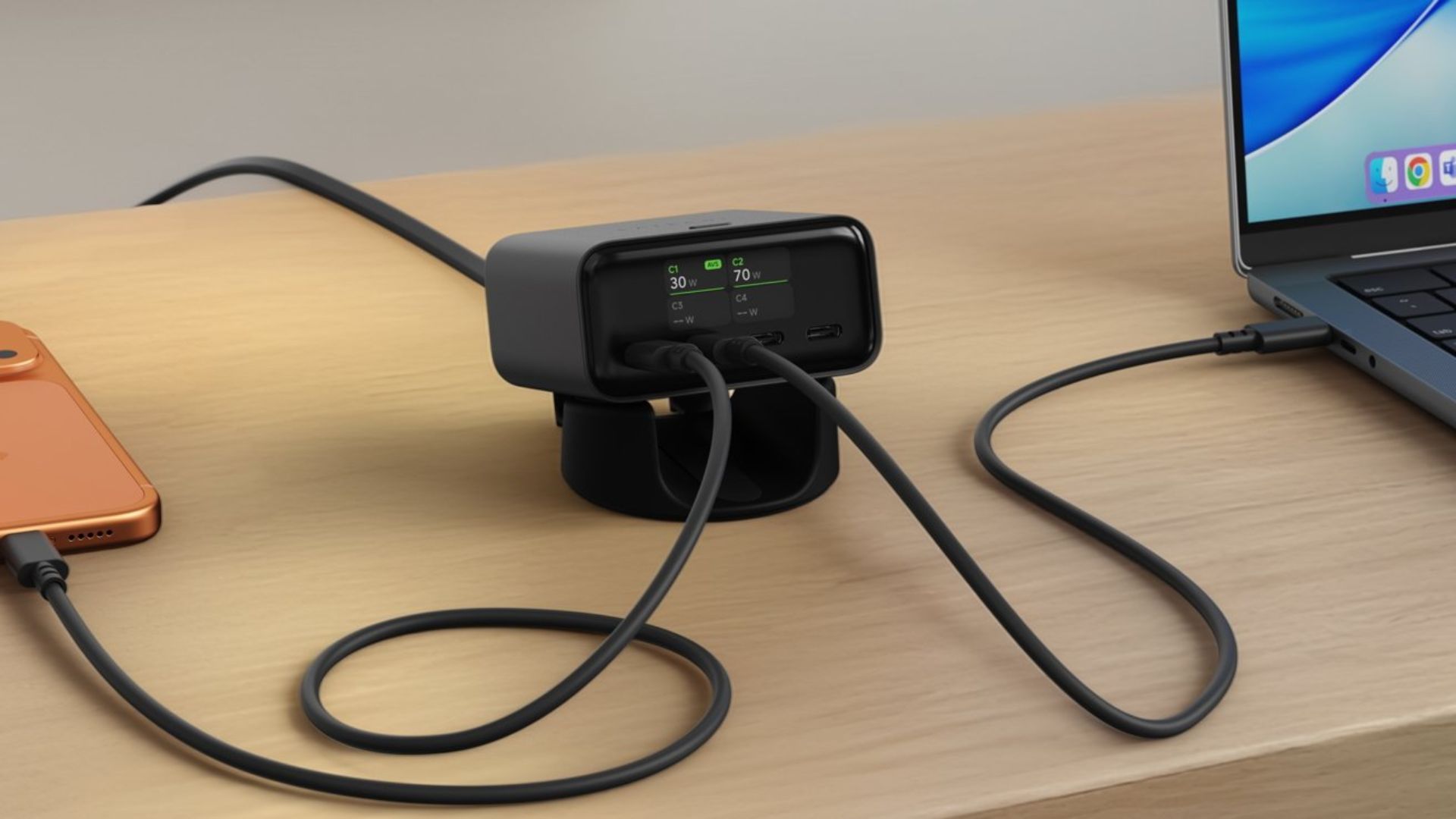
Satechi has expanded its lineup of charging solutions with the introduction of the ChargeView 140W Desktop Charger. This innovative device is designed to sit prominently on your desk, offering both functionality and a sleek aesthetic. Its standout feature is a built-in digital display that provides real-time information on power distribution across its four USB-C ports.
Design and Build
Crafted with a space black aluminum finish, the ChargeView exudes a modern and sophisticated look that complements contemporary workspaces. Its compact design ensures it occupies minimal desk space, and the included modular stand allows for both vertical and horizontal orientations, catering to individual preferences and spatial constraints.
Power and Performance
Equipped with four USB-C ports, the ChargeView delivers a combined output of up to 140 watts. This substantial power capacity enables users to charge multiple devices simultaneously, including high-demand gadgets like the 16-inch MacBook Pro at full speed. The charger intelligently allocates power based on the connected devices’ requirements, ensuring efficient and safe charging.
Port Specifications:
– Port C1: Supports USB PD 3.2 with Adjustable Voltage Supply (AVS) technology, offering output profiles of 5.0V⎓3.0A (15.0W), 9.0V⎓3.0A (27.0W), 15.0V⎓3.0A (45.0W), 20.0V⎓5.0A (100.0W), and 28.0V⎓5.0A (140.0W).
– Ports C2, C3, and C4: Support USB PD 3.1 with Programmable Power Supply (PPS) technology. Port C2 offers similar output profiles to C1, while Ports C3 and C4 provide outputs of 5.0V⎓3.0A (15.0W), 9.0V⎓3.0A (27.0W), 15.0V⎓2.67A (40.0W), and 20.0V⎓2.0A (40.0W).
Real-Time Power Monitoring
The integrated LCD display is a game-changer, offering users immediate insight into the power being delivered to each connected device. This feature eliminates the guesswork often associated with charging multiple devices, allowing users to verify that their gadgets are receiving the appropriate power levels.
Advanced Charging Technologies
The ChargeView incorporates cutting-edge Gallium Nitride (GaN) technology, which enhances charging efficiency while maintaining a compact form factor. GaN chargers are known for their ability to handle higher power levels with less heat generation compared to traditional silicon-based chargers. Additionally, the charger supports USB Power Delivery (PD) 3.2 with AVS, optimizing power output for each device and ensuring rapid and efficient charging.
Safety Features
Safety is paramount with the ChargeView. It includes multiple protective mechanisms to safeguard connected devices:
– Over-Voltage Protection: Prevents devices from receiving excessive voltage.
– Over-Current Protection: Shields devices from drawing too much current.
– Over-Temperature Protection: Monitors and controls the charger’s temperature to prevent overheating.
– Short-Circuit Protection: Detects and mitigates short circuits to protect both the charger and connected devices.
Compatibility
The ChargeView is compatible with a wide range of USB-C devices that support USB Power Delivery, including:
– Apple Mac: MacBook Air (2018 – 2019, M1 – M5), MacBook Neo (13-inch, 2026), MacBook Pro 13-inch (M1, M2, 2020 and later), MacBook Pro 14-inch (M1 – M5/Pro/Max), MacBook Pro 16-inch (M1 – M5/Pro/Max).
– Apple iPad: iPad Pro 11-inch and 12.9/13-inch (all USB-C generations), iPad Air (M1, M2, M3 and later), iPad Mini (USB-C, 6th generation and later), iPad (USB-C, 10th generation and later).
– Apple iPhone: iPhone 15 series, iPhone 16 series, iPhone 17 series, iPhone 16e, iPhone 17e, iPhone Air.
– Other Apple Devices: Apple Watch (with USB-C charging cable), AirPods Pro (USB-C case), AirPods 4 (USB-C case), Apple Vision Pro.
– Windows and Chromebook: Compatible with USB-C laptops from Dell, HP, Lenovo, Microsoft Surface, ASUS, Acer, and others that support USB Power Delivery.
– Android and Other Devices: Compatible with Samsung Galaxy, Google Pixel, OnePlus, and other USB-C smartphones and tablets.
– Gaming Devices: Nintendo Switch (USB-C), Steam Deck, ASUS ROG Ally.
Setup and Usage
Setting up the ChargeView is straightforward:
1. Assemble the Stand: Attach the modular stand to the charger in your preferred orientation.
2. Connect Power: Plug the included AC power cable into the charger and connect it to a wall outlet. The charger supports input voltages ranging from 100V to 240V AC, making it suitable for international use.
3. Connect Devices: Use USB-C cables that support Power Delivery to connect your devices. For optimal performance, connect high-power devices like laptops to Port C1.
4. Monitor Charging: Utilize the LCD display to monitor real-time power output for each port, ensuring devices are charging as expected.
Pricing and Availability
The Satechi ChargeView 140W Desktop Charger is available for purchase at a price of $99.99. It can be acquired directly from Satechi’s official website or through authorized retailers.
Conclusion
The Satechi ChargeView 140W Desktop Charger is a versatile and powerful addition to any workspace. Its combination of high power output, real-time monitoring, advanced safety features, and sleek design makes it an excellent choice for users seeking an efficient and reliable charging solution for multiple devices.