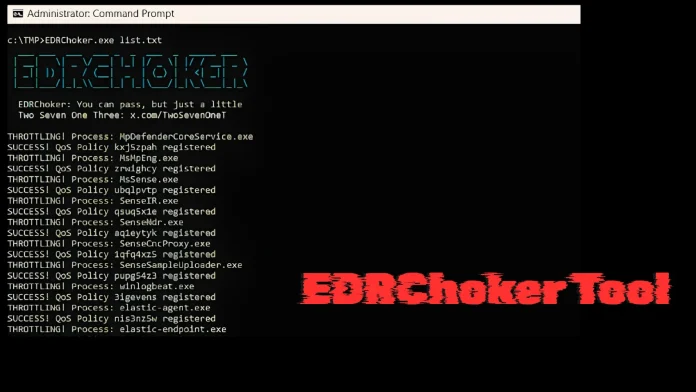
A new open-source tool named EDRChoker has emerged, offering a novel method for neutralizing cloud-connected Endpoint Detection and Response (EDR) agents. Unlike traditional techniques that terminate processes or inject malicious code, EDRChoker leverages Windows’ native Policy-Based Quality of Service (QoS) to drastically reduce the network bandwidth of EDR processes, effectively severing their communication with cloud-based management servers.
Understanding EDRChoker’s Mechanism
Developed by security researcher @TwoSevenOneT, EDRChoker exploits the Windows Policy-Based QoS engine to throttle EDR processes to near-zero bandwidth. This approach isolates the EDR agents from their command infrastructure without triggering common security alerts associated with process termination or code injection.
Modern EDR platforms depend on continuous, low-latency connections between endpoint agents and cloud management servers for telemetry collection, threat correlation, and administrative control. By disrupting this connection, EDRChoker renders the EDR agent incapable of reporting detections, receiving policy updates, or accepting remote commands, effectively blinding the security system.
Technical Implementation of EDRChoker
Traditional methods to disrupt EDR communications involve using Windows Defender Firewall rules or Windows Filtering Platform (WFP) API calls. Tools like EDRSilencer have utilized the `FwpmFilterAdd0` API to register outbound network filters that selectively drop EDR agent packets. However, these methods generate detectable events, such as `packet-block` and `packet-drop`, which can alert security platforms to potential evasion attempts.
EDRChoker circumvents these detection mechanisms by employing QoS throttling, enforced by `pacer.sys`, an NDIS Lightweight Filter Driver operating directly above the physical Network Interface Card (NIC). This driver functions at a lower level in the network stack compared to WFP, allowing it to govern packets before they reach WFP-level monitoring tools.
By setting the bandwidth limit to an extremely low rate (e.g., 8 bits per second), EDRChoker makes standard TLS handshakes, which require several kilobytes of data, impossible to complete. As a result, the EDR agent experiences continuous timeouts without generating detectable firewall block events.
Operational Modes and Deployment
EDRChoker offers two operational modes:
1. Install Mode: Accepts an input file of EDR process names and creates uniquely named QoS policies (combining the process name with a random GUID) that persist across system reboots.
2. Remove Mode: Executed without parameters to cleanly purge all installed QoS policies.
The tool is available on GitHub and is designed to ensure that no two deployments produce identical rule signatures, enhancing its stealth capabilities.
Implications for Cybersecurity
The introduction of EDRChoker underscores the evolving tactics in cybersecurity, where attackers continuously develop sophisticated methods to evade detection. By exploiting legitimate system features like QoS, tools like EDRChoker can neutralize security measures without leaving significant forensic traces.
This development highlights the need for security teams to adopt multi-layered defense strategies and remain vigilant against emerging threats that leverage system functionalities in unintended ways.
Recommendations for Defense
To mitigate the risks posed by tools like EDRChoker, organizations should consider the following measures:
– Implement Multi-Layered Security Controls: Utilize a combination of security solutions to create overlapping layers of defense, reducing the likelihood of a single point of failure.
– Enhance Endpoint Security: Deploy advanced endpoint protection solutions that can detect and respond to anomalous behaviors, even those that exploit legitimate system features.
– Conduct Continuous Monitoring and Threat Hunting: Regularly monitor network traffic and system logs for signs of unusual activity, and proactively hunt for potential threats within the environment.
– Implement Strong Access Controls: Restrict administrative privileges and enforce the principle of least privilege to minimize the potential impact of compromised accounts.
By adopting these strategies, organizations can enhance their resilience against sophisticated evasion techniques and maintain robust security postures in the face of evolving cyber threats.
Twitter Post:
Introducing EDRChoker: A new tool that uses Windows’ QoS to silently throttle EDR processes, severing their cloud connections without detection. #CyberSecurity #EDRChoker #ThreatEvasion
Focus Key Phrase:
EDRChoker tool
Article X Post:
Hashtags:
Article Key Phrase:
Category: Security News