Microsoft has introduced a significant security enhancement to Visual Studio Code (VS Code) by implementing a two-hour delay for automatic extension updates. This measure aims to mitigate the risks associated with software supply chain attacks, which have increasingly targeted development environments.
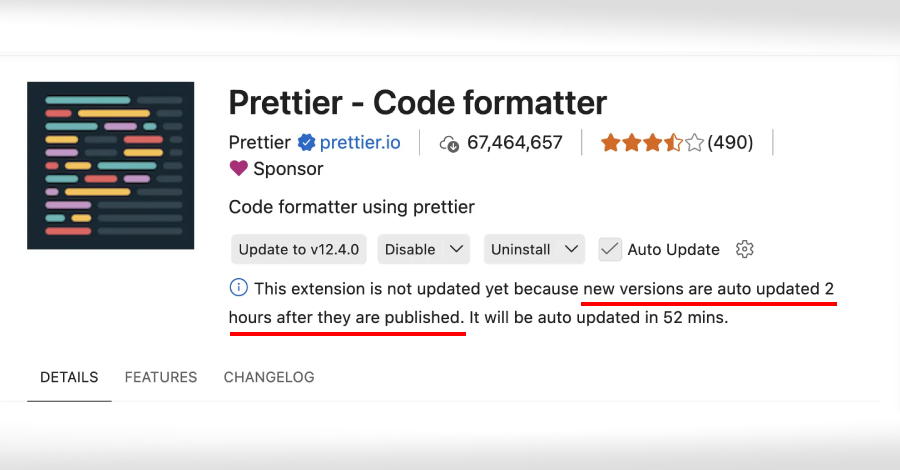
In the latest release, VS Code 1.123, automatic updates for extensions will now occur two hours after a new version is published. This delay provides an additional safeguard against potentially compromised or problematic releases. Users retain the flexibility to manually update extensions at any time by selecting the Update button. For extensions with pending updates, the details view will display the reason for the delay and the scheduled automatic update time.
Notably, this delay does not apply to extensions from trusted publishers such as Microsoft, GitHub, and OpenAI, which will continue to receive immediate updates.
This development follows similar initiatives in the software development community. For instance, RubyGems recently introduced an opt-in cooldown feature in Bundler 4.0.13, allowing developers to set a predefined delay before installing newly published gem versions. This feature aims to reduce exposure to malicious versions by providing a buffer period for detection and mitigation.
Other package managers have also adopted similar controls:
– Bun: Introduced the `minimumReleaseAge` feature in version 1.3+, setting a minimum age for package releases before installation.
– npm: Implemented the `min-release-age` parameter in version 11.10.0+, allowing developers to specify a minimum release age for packages.
– pnpm: Added the `minimumReleaseAge` setting in version 10.16+, enabling a delay before new package versions can be installed.
– Yarn: Incorporated the `npmMinimalAgeGate` feature in Yarn Berry 4.10.0+, enforcing a minimum age for npm packages before installation.
These measures are responses to a surge in software supply chain attacks targeting various ecosystems. By enforcing a minimum age threshold before a package version can be installed, these controls aim to minimize the window during which malicious packages can spread before being identified and removed by registry maintainers.
Understanding Software Supply Chain Attacks
Software supply chain attacks involve the insertion of malicious code into legitimate software packages or updates, compromising the software at its source. This method allows attackers to distribute malware to a wide range of users who trust the software’s authenticity.
In recent years, such attacks have become more prevalent, targeting development tools and environments to exploit the trust developers place in these systems. By compromising widely used tools, attackers can infiltrate numerous systems, leading to data breaches, unauthorized access, and other security incidents.
The Role of Extension Marketplaces in Supply Chain Security
Extension marketplaces, such as those for VS Code, play a crucial role in the software development ecosystem by providing developers with tools to enhance their workflows. However, these marketplaces can also become vectors for supply chain attacks if malicious extensions are published and distributed.
To address this risk, implementing delays in automatic updates allows time for the community and security tools to detect and respond to malicious releases before they reach a broader audience. This proactive approach enhances the overall security posture of the development environment.
Best Practices for Developers
While these new measures add layers of security, developers should also adopt best practices to protect their environments:
1. Review Extensions Carefully: Before installing or updating extensions, review their source, update history, and user reviews to ensure they are trustworthy.
2. Limit Extension Use: Install only the extensions necessary for your workflow to reduce the attack surface.
3. Stay Informed: Keep abreast of security advisories related to the tools and extensions you use.
4. Implement Access Controls: Ensure that your development environment has appropriate access controls to prevent unauthorized changes.
5. Regularly Update Security Tools: Keep your security tools and software up to date to benefit from the latest protections against emerging threats.
By combining these best practices with the security measures implemented by tool providers, developers can significantly reduce the risk of supply chain attacks and maintain a secure development environment.
Conclusion
Microsoft’s introduction of a two-hour delay for automatic extension updates in VS Code represents a proactive step toward enhancing software supply chain security. This measure, along with similar initiatives by other package managers, reflects a growing recognition of the need to protect development environments from emerging threats. By staying vigilant and adopting best practices, developers can contribute to a more secure software ecosystem.