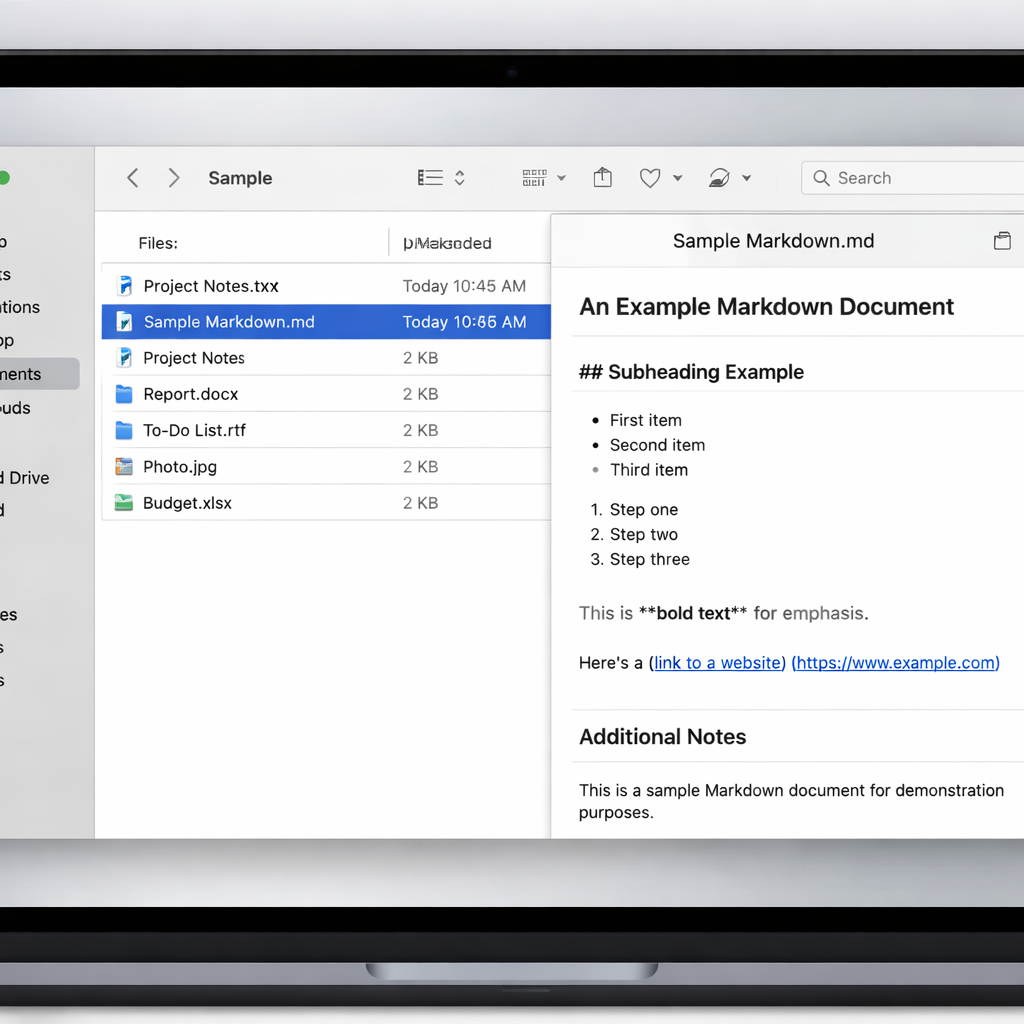
macOS 27.3, currently in its first developer beta, introduces a native Markdown preview feature in Quick Look. Users selecting a .md file in Finder and pressing the spacebar will now see formatted headings, bold and italic text, lists, links, and other Markdown styling — no third-party app or extension needed for basic readability. This marks a notable shift in how Apple handles plaintext documentation on the Mac.
Markdown Support Expanding Across Apple Platforms
This change builds on recent efforts to integrate Markdown across Apple’s ecosystem. With iOS 26, Notes gained Markdown import and export capabilities, letting users bring in or share out Markdown-formatted content. Then in iOS 27, Apple introduced Markdown copy-and-paste functionality — allowing content to be copied as rich text and pasted as Markdown where supported. Meanwhile, developers writing apps with Apple’s new Siri AI tools can include SKILL.md files to define how app actions are described and handled.
Timing and Developer Access
The macOS 27.3 update is still in testing stages, with the first developer beta released just one day ago. As with other Apple betas, expect feedback from early adopters to influence the final release. No public beta has been announced yet. This version of macOS—also known as Golden Gate—is being rolled out gradually, with features like AI-enhanced Siri and updated system-wide improvements accompanying such developer previews.
Prior to this, to view Markdown files in a formatted way on Mac, users often relied on purpose-built editors or Quick Look extensions. By bringing native rendering into Quick Look, macOS 27.3 removes that friction for everyday users who simply want to glance at documentation or read project notes without launching an editor.
This update reflects Apple’s broader move toward treating Markdown as a first-class document format—balancing the flexibility of plaintext with the polished look of rich text. It shows up across user-facing features like Notes, as well as in tools for developers creating Siri AI apps.
Why this matters: Native Markdown preview simplifies workflows for everyone from students to developers—making plain text files instantly legible and reducing reliance on external tools. It points toward Apple embracing lightweight, portable documentation formats in a more system-integrated way. Users testing macOS 27.3 should explore how well the Quick Look previews render complex Markdown (tables, code blocks, etc.), and watch for the feature’s refinement ahead of the public release.