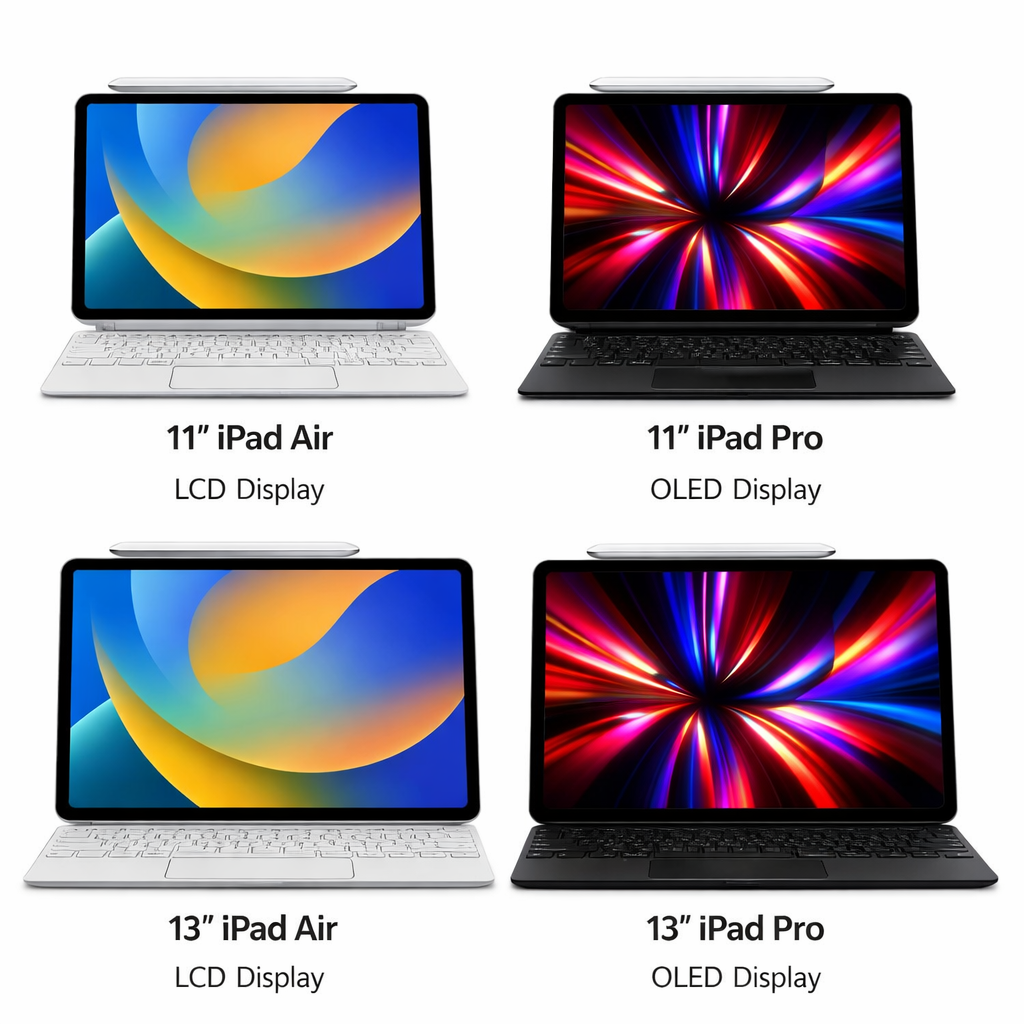
Apple’s 2026 iPad lineup delivers two standout models, the iPad Air and iPad Pro, both available in 11-inch and 13-inch versions. While the Air offers simplicity and affordability, the Pro pushes the envelope with premium features. Here’s a side-by-side breakdown to help you decide which is right for you.
What’s New in the iPad Air
This year’s iPad Air brings a performance boost thanks to Apple’s M4 chip, paired with 12 GB RAM—up from 8 GB previously. You get the same two display sizes—11-inch and 13-inch—but only with LCD panels capped at a standard 60 Hz refresh rate. That means no OLED or ProMotion tech here.
The Air still uses Touch ID, supports the Magic Keyboard and the newer Apple Pencil Pro, and delivers the full iPadOS multitasking ecosystem. Storage starts at 128 GB, topping out at 1 TB. Available colors are blue, purple, starlight, and space gray.
Why the iPad Pro Commands a Premium
The iPad Pro elevates performance with Apple’s M5 chip. Its headline display feature is an Ultra Retina XDR panel using tandem OLED technology, delivering dramatically deeper blacks, higher contrast, and far better brightness—plus an adaptive refresh rate up to 120 Hz via ProMotion. Visuals and touch responsiveness are noticeably smoother compared to the Air.
The Pro adds features like Face ID, full Thunderbolt / USB-4 support, a four-speaker sound array, and an optional nano-texture glass finish (for ultra-premium models). It’s thinner and lighter than the Air—11-inch Pro models are just 5.3 mm thick, with 13-inch variants trimming down to 5.1 mm. Internal memory ranges from 12 GB up to 16 GB depending on storage, which spans from 256 GB to a massive 2 TB.
Spec Comparisons at a Glance
Here are the major differences when you compare the two models directly:
- Display: The Air’s LCD (60 Hz) vs. Pro’s OLED (10-120 Hz) with greater HDR brightness.
- Authentication: Touch ID on the Air; Face ID on the Pro.
- Connectivity & I/O: USB-C with limited throughput on the Air; Thunderbolt/USB-4 on the Pro for high-speed transfers.
- Cameras & Extras: Both have a 12 MP wide-angle rear camera, but only Pro gets the LiDAR scanner and studio-quality mics.
- Audio & Design: Pro delivers four speakers and is thinner and lighter; Air uses stereo paired for landscape and is a bit thicker.
- Storage & Memory: Air: 128 GB to 1 TB, 12 GB RAM. Pro: 256 GB to 2 TB, 12-16 GB RAM.
Which Model Should You Buy?
For most users, the iPad Air hits the sweet spot. It provides excellent performance for everyday use, supports big-feature accessories like the Pencil Pro and keyboard, and gives you plenty of storage. Unless you’re doing studio work or high-frame-rate gaming, its LCD screen and 60 Hz refresh rate are likely sufficient.
That said, the iPad Pro is a luxury if you care deeply about display quality, enhanced video and audio, advanced connectivity, or the absolute best components Apple offers. The OLED screen, Face ID, faster I/O, and higher storage tiers make it ideal for professionals, creative work, or anyone who wants the cutting edge.
Both devices run the same iPadOS, so the user experience beyond hardware won’t diverge heavily. Current sales, especially on Pro models (like the 13-inch version), bring the price gap closer—which makes the Pro more tempting if you’re willing to spend more. But unless those premium extras matter to you, the Air typically offers better value.
Bottom line: Choose the Air for balance and value. Opt for the Pro if display tech, performance headroom, and pro-level features are your priorities.