Google is merging its Gemini Spark personal agent into the core Gemini chat app with a new redesign unveiled today. The update reinvents the navigation around Spark tasks—now rebranded simply as “Task”—making it easier to start, track, and manage tasks in the same interface used for conversational AI.
Key Interface Changes
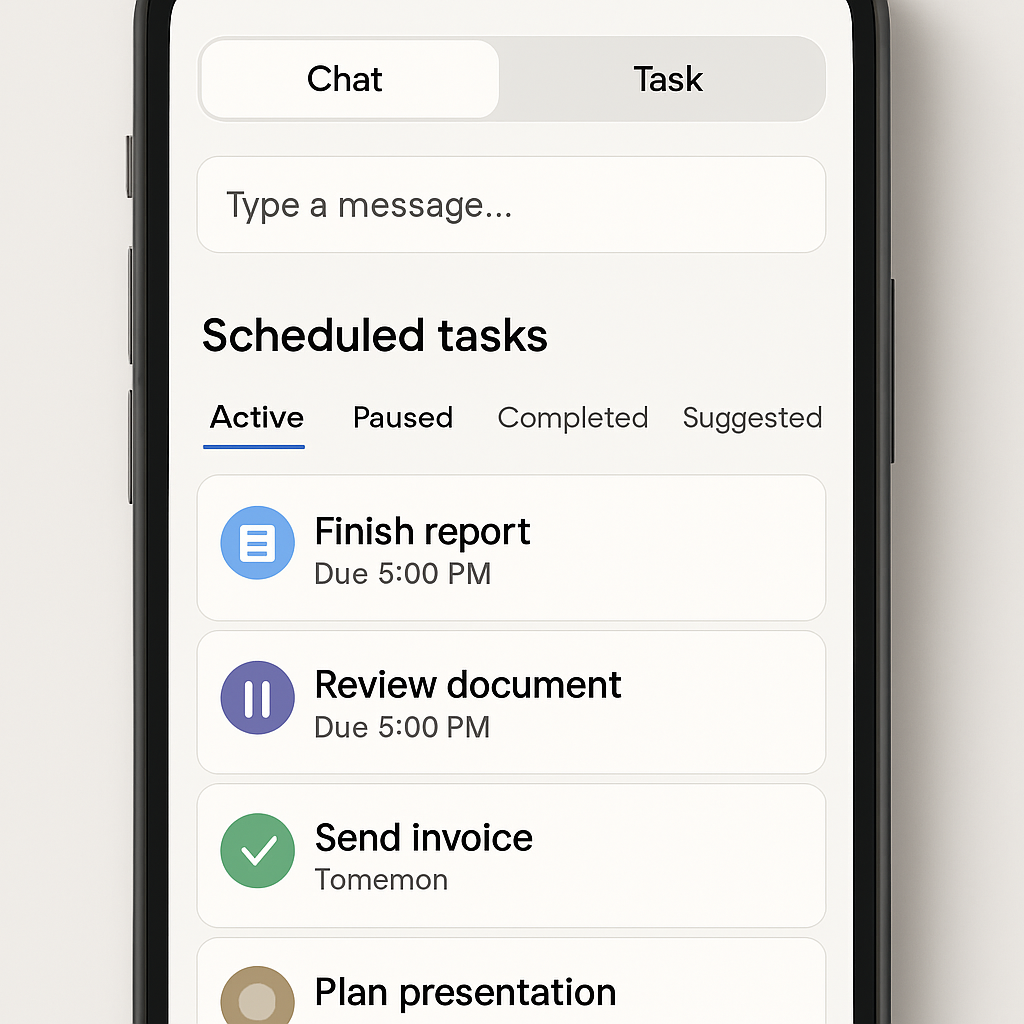
The overhaul introduces “Chat” and “Task” buttons positioned just above the message prompt, letting users toggle between regular chat and task creation with one tap. The distinct Spark label is being phased out—its role now subsumed under the Task tab. Also, Spark-specific entries in the navigation drawer are removed.
Alongside these shifts is the addition of a new “Scheduled” page, which gathers tasks and other scheduled actions in a unified feed. Tasks are categorized by status: Active, Paused, Completed, and Suggested. This aims to deliver better visibility and control over all task-related activity.
Chats and tasks now share the same historical view. Previously separate, they are combined into a single timeline. A new filter icon lets users sift through items by type: All, Ready, Needs attention, or In progress.
Details, Availability & Subscription Requirements
“Gemini Spark Settings” has been shortened to “Task settings,” reinforcing the simplified branding. The updated design is rolling out via a server-side update for Android users. At present, it is not yet available on iOS or on Gemini’s web interface. Access to the Task features still requires a paid tier—specifically an AI Pro or AI Ultra subscription.
This tighter integration follows Google’s unveiling of Gemini’s 24/7 personal agent capabilities in May 2026. With this redesign, tasks are no longer a siloed experience but woven into the main conversation flow—a change that should reduce friction and make Gemini’s assistant features more discoverable.
This refresh is more than just a visual tweak—it reorganizes the way users interact with AI-driven task management. It suggests a shift toward a unified experience where conversations and to-dos coexist. What remains to be seen is how well this blended history works in practice, especially on non-Android platforms. Expect further refinements as Google learns how people are using Chat and Task together.