Google Photos has unveiled a comprehensive redesign of its video editing interface for both Android and iOS platforms, aiming to provide users with a more intuitive and feature-rich editing experience.
Streamlined User Interface
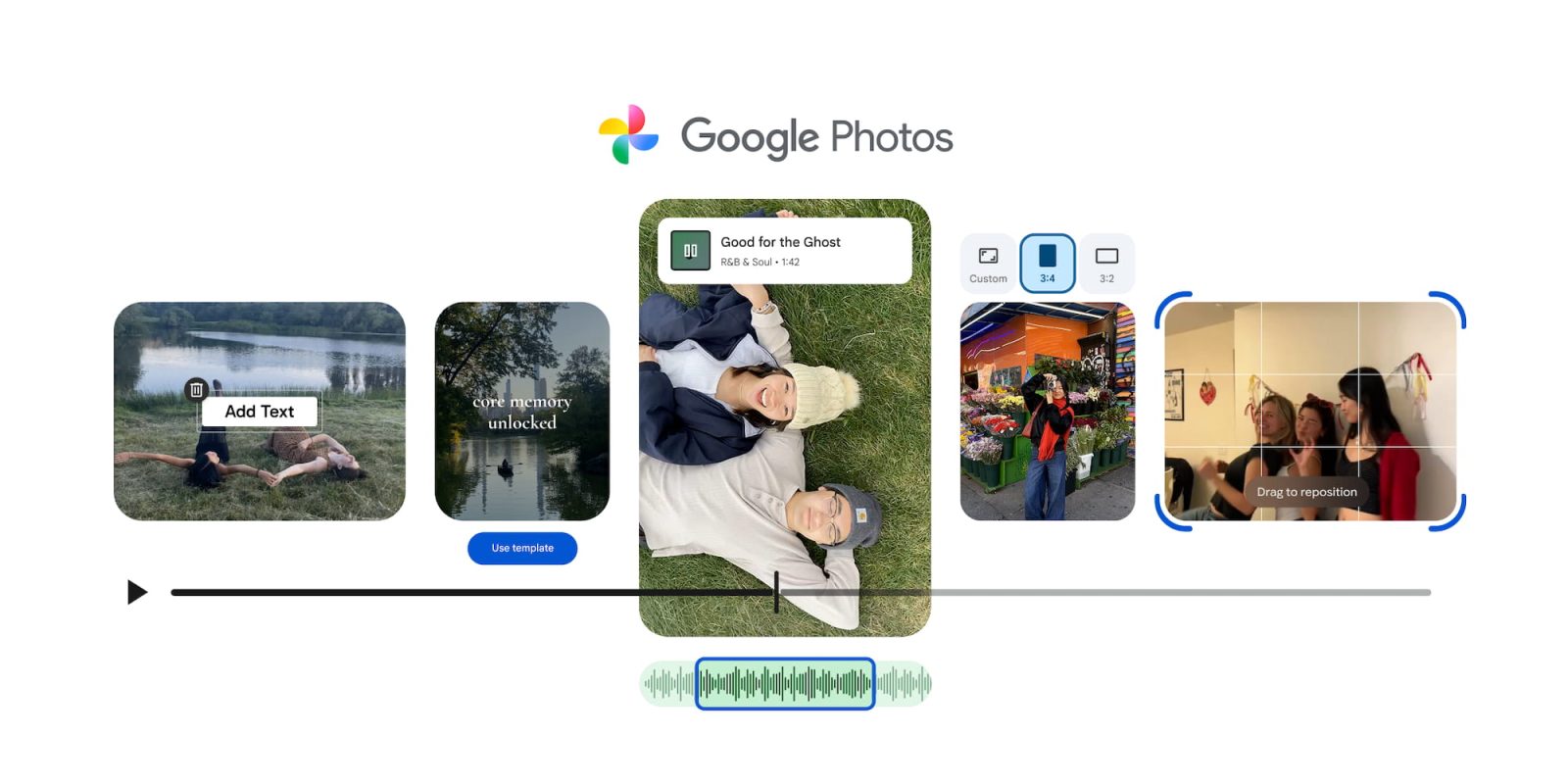
The updated video editor adopts a carousel-based layout, mirroring the design of the image editor. This approach incorporates Material 3 Expressive elements, including containers, components, and animations, resulting in a cohesive and modern aesthetic. The interface is organized into several key sections:
– Auto Enhancements: Features like ‘Enhance’ and ‘Stabilize’ allow users to improve video quality with a single tap.
– Crop: Provides tools for adjusting the frame and aspect ratio of videos.
– Adjustments: Offers sliders for fine-tuning various aspects such as Brightness, Contrast, Tone, White Point, Highlights, Shadows, Black Point, Vignette, Saturation, Warmth, Tint, Skin Tone, and Blue Tone.
– Filters: A selection of 20 filters, including Vivid, Playa, Honey, Isla, Desert, Clay, Palma, Blush, Alpaca, Modena, West, Metro, Reel, Bazaar, Ollie, Onyx, Eiffel, Vogue, and Vista, enables users to apply different visual styles to their videos.
– Audio Controls: Options to mute the original audio, add music, or use the ‘Audio Eraser’ feature to remove specific sounds.
– Speed Adjustment: Allows users to modify playback speed with options ranging from 0.25x to 4x.
– Music Integration: Access to a curated library of soundtracks categorized by moods such as Bright, Chill, Dramatic, Funky, Inspiring, Romantic, and Sad. Users can select specific sections of a clip and adjust the volume levels of both the video and the added music.
– Text Overlay: Tools to add text with customizable font, color, and background options.
Enhanced Editing Capabilities
A notable addition is the universal timeline, which supports multi-clip editing and storytelling. This feature includes an adaptive canvas that simplifies the editing process. Users can add clips by tapping the left side of the timeline and rearrange them through drag-and-drop functionality. This streamlined approach is also applicable when editing individual clips, making the interface more compact and prioritizing the preview area.
Template-Based Video Creation
For those seeking a quicker editing process, Google Photos introduces templates with built-in music, text, and cuts synchronized to a soundtrack. Users can select a style, choose the desired photos and videos, and the app will generate a polished video. To access this feature, navigate to the ‘Create’ tab and select ‘Highlight video.’
Availability
These updates are currently being rolled out, with the redesigned video editor widely available on Android devices.
Twitter Post
Exciting news! Google Photos unveils a revamped video editor with intuitive features and templates for effortless video creation. Update your app to explore the new tools! #GooglePhotos #VideoEditing #AppUpdate
Focus Key Phrase
Google Photos video editor redesign
Article X Post:
Hashtags:
Article Key Phrase:
Category: Google News