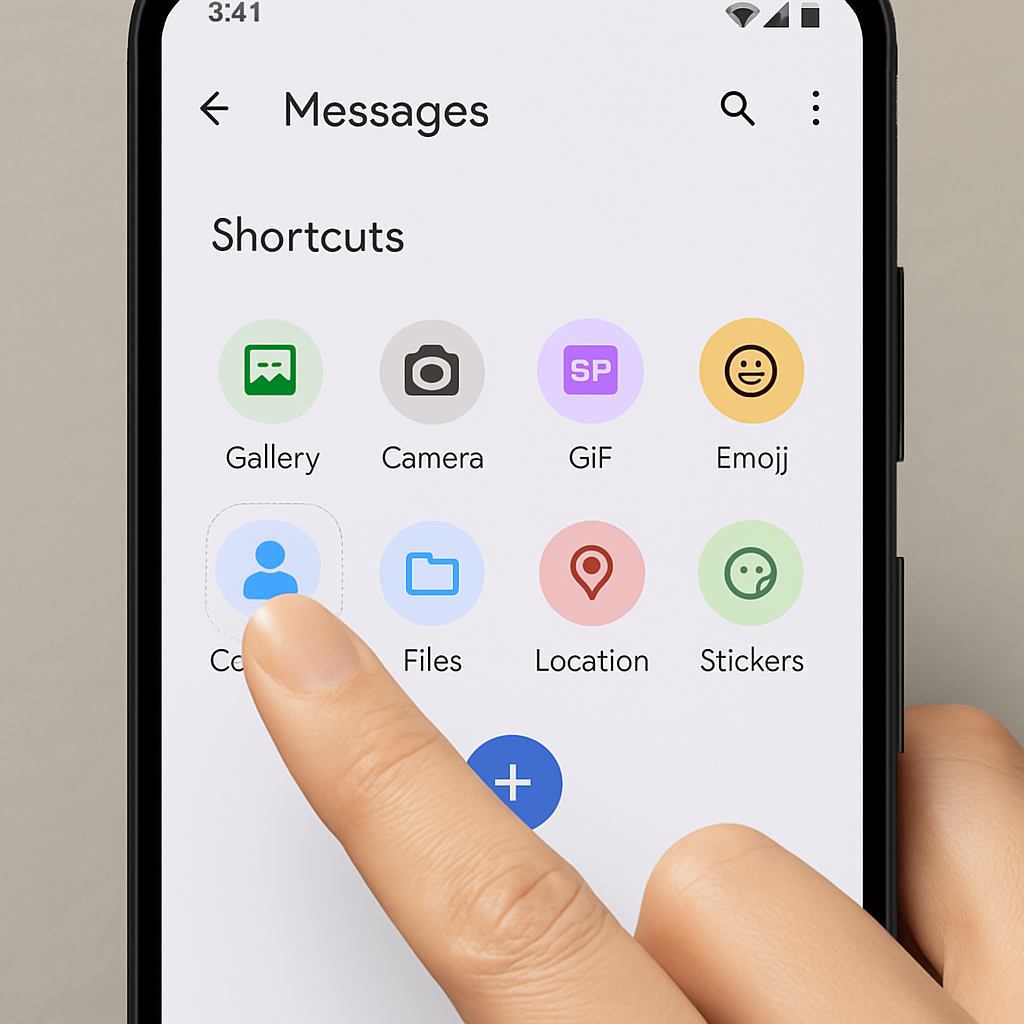
Google Messages is enhancing user experience by introducing the ability to customize the shortcuts grid within conversations. This feature allows users to rearrange the grid of shortcuts accessed by tapping the ‘+’ icon adjacent to the text input field. The layout of this grid varies depending on the device’s screen size.
Currently, the shortcuts grid includes up to eleven options: Gallery, Camera, GIFs, Stickers, Magic Compose, Files, Real-time Location, Contacts, Schedule Send, Selfie GIF, and One-time Location. Notably, the two location-related shortcuts were integrated earlier this year as part of the Find Hub update.
With the latest beta version 20260731_00_RC00 of Google Messages, users are greeted with a prompt stating, “Touch & hold a shortcut to drag it to a new spot.” This intuitive functionality enables users to personalize the arrangement of shortcuts to better suit their messaging habits.
As of today, this feature is available to users enrolled in the beta program. The customization process is straightforward, reminiscent of the interface previously seen in Gboard. While the current update focuses on rearranging shortcuts, it would be beneficial if future iterations allow users to hide unused actions, further streamlining the messaging experience.
This development underscores Google’s commitment to enhancing user customization and efficiency within its messaging platform. By allowing users to tailor the shortcuts grid, Google Messages aims to provide a more personalized and user-friendly interface, catering to diverse communication preferences.