Google has updated its Contacts app on Android to include a new ‘Your info’ card, simplifying the process of accessing and sharing your personal contact details. This feature is part of the latest app update, version 4.83.13.940538822, and is now available to users.
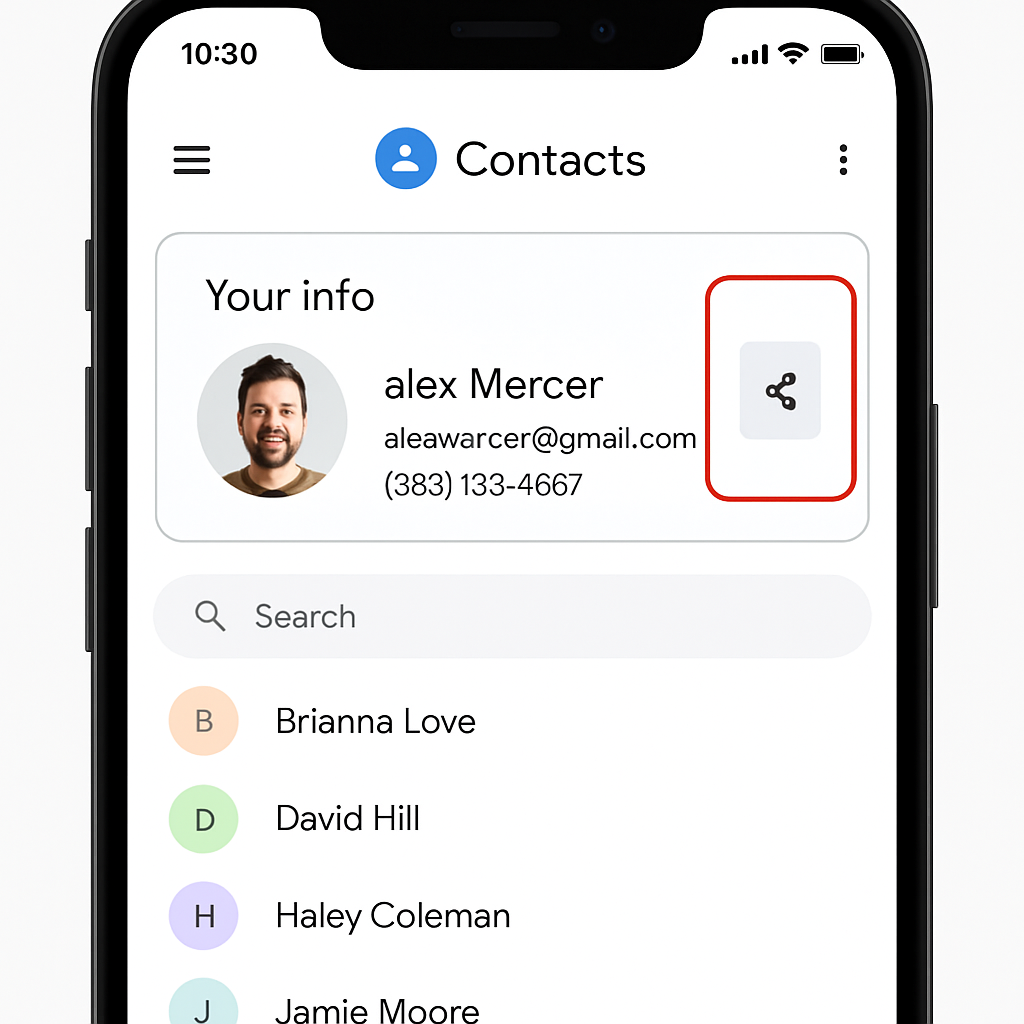
Upon opening the updated Contacts app, users will notice the ‘Your info’ card prominently displayed at the top of their contact list, even above starred or favorite contacts. This card provides quick access to your profile information, including your profile picture, phone numbers, email addresses, and any additional data you’ve added.
A notable aspect of this feature is the dedicated share button located on the side of the ‘Your info’ card. Tapping this button allows you to share your contact information as a VCard. You also have the option to limit what data is shared, ensuring that only the information you choose is included.
In the phone number section of the ‘Your info’ card, the number associated with your device is labeled as ‘device number’ and is displayed first. When sharing your contact information, this device number is the default number included, streamlining the sharing process.
This addition to the Google Contacts app mirrors similar functionality found in Apple’s Contacts app, where a ‘My card’ feature has been available for some time. By introducing the ‘Your info’ card, Google aims to provide Android users with a comparable level of convenience and efficiency in managing and sharing their contact information.
For more detailed information on how to use the ‘Your info’ card, Google has published a comprehensive support page outlining its features and functionalities.
The introduction of the ‘Your info’ card in Google Contacts signifies a step towards enhancing user experience by making personal information management more intuitive. As digital communication continues to evolve, such features play a crucial role in ensuring that users can easily access and share their contact details when needed.