A fresh phishing kit named GhostCode is wreaking havoc on Microsoft 365 accounts — and it doesn’t even need the user’s password. Instead, it tricks victims into authorizing legitimate Microsoft MFA (multi-factor authentication) prompts, giving attackers full account control in as little as 78 seconds. On September 16, 2026, researchers revealed how this attack bypasses standard defenses, hijacking cloud credentials with alarming speed.
How GhostCode Trick Users and Take Over Accounts
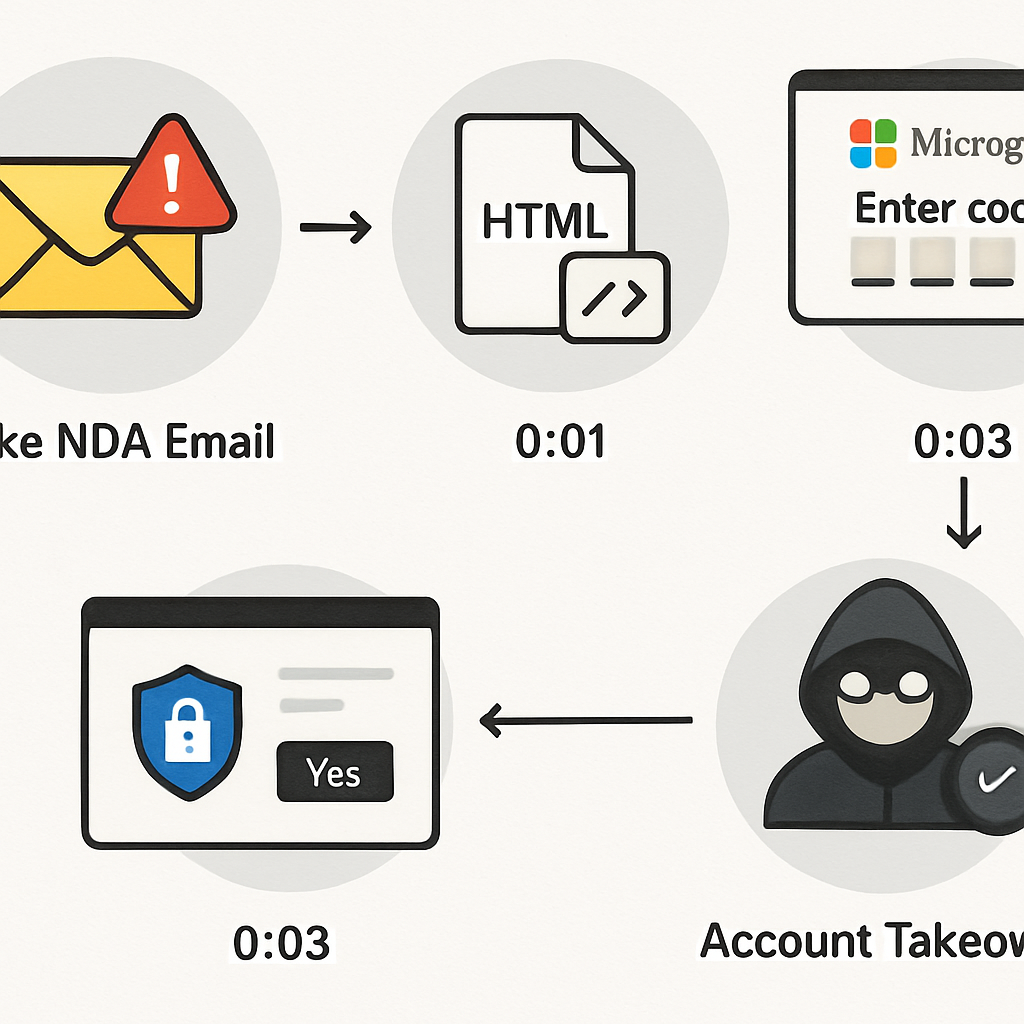
Attackers deploying GhostCode initiate the threat by masquerading as procurement staff through business contact forms. They then request a signed non-disclosure agreement (NDA), which leads to sending a password-protected HTML attachment via a file-sharing platform. Opening this attachment brings up what seems like a document portal but actually pushes the victim into a Microsoft device-code sign-in flow. Once the victim completes what appears to be a normal login—including MFA—the attackers immediately gain access through a legitimate token.
The trick works because the kit abuses the OAuth device-authorization process meant for devices unable to render full sign-in prompts (smart TVs, etc.). GhostCode uses Microsoft’s Authentication Broker application ID to generate a device code, embeds that code within a polished fake document portal, and persuades the user to authorize access as though approving their own device. Even the redirect is concealed until after the correct attachment password is submitted.
To evade detection, the kit pads attachments with junk data, hides visible text with HTML comments, and defers revealing key redirect URLs. It also uses browser challenges and location checks to filter out automated scanners. Once access is granted, attackers register multiple devices—sometimes three—in under 80 seconds and acquire a Primary Refresh Token (PRT) in about 30 seconds. That token enables ongoing access across Microsoft 365 without repeated sign-ins.
Why GhostCode’s Attack Model Threatens Businesses
Traditional defenses like password leaks or brute-force detection offer little protection against GhostCode, because no password is stolen. The token-based access happens via Microsoft’s legitimate identity systems, making alerts harder to trigger with typical pattern-based protections. Administrators are only alerted once suspicious devices are registered or unusual token usage appears—but by then, damage is already done.
To defend against this rapid identity compromise, security teams should strongly consider disabling or restricting device-code authentication via Conditional Access policies unless absolutely necessary. Other controls include limiting device compliance, tracking new device registrations, enforcing revocations of suspicious tokens, and more carefully reviewing non-interactive sessions for unusual behavior.
Also advised: raising awareness—if your organization ever asks someone to copy a code into a Microsoft page without prior context, that should raise red flags. Indicators such as lookalike domains, disposable email addresses, and encrypted redirect paths in attachments can all signal an ongoing GhostCode attack.
IoCs uncovered in the GhostCode campaign include deceptive domains like “bjssourcing.com” and “greenlightdlstribution.com,” disposable addresses tied to fake identities, residential proxy IPs matching victim locations, and usage of Microsoft’s Authentication Broker application ID within the OAuth-device flow.
WHAT THIS MEANS: GhostCode demonstrates that threat actors are shifting to “token phishing” and leveraging legitimate authentication flows to bypass MFA and traditional password-based defenses. As cloud reliance grows, attacks like this become potentially devastating, especially within environments that permit wide Conditional Access policies or lax device registration protocols.