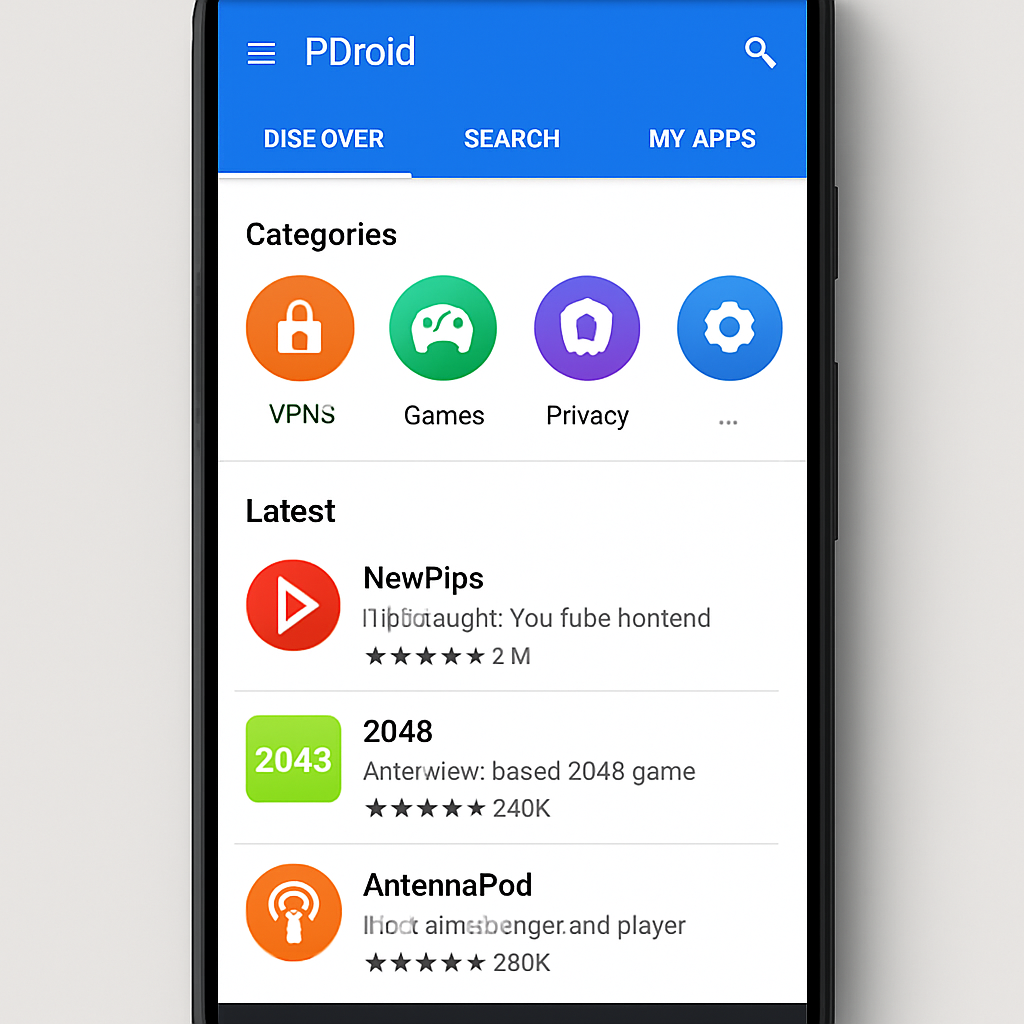
F-Droid has officially launched version 2.0 of its Android client, marking its most significant overhaul in ten years. After over a year of development and 14 test builds, the update is rolling out gradually and brings sweeping changes to how users find, install, and update apps in this free and open-source software repository.
Modern Code, Streamlined Navigation
The new F-Droid 2.0 refresh rewrites large chunks of its codebase using Kotlin and Jetpack Compose, bringing its user interface in line with current Android Material Design standards. This modernization is expected to make future maintenance and feature development smoother.
Navigation has been simplified into three primary sections: Discover, Search, and My Apps. The Discover tab now merges traditional app browsing with category views. My Apps consolidates installed apps, available updates, and related issues into one home. Secondary features like Settings and the Nearby Swap tool are now tucked into the top bar to reduce clutter.
Smarter Discovery, Privacy-Friendly Search, and Updated Installs
App discovery gets a boost with Discover highlighting recent additions, the latest updates, and popular downloads. Categories have been fleshed out: users can find VPNs, firewalls, password managers, launchers, and navigation tools more easily. Gaming is now split into 17 genres to help pinpoint specific kinds of titles.
The search feature has also seen upgrades. Users can search across app names, descriptions, categories, and translated text. Support for Chinese, Japanese, and Korean scripts is improved. Multiple filters let users narrow results by category, device compatibility, and anti-features—such as excluding apps that depend on non-free online services—making it especially useful for privacy-conscious users.
Updating and installing apps works differently now. By default, F-Droid 2.0 checks for updates automatically, though manual controls remain for those who prefer them. The old pull-to-refresh gesture is moved out of sight into the My Apps overflow menu.
Platform Integration, Privacy Tools, and Missing Features
Thanks to changes in Android’s installer frameworks—spurred in part by regulatory pressure—F-Droid now leverages newer installer APIs and pre-approval mechanisms where supported. This lets users approve installations sooner, instead of only after downloads finish.
Privacy resources are enhanced. Tor support is shifted toward generic proxy settings, with Tor VPN recommended as the easier path for most users. A previously controversial app-hiding feature is altered: it now only masks an app’s icon and name, while still allowing discovery through system settings or forensic means.
Not all legacy functions are restored yet: the Privileged Extension isn’t supported in 2.0, and the panic app-wiping capability hasn’t returned. Users who depend on those tools—especially for safety or privacy—may wish to hold off upgrading until those features return or are reworked.
Overall, F-Droid 2.0 represents a major transformation for one of the key open-source Android app ecosystems, balancing usability, performance, and privacy. The redesign modernizes both form and function while preserving the core values of free and open-source software.
Worth Watching
This release matters because it sets a new standard for what alternative app stores can offer in terms of user experience and regulatory compliance. As Android evolves and antitrust pressure increases—especially from laws like the European Union’s Digital Markets Act—stores like F-Droid that embrace modern installer APIs could find themselves in a stronger position. The next steps to monitor: restoration of the missing Privileged Extension and app-wiping tools, how users respond to redesigned privacy settings, and whether these changes will pressure mainstream app stores to follow suit.