CapCut Pad: Elevating Video Editing on Android Tablets to Desktop Standards
In the rapidly evolving digital landscape, video content has become a dominant form of communication and expression. Recognizing this trend, CapCut has introduced CapCut Pad, a sophisticated video editing application designed specifically for Android tablets. This new offering aims to deliver a desktop-level editing experience, bridging the gap between mobile convenience and professional-grade capabilities.
A New Era for Android Tablet Video Editing
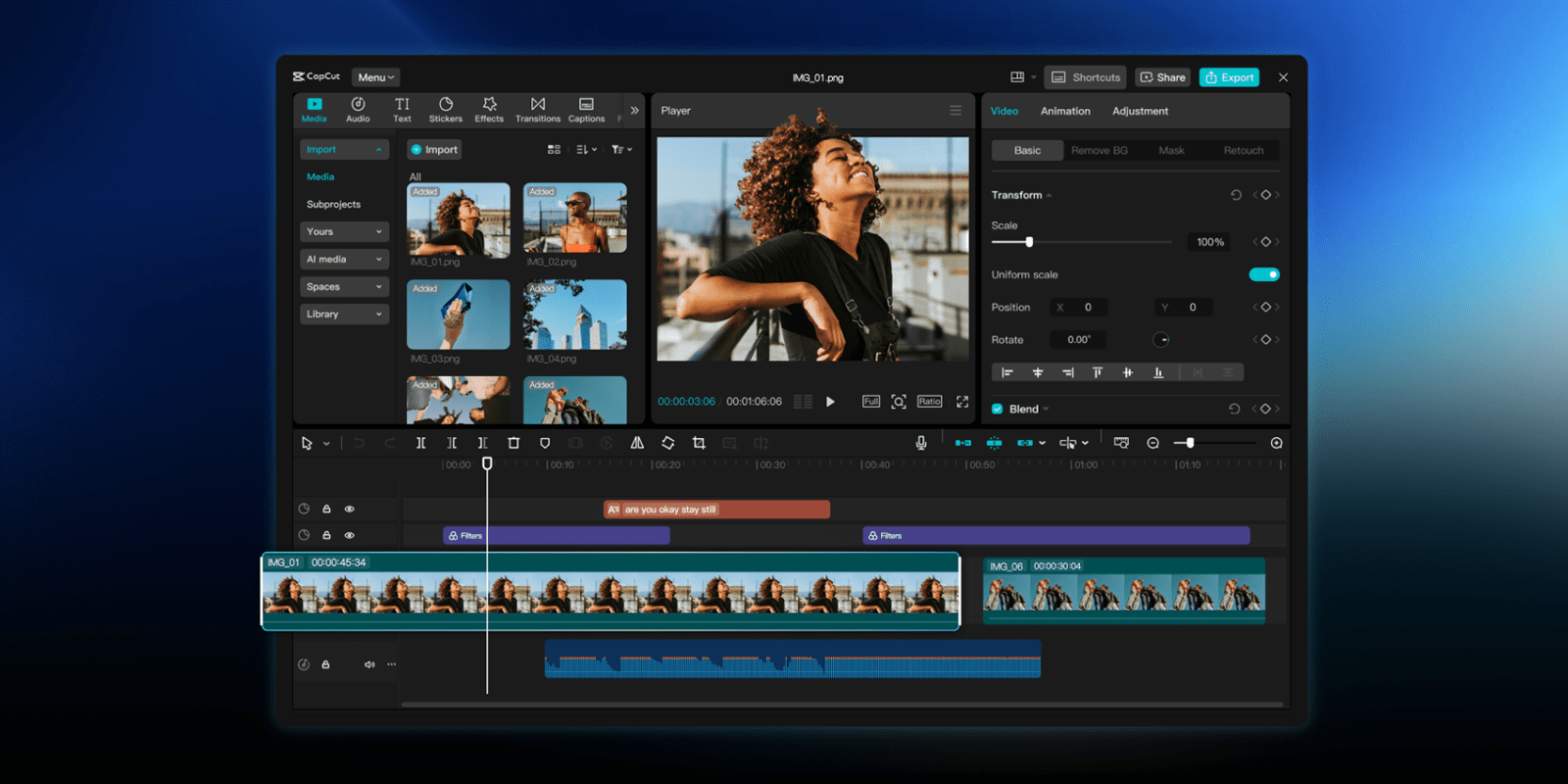
CapCut Pad emerges as a game-changer for content creators who rely on Android tablets. While smartphones have long been equipped with basic editing tools, the expansive screen real estate and enhanced processing power of tablets present an opportunity for more intricate editing tasks. CapCut Pad capitalizes on these advantages, providing users with a comprehensive suite of features that were previously confined to desktop environments.
Key Features and Functionalities
The application boasts an array of advanced tools tailored for meticulous video editing:
– Multi-Track Timeline Editing: Users can manage multiple video and audio tracks simultaneously, facilitating complex projects with ease.
– Chroma Key (Green Screen): This feature allows for seamless background replacement, enabling creative compositions and special effects.
– Video Stabilization: Shaky footage can be smoothed out, resulting in professional-looking videos without the need for additional hardware.
– Keyframe Animation: Precise control over animations and transitions is achievable, adding dynamic elements to videos.
– Smooth Slow Motion: High-quality slow-motion effects can be applied, enhancing the visual appeal of action sequences.
– In-App Fonts and Effects: A diverse library of fonts and visual effects is available, allowing for personalized and engaging content creation.
Performance and Output Quality
CapCut Pad is engineered to handle high-resolution projects efficiently. The application supports exports up to 4K resolution at 60 frames per second, complete with High Dynamic Range (HDR) capabilities. This ensures that the final output meets the standards expected in professional video production.
User Interface and Experience
The user interface of CapCut Pad is thoughtfully designed to leverage the touch capabilities of tablets. It offers an intuitive workspace that balances functionality with ease of use. The layout is optimized for touch interactions, making complex editing tasks more accessible to a broader audience.
Accessibility and Pricing
CapCut Pad is available for download on the Google Play Store. While the core functionalities are accessible for free, certain advanced features require a CapCut Pro subscription. The subscription is priced at approximately $10 per month, though exact pricing details are provided within the app itself.
Comparative Landscape
The introduction of CapCut Pad places it in direct competition with other video editing applications available on Android tablets. Notably, LumaFusion has been a prominent player in this space, offering a robust editing suite that has been continually updated to enhance its feature set. The competition between these platforms is likely to drive innovation and provide users with more choices tailored to their specific editing needs.
Conclusion
CapCut Pad represents a significant advancement in mobile video editing, particularly for Android tablet users. By delivering desktop-level capabilities in a mobile-friendly format, it empowers content creators to produce high-quality videos without the constraints of traditional desktop setups. As the demand for versatile and powerful editing tools continues to grow, CapCut Pad is poised to become a staple in the toolkit of modern video editors.