Apple’s enterprise solutions, Apple Business Manager (ABM) and Apple School Manager (ASM), have become essential tools for organizations deploying Apple devices. However, managing these platforms through their web interfaces can be cumbersome, especially when handling large numbers of devices. To address this challenge, developer Rod Christiansen has introduced ASBMUtil, a native macOS application designed to streamline the management of Apple devices within these platforms.
Introducing ASBMUtil
ASBMUtil is a SwiftUI-based application that provides a user-friendly interface for interacting with Apple’s enterprise tools. By leveraging the official API released by Apple, ASBMUtil allows administrators to manage devices more efficiently without relying on complex JSON configurations or terminal commands.
Key Features of ASBMUtil
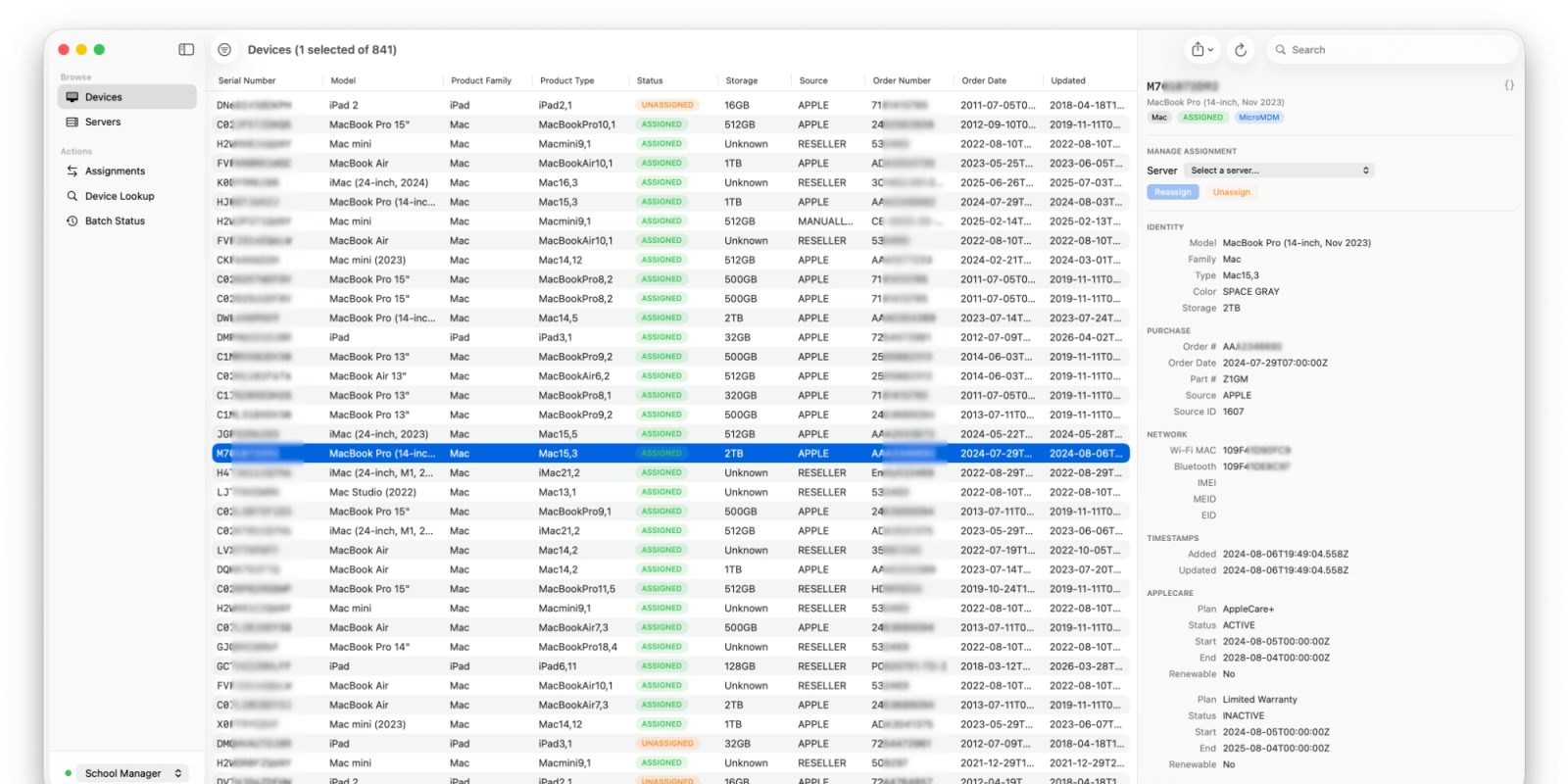
1. Comprehensive Device Browser: The application presents all managed devices—Macs, iPads, iPhones, and Apple TVs—in a single, paginated, and sortable table. This unified view simplifies the monitoring and management of devices across the organization.
2. Detailed Device Information: Selecting a device reveals a sidebar with extensive details, including serial number, order status, device management assignment, AppleCare coverage, and MAC address. This feature provides administrators with quick access to critical device information.
3. Advanced Filtering Options: ASBMUtil offers powerful filters that allow users to sort devices by status, order number, model family, or device management server. Administrators can stack multiple filters to pinpoint specific devices, enhancing the efficiency of device management tasks.
4. MDM Server Management: The application displays all Mobile Device Management (MDM) servers and their assigned devices, providing a clear overview of device distribution across servers.
5. Bulk Assignment and Unassignment: Administrators can select multiple devices and reassign them to different servers with ease. Additionally, ASBMUtil supports importing CSV files for bulk assignments, accommodating various organizational workflows.
6. Data Export Capabilities: The application allows users to export selected or filtered device data to CSV or JSON formats via the macOS share sheet, facilitating data analysis and reporting.
7. Multi-Profile Support: For organizations managing multiple Apple environments, ASBMUtil enables seamless switching between different Apple Business and School Manager accounts, streamlining the management process.
Enhancing the Apple Enterprise Experience
The introduction of ASBMUtil marks a significant advancement in the management of Apple devices within enterprise and educational settings. By providing a native macOS application that integrates directly with Apple’s enterprise APIs, ASBMUtil simplifies device management tasks, reduces administrative overhead, and enhances overall efficiency.
For IT administrators and organizations heavily invested in Apple’s ecosystem, ASBMUtil offers a compelling solution to the challenges associated with managing large fleets of devices. Its intuitive interface, combined with powerful features, positions it as a valuable tool in the Apple enterprise landscape.
Twitter Post:
Introducing ASBMUtil: A native macOS app revolutionizing Apple device management in enterprises. Streamline your workflow with powerful features and an intuitive interface. #ASBMUtil #AppleEnterprise #DeviceManagement
Focus Key Phrase:
ASBMUtil Apple device management
Article X Post:
Hashtags:
Article Key Phrase:
Category: Apple News