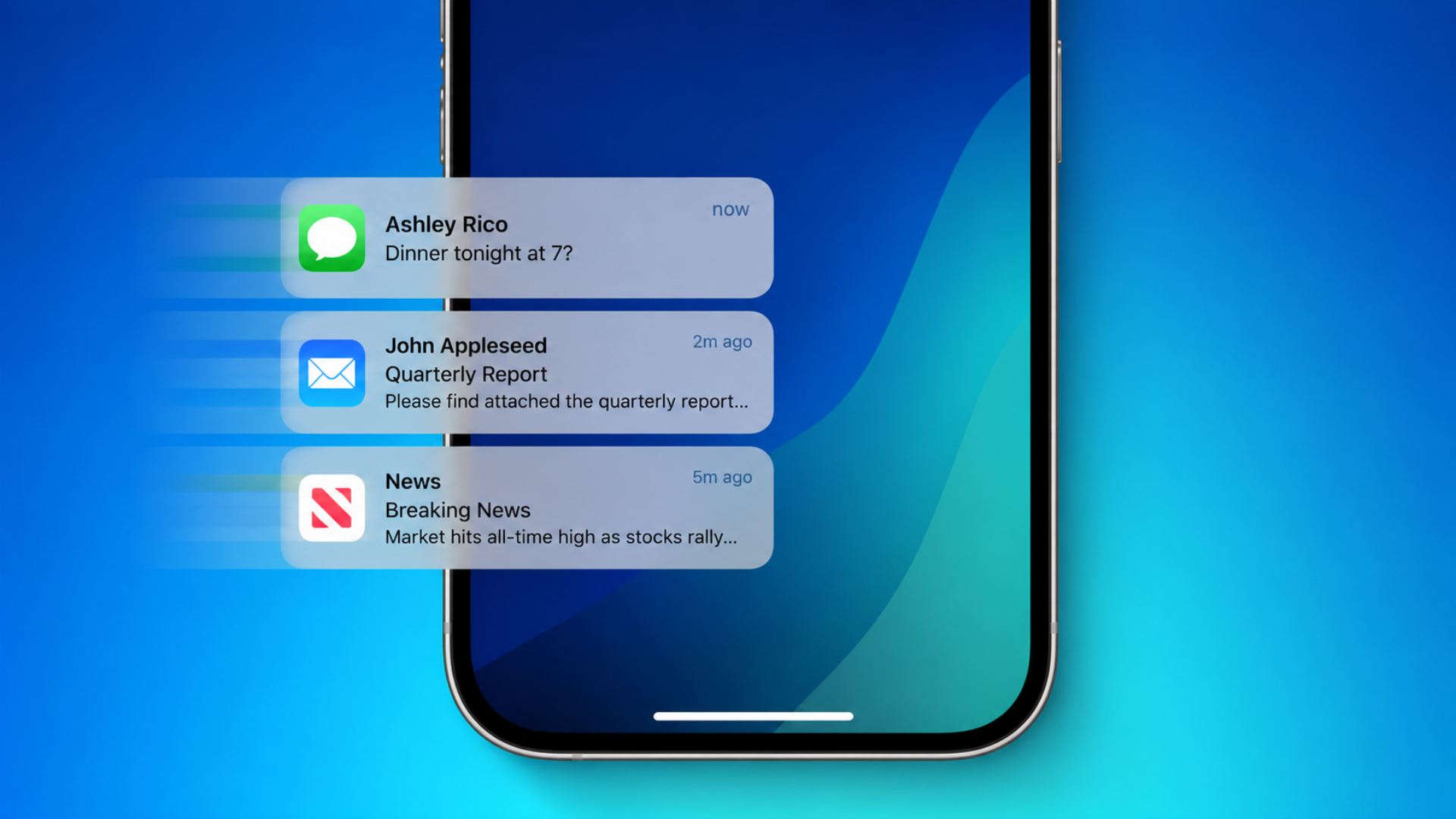
Apple is set to introduce a significant change in how notifications appear on the iPhone with the upcoming iOS 27 update. Traditionally, notifications have dropped down from the top of the screen. However, in iOS 27, new alerts will slide in from the left side of the display. This shift is part of a broader redesign aimed at enhancing user interaction and streamlining access to various features.
According to Bloomberg’s Mark Gurman, Apple is relocating the Notification Center access to the top-left corner of the screen. This adjustment is necessitated by the introduction of a new Siri-linked Search or Ask interface, which users can access by swiping down from the top-center of the screen. Gurman notes, Notifications across iOS 27 and iPadOS 27 have a new effect for when alerts arrive. They now slide in from the left side of the screen.
This change is indicative of Apple’s efforts to integrate Siri more deeply into the iOS experience. By assigning the top-center swipe gesture to the new AI search panel, Apple is positioning Siri as a more central component of the user interface. Consequently, the Notification Center’s gesture has been moved to the left side to accommodate this new functionality.
For users, this means adapting to a new gesture for accessing notifications. While the core functionality of the notification system remains unchanged, the visual presentation and access method will feel different. This redesign aims to create a more cohesive and intuitive user experience by aligning gestures with their respective functions more logically.
Apple is expected to unveil iOS 27 at the Worldwide Developers Conference (WWDC) 2026, with the first beta release anticipated shortly after the keynote. This update is part of a series of enhancements aimed at refining the user interface and integrating more advanced AI features into the iOS ecosystem.
In addition to the notification changes, iOS 27 is rumored to include several other notable updates:
1. Redesigned Siri Interface: Siri is expected to receive a significant overhaul, featuring a more integrated experience within the Dynamic Island and a new chatbot-style interface that resembles popular AI applications like ChatGPT and Gemini. This redesign aims to make Siri more contextually aware and capable of handling more complex interactions. ([macobserver.com](https://www.macobserver.com/news/ios-27-leak-reveals-apples-new-siri-interface-ai-camera-features-and-chatbot-app/?utm_source=openai))
2. AI-Enhanced Camera Features: The Camera app is reportedly set to receive AI-driven enhancements, allowing for smarter scene recognition and improved photo quality. These features are designed to provide users with professional-grade photography tools directly within the native Camera app. ([macobserver.com](https://www.macobserver.com/news/ios-27-leak-reveals-apples-new-siri-interface-ai-camera-features-and-chatbot-app/?utm_source=openai))
3. Chatbot Application: Apple is said to be developing a standalone chatbot application that will offer users an AI-powered conversational experience. This app is expected to integrate seamlessly with other iOS features, providing users with a versatile tool for information retrieval and task management. ([macobserver.com](https://www.macobserver.com/news/ios-27-leak-reveals-apples-new-siri-interface-ai-camera-features-and-chatbot-app/?utm_source=openai))
4. Liquid Glass Design Refinements: The Liquid Glass design language, introduced in iOS 26, is expected to be refined in iOS 27. Apple plans to provide users with more control over the opacity of the Liquid Glass interface, allowing for a more personalized visual experience. This adjustment addresses user feedback regarding readability and aesthetic preferences. ([macobserver.com](https://www.macobserver.com/news/ios-27-to-finally-bring-full-control-over-liquid-glass-opacity-says-report/?utm_source=openai))
5. Battery Icon Redesign: A subtle yet noticeable change in iOS 27 is the redesign of the battery icon. The new icon is expected to feature a solid black design, replacing the previous inner battery fill animation. This change aims to provide a cleaner and more uniform appearance across the user interface. ([macobserver.com](https://www.macobserver.com/news/ios-27s-battery-icon-change-has-people-looking-twice-at-their-iphones/?utm_source=openai))
6. Genmoji Enhancements: The Genmoji feature is set to become more proactive in iOS 27, offering users automatic suggestions based on their photo library and commonly typed phrases. This enhancement aims to make communication more expressive and personalized. ([macobserver.com](https://www.macobserver.com/news/ios-27-genmoji-upgrade-reportedly-uses-photos-and-common-phrases-for-suggestions/?utm_source=openai))
7. Search or Ask AI Shortcut: A new system-wide Search or Ask gesture is expected to be introduced, integrating Siri, ChatGPT, and Gemini directly into the iPhone interface. This feature will allow users to access AI-powered search and assistance functionalities more seamlessly. ([macobserver.com](https://www.macobserver.com/news/apple-reportedly-bringing-search-or-ask-ai-shortcut-to-dynamic-island-in-ios-27/?utm_source=openai))
These updates reflect Apple’s ongoing commitment to enhancing user experience through thoughtful design changes and the integration of advanced technologies. By refining existing features and introducing new functionalities, iOS 27 aims to provide a more intuitive, efficient, and personalized experience for iPhone users.
As with any major software update, users can expect a period of adjustment as they familiarize themselves with the new gestures and interface changes. However, these modifications are designed with the goal of creating a more cohesive and user-friendly environment. Apple’s focus on integrating AI features and providing greater customization options demonstrates its dedication to meeting the evolving needs and preferences of its user base.
In conclusion, the introduction of the left-side notification animation in iOS 27 is more than just a visual tweak; it signifies a broader shift in how users interact with their devices. By reimagining notification delivery and access, Apple is paving the way for a more streamlined and intelligent user experience. As the official release approaches, users can look forward to exploring these new features and discovering how they enhance daily interactions with their iPhones.
Twitter Post: Exciting changes coming in #iOS27! Notifications will now slide in from the left, and Siri gets a major upgrade with a new ‘Search or Ask’ interface. #Apple #iPhone #TechNews
Focus Key Phrase: iOS 27 left-side notification animation
Article X Post:
Hashtags:
Article Key Phrase:
Category: Apple News