Enhance Your Google Forms with Seamless Payment Integration Using Payable
Google Forms has long been a preferred tool for creating surveys, quizzes, and data collection forms due to its simplicity and ease of use. However, one notable limitation has been its inability to process payments directly within forms. This gap is effectively bridged by Payable, an innovative add-on that integrates secure payment options into Google Forms, transforming them into powerful e-commerce tools.
Understanding Payable’s Integration with Google Forms
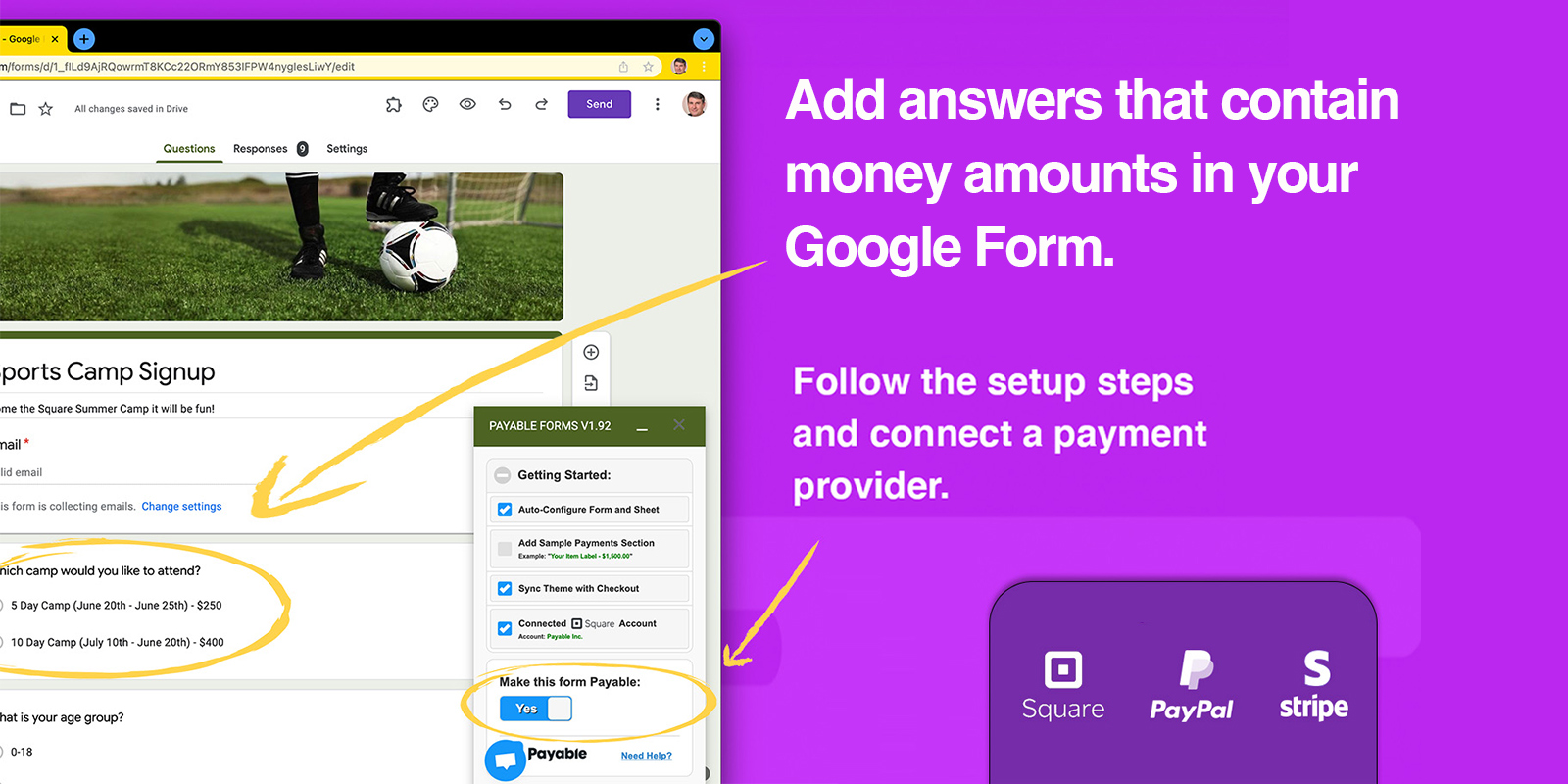
Payable is a robust extension available through the Google Workspace Marketplace that seamlessly embeds payment functionalities into Google Forms. By leveraging Payable, users can incorporate various payment gateways, including:
– PayPal: A globally recognized platform facilitating secure online transactions.
– Stripe: A developer-friendly payment processor known for its flexibility and scalability.
– Square: A comprehensive payment solution catering to both online and in-person transactions.
– Rapyd: A fintech company offering a wide range of payment and financial services.
– Razorpay: An Indian payment gateway providing a suite of payment solutions.
This integration allows form creators to offer multiple payment options, enhancing user convenience and potentially increasing form completion rates.
Setting Up Payable in Google Forms
Integrating Payable into your Google Forms is a straightforward process:
1. Install the Payable Add-on: Navigate to the [Google Workspace Marketplace](https://workspace.google.com/marketplace) and search for the Payable Form extension. Click on ‘Install’ and follow the prompts to grant the necessary permissions.
2. Access Payable in Google Forms: Once installed, open your Google Form. Click on the ‘Add-ons’ icon (represented by a puzzle piece) in the toolbar, select ‘Payable Forms,’ and choose ‘Make this form payable.’
3. Configure Payment Settings: Set up your preferred payment gateways by linking your accounts (e.g., PayPal, Stripe). Customize the payment options to align with your form’s requirements.
4. Design Your Form: Create your form as usual, adding questions and fields pertinent to your data collection needs.
5. Assign Prices to Items: For forms involving product selections or services, assign prices to each item. Payable will automatically calculate the total based on user selections.
6. Test the Form: Before sharing, conduct a test submission to ensure the payment process functions correctly.
Benefits of Using Payable with Google Forms
– Enhanced User Experience: By integrating payment options directly into the form, users can complete transactions without being redirected to external sites, resulting in a smoother experience.
– Streamlined Data Management: Payment data is automatically recorded in Google Sheets, alongside form responses, facilitating efficient data analysis and record-keeping.
– Security and Compliance: Payable’s partnerships with reputable payment processors ensure that all transactions are secure and compliant with industry standards.
– Versatility: Suitable for various applications, including event registrations, product orders, service bookings, and donation collections.
Real-World Applications
Payable’s integration is particularly beneficial for:
– Educational Institutions: Schools and universities can collect fees for events, workshops, or materials directly through forms.
– Non-Profit Organizations: Charities can streamline donation processes, making it easier for supporters to contribute.
– Small Businesses: Entrepreneurs can manage orders and payments for products or services without investing in complex e-commerce platforms.
– Event Organizers: Coordinators can handle registrations and associated payments for conferences, seminars, or social events efficiently.
User Feedback and Adoption
With over 463,000 installs and numerous positive reviews, Payable has proven to be a reliable solution for integrating payments into Google Forms. Users appreciate its ease of use, security features, and the convenience it brings to form-based transactions.
Conclusion
Payable effectively addresses the payment processing limitations of Google Forms, enabling users to create comprehensive, payment-enabled forms with ease. Its integration with trusted payment gateways ensures secure transactions, while its user-friendly setup makes it accessible to individuals and organizations of all sizes. By adopting Payable, you can transform your Google Forms into powerful tools for data collection and financial transactions, enhancing both functionality and user satisfaction.