With iOS 27, Apple Calendar is gaining two much-needed upgrades that narrow the gap with more advanced calendar tools. These enhancements target two areas long criticized: event creation and Siri-powered automation.
Natural Language Event Entry
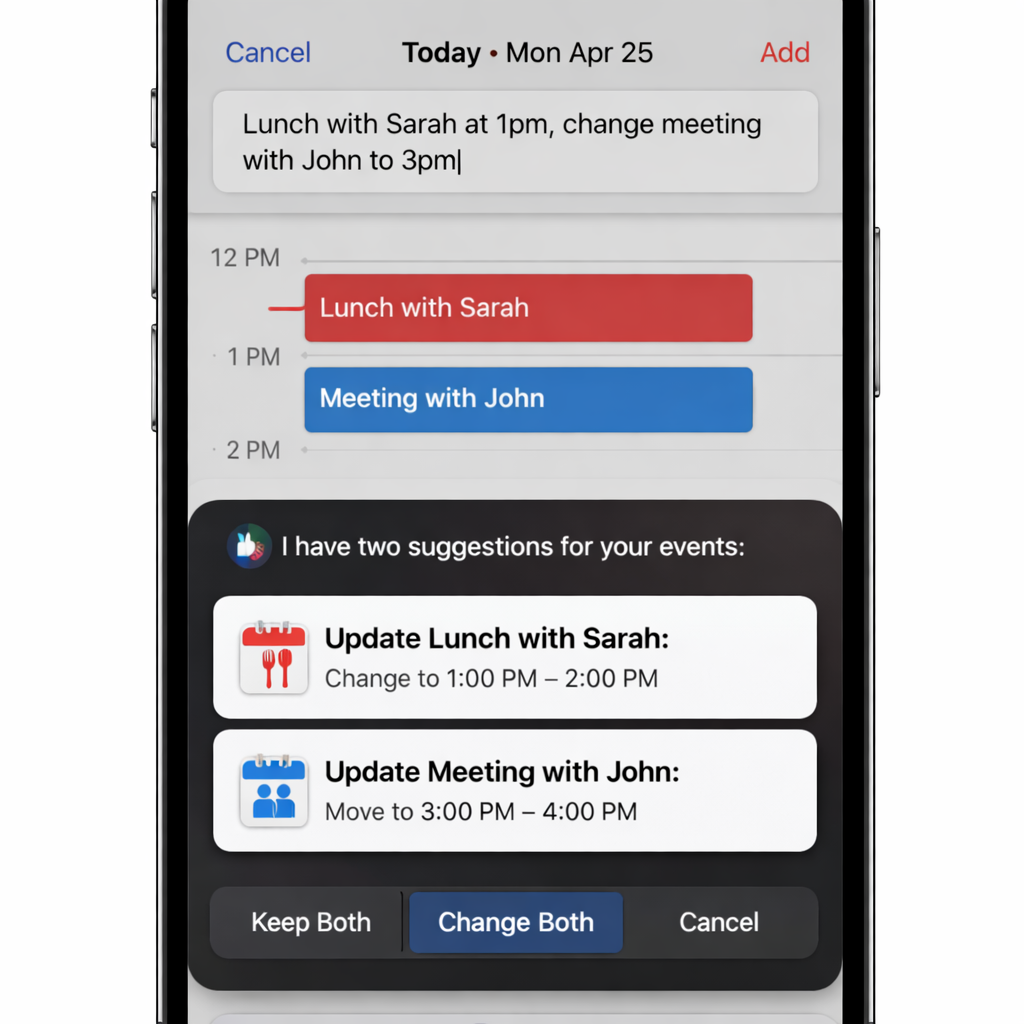
Previously, creating an event in Apple Calendar meant manually entering the title, date, time, invitees, and location. Unlike many third-party apps, there was no way to simply type a phrase and have the app parse out the details. That changes in iOS 27 with the addition of natural language input: now users can type event descriptions in plain English (or other supported languages), and the Calendar app will detect recognizable elements—like dates or participants—and automatically fill in corresponding fields.
While this isn’t yet as capable as offerings from premium calendar apps, which can interpret far more complex inputs and parameters, it’s a substantial leap forward for Apple’s built-in tool. It reduces friction when adding events and reflects growing user demand for conversational, intuitive interfaces.
Siri AI Can Mass-Manage Your Calendar
Another area where Calendar has lagged has been Siri integration. In earlier versions, Siri could help with trivial calendar tasks but wasn’t powerful enough to handle bulk operations or nuanced modifications. iOS 27 addresses that by beefing up Siri AI so it can add multiple events at once—like a sports season or school holiday schedule—modify existing entries via natural language (for example, moving lunch from today to next Wednesday), and understand inquiries about upcoming events without needing perfect phrasing.
These upgrades make Siri a far more effective assistant for organizing schedules. And the improvements are just getting started: iOS 27.3 is set to bring additional features to Siri’s calendar support in the near future.
These two changes—natural language event creation and enhanced Siri control—finally give Apple Calendar features power users have been asking for. While third-party apps still lead in depth and flexibility, Apple is clearly closing the gap.
What This Means
This marks a shift: Apple is embracing smarter, more conversational interfaces in its native apps. Calendar may no longer need to compete purely on stability or integration—users now get more agency and speed. Though these aren’t revolutionary on their own, together they elevate the entire scheduling experience. Watch for how well Siri handles false positives or ambiguous commands, and whether upcoming updates fully bridge the gap with high-end calendar competitors.