iOS 27 ushers in several headline-worthy upgrades, from enhanced Apple Intelligence tools to fresh features in Wallet, Messages, and CarPlay. But one small tweak stands to become a daily essential: a new paste shortcut that appears right above the keyboard. It streamlines how you paste anything—from text to images—without extra taps on menus.
Paste Right When You Need It
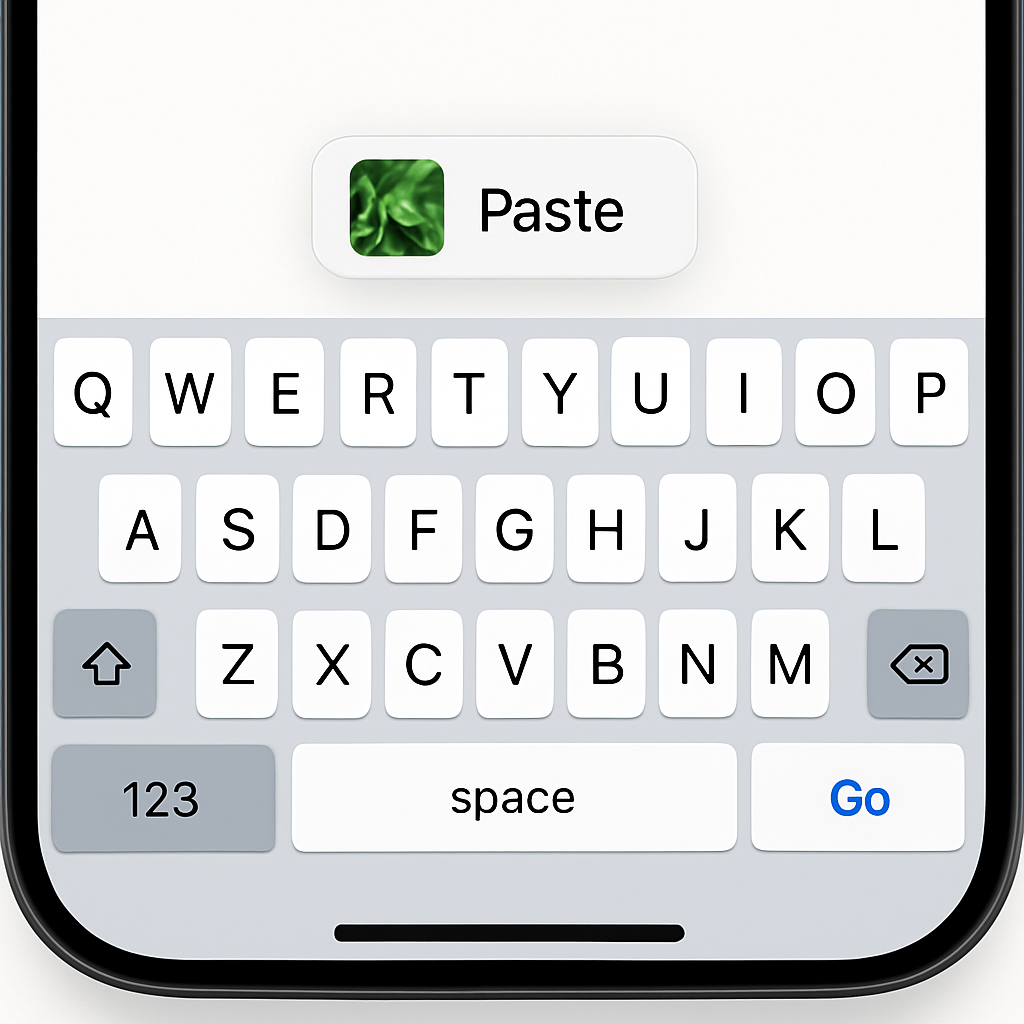
Once you copy something, whether it’s text, a link, or a photo, iOS 27 detects when you enter a new text field in another app or context. Instead of manually selecting “Paste” via the pop-up menu, the OS displays a shortcut above the keyboard. This appears automatically, offering one-tap access to paste whatever’s in your clipboard.
Preview Without Opening
Alongside the shortcut, you get a sneak peek of what you copied. Text shows up as typed, while images show as a small thumbnail preview in the keyboard’s suggestion row. That way, you know exactly what you’re pasting before you tap.
This isn’t a feature most users expected or asked for—but once you start using it, it quickly becomes one of those small conveniences you don’t want to live without. Early testing in the iOS 27 beta showed this keyboard addition feels like it smooths out everyday tasks that previously required extra taps, extra time.
Timing for this rollout aligns with iOS 27’s broader updates, which also include refinements in system apps and deeper AI integration. This paste bar joins several “under-the-hood” usability enhancements that often make the biggest difference in daily phone use.
Though some power users might still prefer Paste via context menus—especially in apps with advanced editing tools—for many people this new top-row shortcut will cut friction. If you frequently copy and share between apps, or switch typing tasks often, it provides a smoother experience.
What this change signifies is Apple’s ongoing focus on anticipating user workflows. Rather than making you think “I need to paste,” iOS now senses that you copied something and infers what you’ll likely want to do next. That kind of design philosophy—anticipation, predictiveness, and convenience—is quietly reshaping what “good” feels like in mobile UX. Keep an eye on similar features as iOS 27 continues to roll out; they may add up to one of Apple’s most frictionless updates yet.