Google Messages has recently introduced a suite of new features aimed at enhancing user experience and functionality. These updates include a redesigned long-press menu, a bolder voice message button, and the implementation of the ‘Tap to Draft’ feature.
Redesigned Long-Press Menu
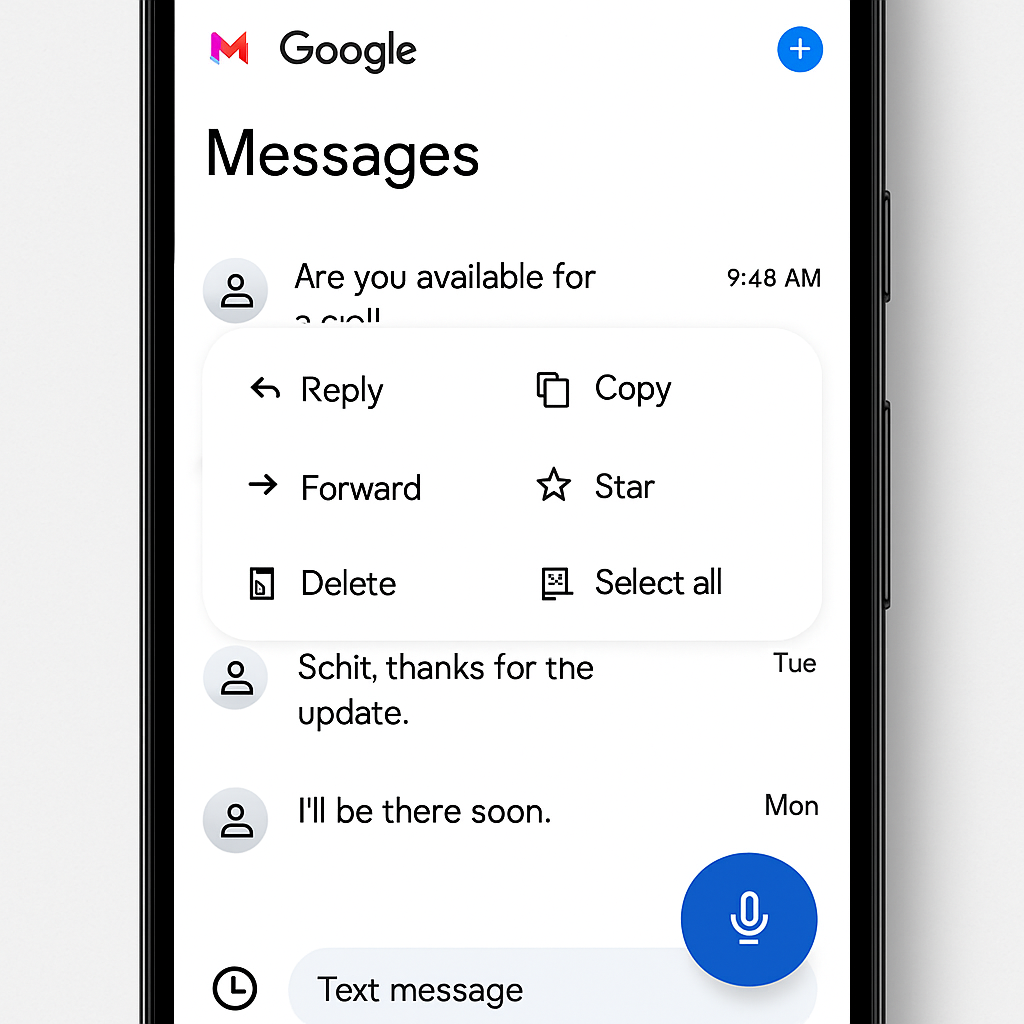
The long-press menu has undergone a significant redesign. Now, when users long-press on a message or image, a floating menu appears, partially centering the selected item. The background is blurred, and haptic feedback is provided, offering a more intuitive and visually appealing interaction. This update is currently available to beta users and is expected to roll out more broadly soon.
Bolder Voice Message Button
To improve accessibility and usability, the voice message button within the app has been made more prominent. This change aims to encourage users to utilize voice messaging more frequently by making the feature more noticeable and easier to access.
Tap to Draft Feature
The ‘Tap to Draft’ feature addresses the issue of accidental message sending when using Smart Replies. With this update, tapping a Smart Reply suggestion places the text into the input field, allowing users to review and edit the message before sending. This enhancement provides greater control over message content and reduces the likelihood of unintended communications.
These updates reflect Google’s ongoing commitment to refining the Messages app, ensuring it remains a competitive and user-friendly messaging platform. Users can anticipate further enhancements as Google continues to develop and test new features.