Apple Unveils visionOS 27 Beta 1: Enhancing the Vision Pro Experience with Seven Innovative Features
Apple has recently introduced the first developer beta of visionOS 27 for the Apple Vision Pro, following its announcement at WWDC 2026. This update brings a suite of new features, interface enhancements, and AI-driven capabilities aimed at elevating the user experience. Developers can now access the beta to test and optimize their applications with the latest software advancements.
How to Update to visionOS 27 Beta 1
Registered developers can update their Apple Vision Pro devices by following these steps:
1. Open the Settings app on your Apple Vision Pro.
2. Navigate to General.
3. Select Software Update.
4. Tap on Beta Updates.
5. Choose visionOS 27 Developer Beta.
6. Download and install the update.
Ensure that your device is sufficiently charged and connected to a stable Wi-Fi network before initiating the installation process.
Key Features Introduced in visionOS 27 Beta 1
1. Siri AI Integration
The most significant addition in visionOS 27 is the enhanced Siri AI experience. Users can now interact with Siri through a dedicated application, utilizing visual intelligence to inquire about objects, content, and information within their physical or digital environments. This advancement allows for more intuitive and context-aware interactions, making the Vision Pro a more powerful tool for daily tasks and information retrieval.
2. Curved Windows Support
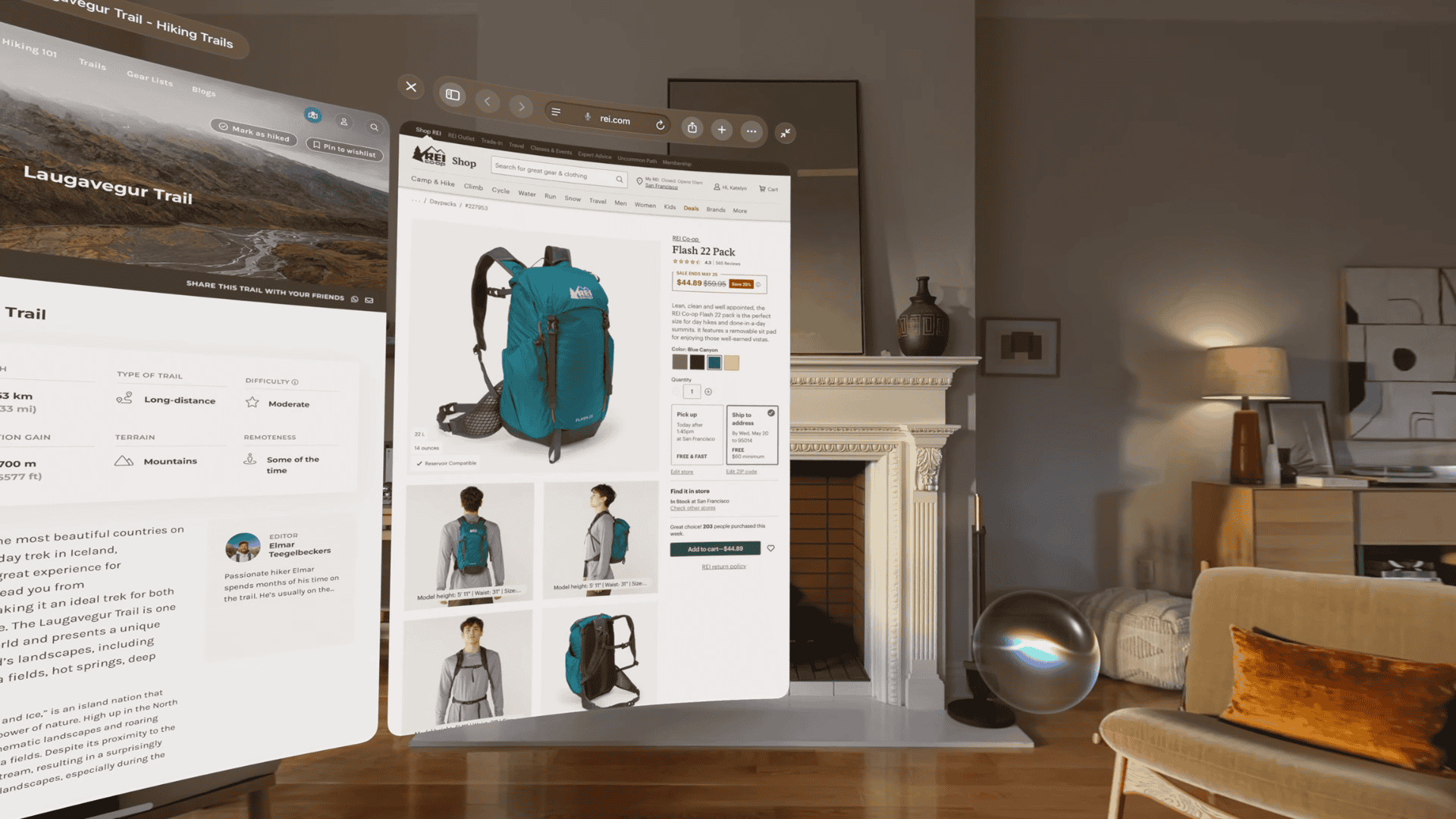
visionOS 27 introduces support for curved windows, enabling applications to seamlessly wrap around the user’s spatial environment. This feature offers an experience akin to using a curved monitor, providing a more immersive and expansive viewing area. Applications such as Safari, Freeform, and Apple TV Multiview are among the first to leverage this new capability, enhancing productivity and entertainment experiences.
3. Redesigned Control Center
Apple has overhauled the Control Center in visionOS 27, organizing it into three distinct sections:
– Notifications and Media Playback: Centralized access to recent notifications and media controls.
– Core System Controls: Quick toggles for essential system settings.
– Environments: Management of spatial computing environments and settings.
This redesign streamlines access to frequently used controls, improving usability and efficiency.
4. Enhanced Panorama Experiences
Users can now transform panoramic photos into immersive environments within the Vision Pro. This feature allows personal panoramas to be experienced in a more lifelike and engaging manner, bringing memories to life in a unique and interactive way.
5. Improved Wi-Fi Connectivity
visionOS 27 enhances Wi-Fi performance, enabling the Vision Pro to connect up to three times faster in certain scenarios. This improvement facilitates quicker downloads, smoother streaming, and more responsive cloud-based applications, significantly enhancing the overall user experience.
6. Smaller Widgets and Enhanced Customization
The update introduces an extra-small widget size, providing users with greater flexibility in arranging widgets within their spatial workspace. Additionally, visionOS 27 offers expanded customization options across the interface, allowing users to tailor their environment to better suit their preferences and workflow.
7. Smarter Notifications
Notifications have been upgraded to offer more intuitive interactions. Users can now expand certain notifications simply by looking at them, enabling hands-free engagement and making the notification experience more seamless and natural.
Final Thoughts
visionOS 27 Beta 1 brings a host of meaningful enhancements to the Apple Vision Pro, with features like Siri AI integration, curved windows, immersive panoramas, and interface refinements leading the update. Apple plans to continue refining the software throughout the beta cycle, with a public release anticipated later this year.