Microsoft Addresses Remote Desktop Warning Display Issues Post-April 2026 Update
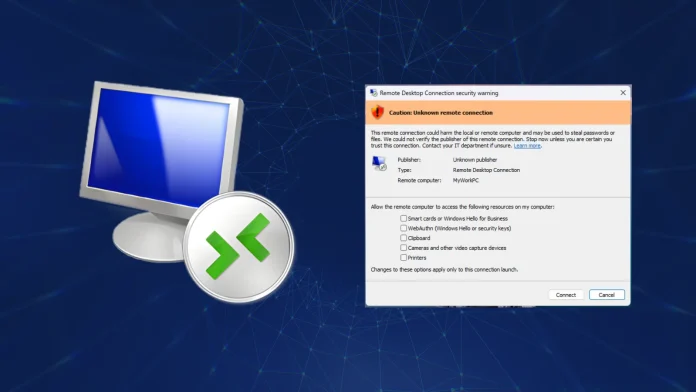
In April 2026, Microsoft released cumulative updates for Windows 11 aimed at enhancing security measures within the Remote Desktop Protocol (RDP). These updates, identified as KB5083769 for Windows 11 versions 25H2 and 24H2, and KB5083768 for version 26H1, introduced new security warning dialogs designed to alert users to potential phishing threats during RDP sessions.
The primary objective of these updates was to mitigate risks associated with CVE-2026-26151, a Remote Desktop spoofing vulnerability that had been actively exploited. The newly implemented warnings were intended to provide users with clear information regarding the publisher’s verification status, the remote computer’s address, and the local resources accessible during the session.
However, shortly after deployment, users began reporting issues with the rendering of these security dialogs. Specifically, on systems utilizing multiple monitors with varying display scaling settings, the warning dialogs displayed overlapping text and obscured buttons, rendering them difficult to read and interact with. For instance, configurations where one monitor was set to 100% scaling and another to 125% were particularly affected.
This display issue posed a significant usability concern, as the security warnings serve as critical checkpoints for users to review and approve before establishing RDP connections. The inability to properly view and interact with these dialogs could potentially expose users to security risks, undermining the very protections the updates aimed to enforce.
Microsoft acknowledged the problem and documented it as a known issue on April 23, 2026. The company has committed to delivering a permanent fix in a forthcoming cumulative update. In the interim, users are advised to ensure uniform display scaling settings across all monitors to mitigate the rendering issues.
The introduction of these security warnings was part of Microsoft’s broader strategy to combat sophisticated phishing campaigns that exploit RDP configurations. By requiring explicit user acknowledgment for local resource redirection and displaying detailed security prompts, Microsoft aims to enhance user awareness and control over remote connections.
As organizations increasingly rely on remote access solutions, maintaining the integrity and usability of security features like RDP warnings is paramount. Users are encouraged to stay informed about updates and apply patches promptly to ensure optimal security and functionality.