Gemini App Introduces Notebooks Feature for Free Users
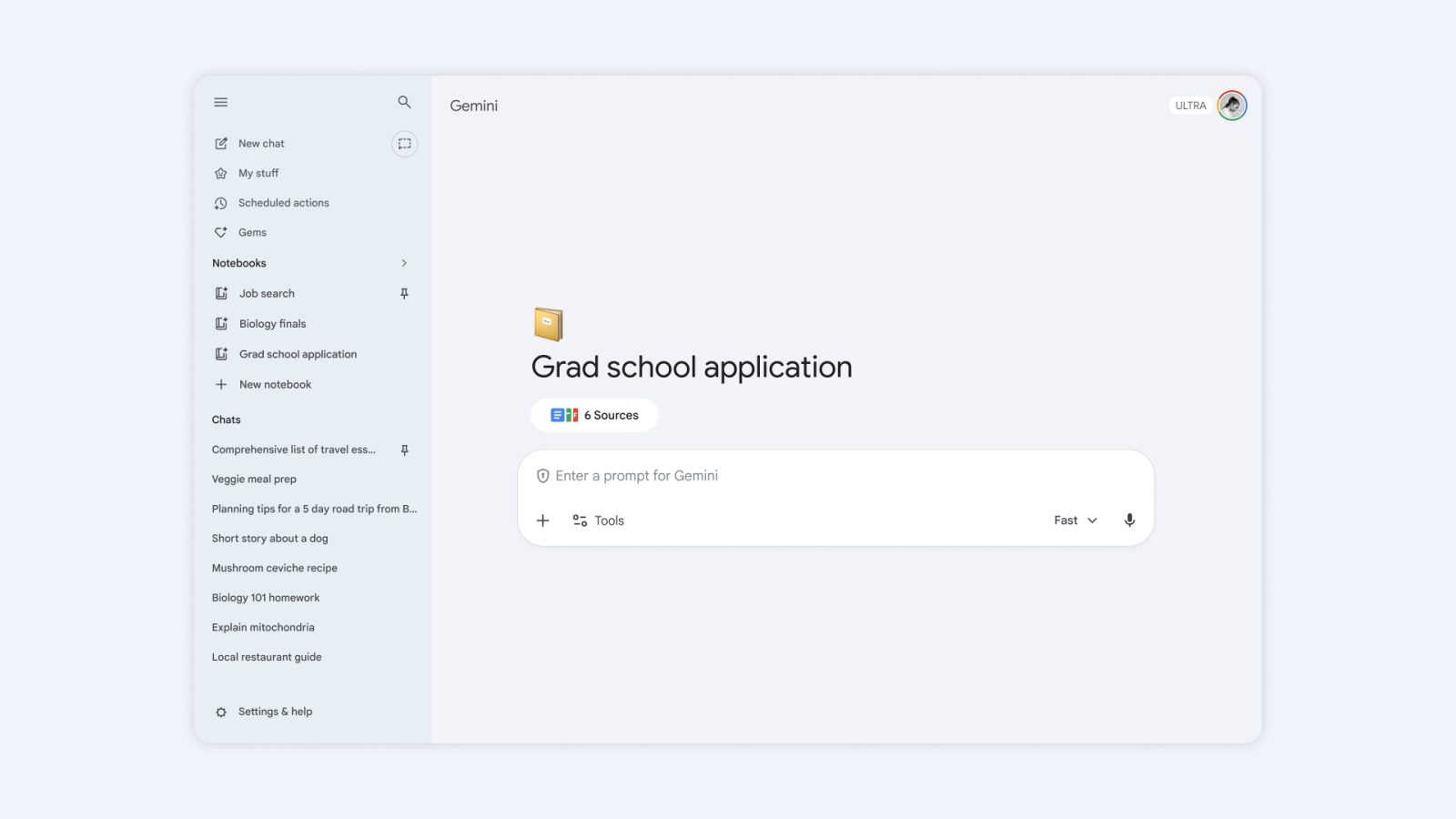
Google has expanded the capabilities of its Gemini app by introducing the Notebooks feature to all users, including those on the free tier. This enhancement allows individuals to organize their chats and files more effectively, creating dedicated spaces for various projects.
Understanding Notebooks in Gemini
The Notebooks feature serves as a personal knowledge base, enabling users to compile and manage information pertinent to specific topics or projects. By integrating with NotebookLM, users can create Video Overviews, Infographics, and other Studio outputs directly within the Gemini app. This integration ensures a seamless workflow across Google’s suite of productivity tools.
Accessing and Utilizing Notebooks
To access Notebooks, users can navigate to the side panel on gemini.google.com, where a new Notebooks section is prominently displayed above Gems and Chats. Within this section, users can create new notebooks or manage existing ones. Adding a conversation to a notebook is straightforward: simply select the desired chat, click on the three-dot overflow menu, and choose Add to notebook.
Once a notebook is created, users can add various sources, including files and web links, to enrich the content. The Gemini app considers all chats and sources within a notebook when generating responses, providing a comprehensive and context-aware experience. Additionally, users have the option to customize the tone and format of responses by providing specific instructions within each notebook.
Memory and Customization Features
A notable aspect of the Notebooks feature is the notebook memory setting. When enabled, Gemini utilizes the collective information within the notebook to inform its responses, ensuring continuity and relevance. Users can disable this feature if they prefer not to have past chats influence new interactions.
Furthermore, the integration with NotebookLM allows for advanced functionalities such as creating Video Overviews and Infographics. This synergy between Gemini and NotebookLM enhances the user’s ability to synthesize and present information effectively.
Availability and Future Developments
The Notebooks feature is now available to all Gemini users, with certain limitations based on subscription tiers. Free users can add up to 50 sources per notebook, while AI Plus subscribers have a limit of 100 sources per notebook. Pro subscribers can include up to 300 sources, and Ultra subscribers have a maximum of 600 sources per notebook.
Currently, the Notebooks feature is accessible via the web interface at gemini.google.com. Google has announced plans to extend this functionality to mobile and Mac applications in the coming weeks, ensuring a consistent experience across all platforms.
Looking ahead, Google envisions Notebooks as personal knowledge bases shared across its suite of products. The company has hinted at introducing more features to enhance the utility of Notebooks, aiming to provide users with even more efficient and personalized workflows.
Conclusion
The introduction of the Notebooks feature in the Gemini app marks a significant step in enhancing user productivity and organization. By providing a dedicated space to manage chats and files, and integrating seamlessly with NotebookLM, Google offers a robust tool for users to compile, manage, and utilize information effectively. As this feature rolls out across all platforms, users can look forward to a more cohesive and enriched experience within the Gemini ecosystem.