Google Play Store Introduces Battery Drain Warnings for Android Apps
In a significant move to enhance user experience and device longevity, Google has begun implementing a new feature in the Play Store that alerts users to Android applications known for excessive battery consumption. This initiative, which commenced on March 1, 2026, aims to provide transparency and encourage developers to optimize their apps for better power efficiency.
Understanding the New Battery Drain Warnings
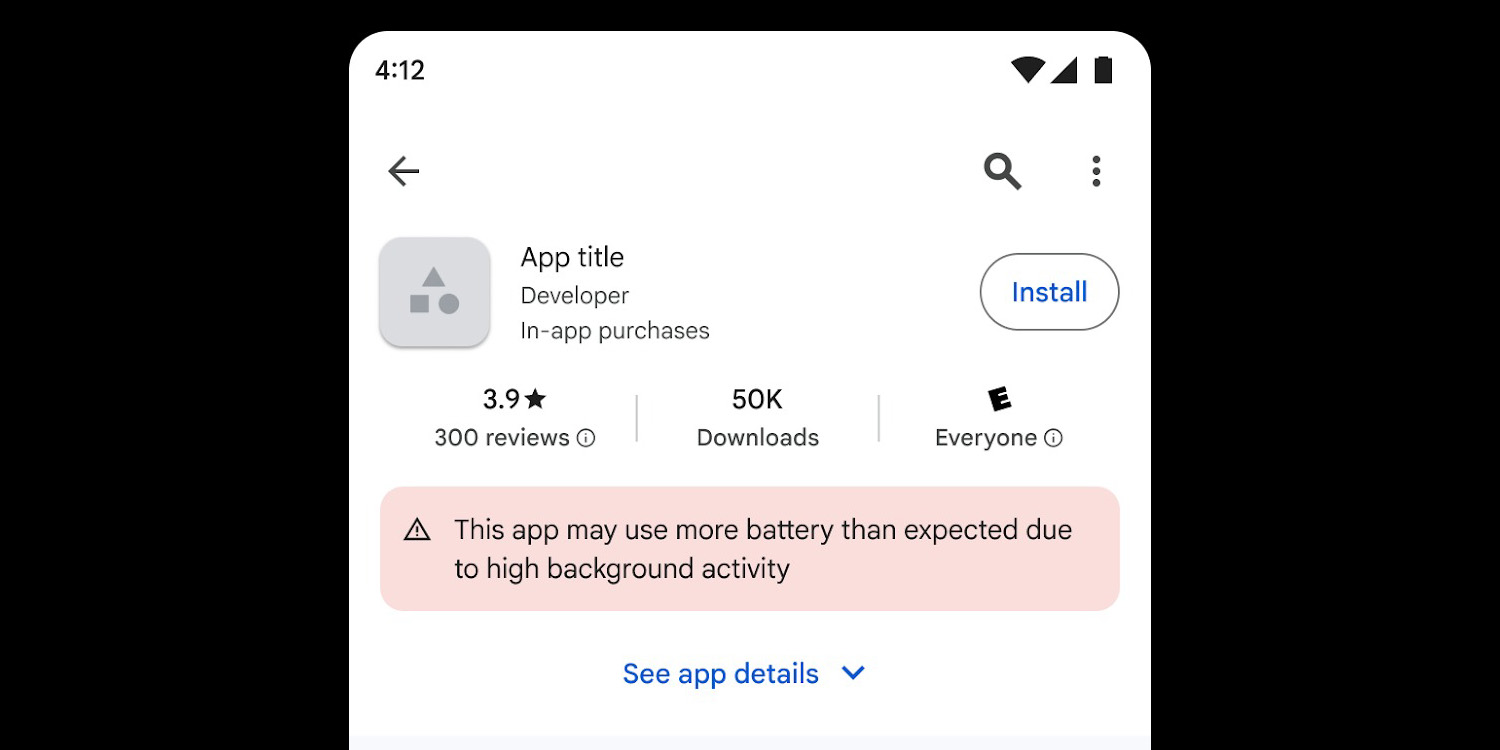
When browsing the Play Store, users may now encounter a warning label on certain app listings stating, This app may use more battery than expected due to high background activity. This notification is designed to inform users before they download an app that could negatively impact their device’s battery life. The warning specifically targets apps that engage in excessive background activities, leading to significant power drain.
The Role of Partial Wake Locks
Central to this initiative is the concept of partial wake locks. In Android devices, a partial wake lock allows an application to keep the device’s CPU running even when the screen is off. While this feature is essential for certain functionalities—such as music playback, navigation, or health tracking—it can lead to unnecessary battery consumption if misused. Apps that hold partial wake locks without clear user benefits can prevent the device from entering low-power states, resulting in faster battery depletion.
Criteria for Flagging Apps
Google has established specific criteria to identify and flag apps with excessive battery usage:
– Excessive Partial Wake Locks: An app is flagged if it holds a non-exempt partial wake lock for more than two cumulative hours within a 24-hour period.
– User Session Threshold: If more than 5% of an app’s user sessions, measured over a 28-day period, exceed the two-hour wake lock limit, the app will be subject to penalties.
These thresholds are designed to balance functionality with power efficiency, ensuring that apps provide value without unduly draining device batteries.
Implications for Developers
For developers, failing to adhere to these guidelines can have significant consequences:
– Visibility Reduction: Apps that exceed the established thresholds may be excluded from prominent discovery surfaces within the Play Store, such as recommendations and top charts.
– Warning Labels: Affected apps will display the aforementioned battery usage warning on their Play Store listings, potentially deterring potential users.
To avoid these penalties, developers are encouraged to:
– Monitor Wake Locks: Utilize the Android Vitals dashboard to track and analyze wake lock usage.
– Optimize Background Processes: Review and refine background activities to ensure they are necessary and efficient.
– Implement Best Practices: Adopt modern scheduling tools like WorkManager or JobScheduler to manage background tasks effectively.
By proactively addressing these areas, developers can enhance their app’s performance, maintain visibility in the Play Store, and provide a better user experience.
User Benefits and Considerations
For users, this new feature offers several advantages:
– Informed Decisions: Users can make more informed choices about which apps to install, based on potential battery impact.
– Improved Battery Life: By avoiding apps with high background activity, users can extend their device’s battery life.
– Enhanced Transparency: The Play Store’s warning system promotes transparency, allowing users to understand how apps interact with their devices.
It’s important to note that not all apps with background activities are detrimental. Applications that require continuous operation for legitimate purposes—such as music streaming services, navigation apps, or health monitors—are typically exempt from these warnings. Users should consider the context and necessity of an app’s background activity when evaluating these warnings.
Collaborative Efforts and Future Outlook
This initiative is the result of a collaborative effort between Google and Samsung, leveraging real-world device data to establish accurate and fair thresholds for battery usage. The partnership underscores a shared commitment to improving user experience and device performance.
Looking ahead, Google plans to continue refining these metrics and enforcement mechanisms. Developers are encouraged to stay informed about best practices for power efficiency and to actively monitor their apps’ performance metrics. By doing so, they can ensure compliance with Play Store policies and contribute to a more efficient and user-friendly app ecosystem.
Conclusion
Google’s introduction of battery drain warnings in the Play Store marks a significant step toward enhancing user awareness and promoting responsible app development. By providing clear information about apps’ battery usage, Google empowers users to make informed decisions and encourages developers to prioritize power efficiency. This initiative not only aims to improve individual device performance but also contributes to the broader goal of creating a more sustainable and user-centric digital environment.