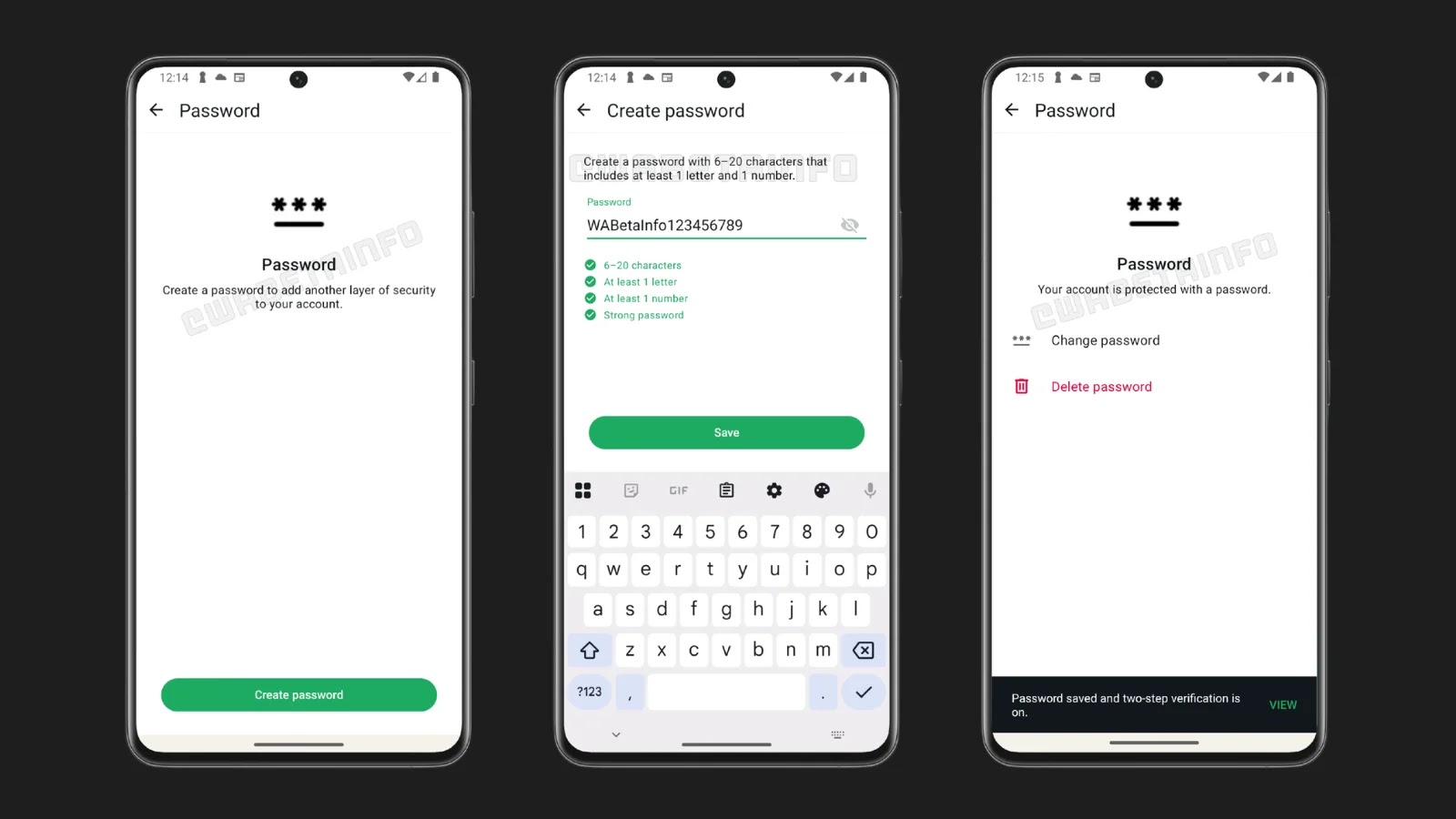
WhatsApp Enhances Security with Optional Account Password Feature
WhatsApp has introduced a new security feature in its latest Android update, version 2.26.7.8, available through the Google Play Beta Program. This update unveils an optional account password feature designed to bolster user account security by adding an additional layer of protection beyond the existing two-step verification (2FA) system.
Existing Security Measures
WhatsApp currently offers two-step verification as an optional security measure. This feature requires users to enter a secondary PIN after successfully registering their phone number, providing an extra layer of security against unauthorized access. Additionally, in a previous update (version 2.23.24.10), WhatsApp introduced the ability to protect accounts using a registered email address. This allows users to regain access quickly when unable to receive the 6-digit SMS verification code, such as when a SIM card is temporarily unavailable.
Introduction of the Account Password Feature
Building upon these security measures, WhatsApp is now developing an account password feature. This feature serves as a third authentication credential, further enhancing account security by making unauthorized access significantly more difficult, even in cases involving SIM swapping or compromised devices.
How the Account Password Works
The account password is an alphanumeric string, between 6 and 20 characters in length, that must include at least one letter and one number. Once set, WhatsApp will evaluate the chosen password and indicate whether it is strong enough, guiding users toward more robust security choices. Importantly, users can update or remove their password at any time, giving them full flexibility and control over their security configuration.
The feature integrates into the login flow at the final step. If a user has set an account password but not two-step verification, WhatsApp will prompt for the password immediately after the 6-digit SMS code is entered. If both 2FA and the account password are enabled, users must first enter the two-step verification PIN, then the account password, creating a three-factor barrier against unauthorized access. This means that even if a malicious actor obtains both the SMS verification code and the 2FA PIN through techniques like SIM swapping, they would still be blocked without the account password.
Optional Implementation
Setting an account password remains entirely optional, allowing users to decide whether they want this additional protection. This mirrors WhatsApp’s approach with two-step verification, which is also opt-in, rather than mandatory. The new password feature does not replace existing security mechanisms; instead, it strengthens them by adding a credential layer known only to the account owner.
Development and Rollout
The account password feature is currently in development and has not yet been rolled out publicly. WhatsApp is still refining how passwords can best secure accounts against unauthorized access, and once testing is complete, the feature will be gradually rolled out to users. With account takeover attacks, including SIM swapping and phishing, remaining a persistent threat, this feature represents a significant step in WhatsApp’s ongoing effort to harden account authentication and reduce the risk of unauthorized access across its more than two billion users worldwide.