Google’s Snapseed for iPhone: Elevating Mobile Photography with Pro Controls and Retro Film Emulation
Google has officially launched a significant update to its Snapseed app for iOS, transforming it from a mere photo editor into a comprehensive photography tool. This update introduces a built-in camera feature equipped with professional manual controls and real-time film emulation, catering to both amateur and professional photographers.
Seamless Camera Integration
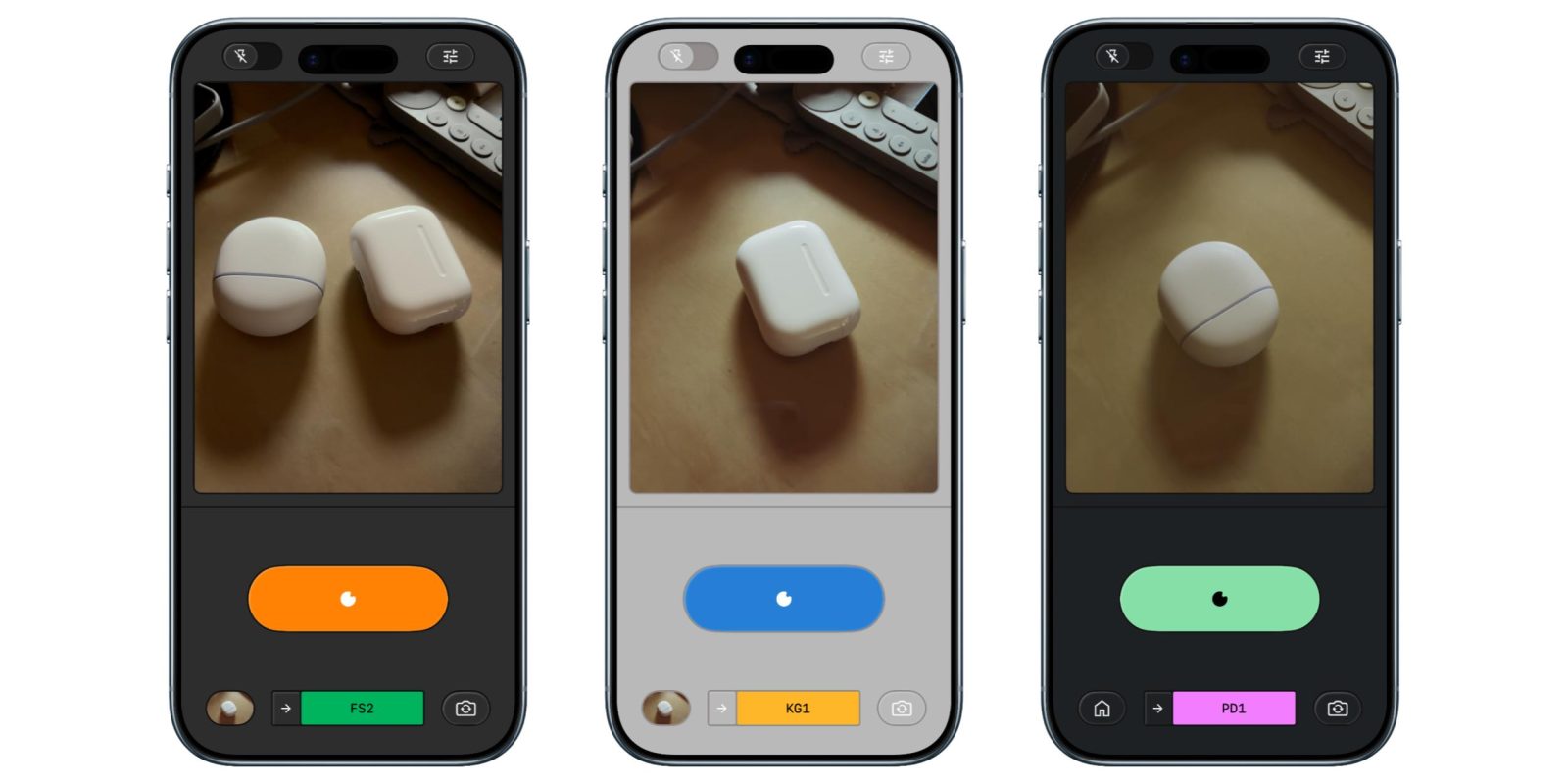
Previously, accessing the Snapseed camera required navigating through the Lock Screen widget, Control Center, or Camera Control. With the latest update, a dedicated camera icon is now conveniently located in the top-right corner of the app, streamlining the process of capturing photos directly within Snapseed.
Professional Manual Controls
The new camera functionality offers manual adjustments for exposure and focus, empowering users to fine-tune their shots with precision. By enabling the PRO mode via the top-left toggle, photographers gain access to controls for ISO, Shutter Speed, and Focus. These settings are adjustable through an intuitive skeuomorphic dial, allowing for seamless transitions from automatic to manual settings. Additionally, the flash control has been repositioned to the bottom-left corner, with zoom controls on the opposite side, enhancing the overall user experience.
Real-Time Film Emulation
Snapseed’s camera now features real-time film emulation, offering a selection of styles inspired by classic film stocks:
– KP1: Inspired by Kodak Portra 400
– KP2: Inspired by Kodak Portra 160
– KG1: Inspired by Kodak Gold 200
– KE1: Inspired by Kodak E200
– FS1: Inspired by Fuji Superia 200
– FS2: Inspired by Fuji Superia 800
– FP1: Inspired by Fuji Pro 400h
– AG1: Inspired by Agfa Optima 200
– AS1: Inspired by Agfa Scala 200
– PD1: Inspired by Polaroid 600
– TC1: Inspired by Technicolor
These emulations allow users to apply nostalgic film aesthetics to their photos in real-time, enhancing creative possibilities. The interface includes a rewind button animation when switching between film styles, adding a touch of skeuomorphic design.
Non-Destructive Editing Workflow
A standout feature of this update is the non-destructive editing workflow. Every photo taken with Snapseed’s camera includes a full editing stack, enabling users to modify, fine-tune, or revert any aspect of the image even after saving it to the gallery. This flexibility ensures that creative decisions can be adjusted post-capture without compromising image quality.
Customizable Viewfinder Themes
To further personalize the shooting experience, Snapseed offers various color themes for the viewfinder, including Editor, Dusk, Negative, Steel, Haze, and Depth. These options allow users to tailor the interface to their preferences, enhancing usability and visual appeal.
Availability and Future Updates
Snapseed version 3.15.0 is now available for free on the App Store. Google has also announced plans to update the Android version of Snapseed with the redesigned editor that debuted for iPhone and iPad last year, ensuring a consistent experience across platforms.
Conclusion
The latest update to Snapseed for iOS marks a significant evolution in mobile photography, offering users professional-grade controls and creative tools within a single app. By integrating a powerful camera with manual settings and real-time film emulation, Snapseed empowers photographers to capture and edit stunning images directly on their iPhones.