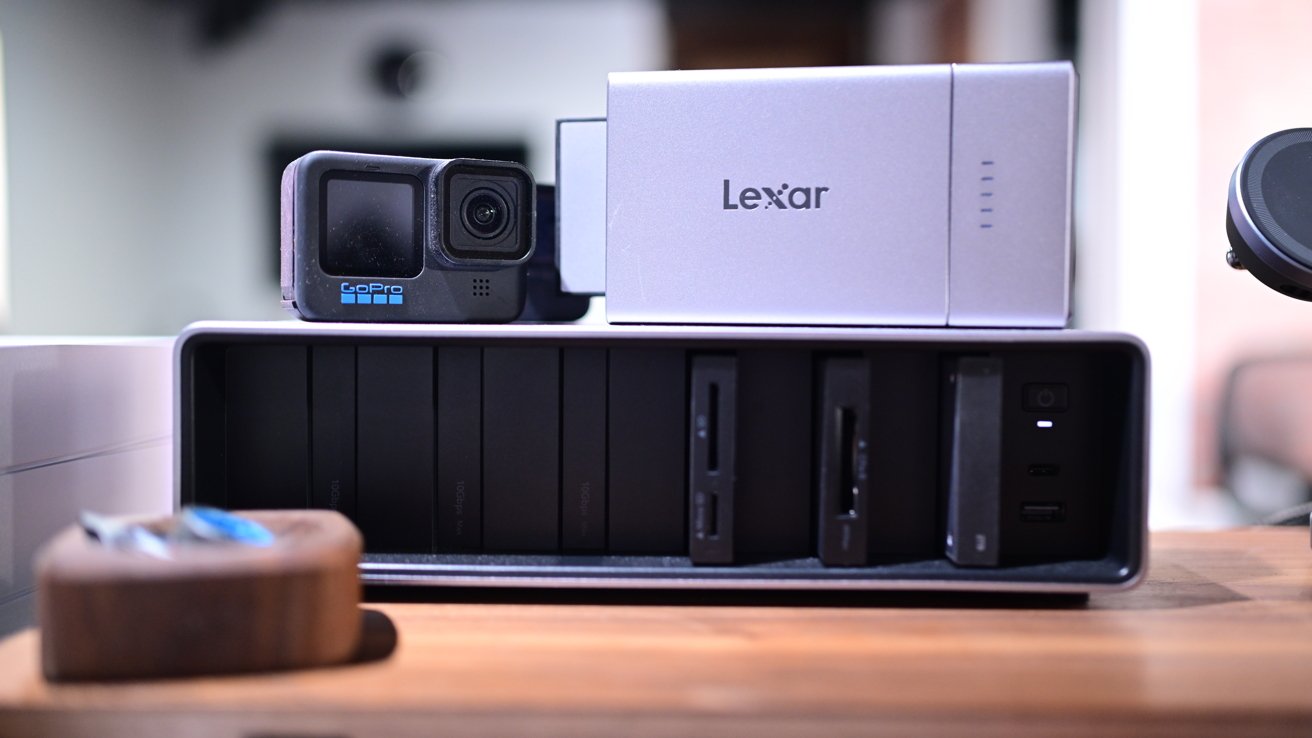
Lexar Professional Workflow Docking Station: A Modular Powerhouse for Creative Professionals
In the dynamic world of digital content creation, efficiency and adaptability are paramount. The Lexar Professional Workflow Docking Station emerges as a game-changer, offering a customizable and modular solution tailored for photographers, videographers, and other creative professionals.
Design and Build Quality
Crafted with a sleek aluminum body anodized in dark grey, the docking station exudes a premium aesthetic that complements Apple’s professional devices. The minimalist design is accentuated by a subtle Lexar logo on the top, maintaining a clean and professional appearance.
The front panel features six bays designed for various modules, with the rightmost two bays optimized for higher data transfer speeds. Specifically, the first four bays support up to 10 Gb/s, while the last two can handle up to 40 Gb/s, catering to high-performance needs. Additionally, the front right edge houses a power button, a USB-C port, and a USB-A port, enhancing connectivity options.
On the rear, the docking station is equipped with three Type-C ports: one Thunderbolt 4 port for connecting to a Mac, another for daisy-chaining additional Thunderbolt devices, and a third for the included power supply. Notably, Lexar’s choice of a standard USB-C power cable over proprietary connectors simplifies replacement and enhances compatibility.
Modular Versatility
Lexar offers five distinct modules that can be integrated into the docking station:
– CFExpress 4.0 Type A card reader
– CFExpress 4.0 Type B card reader
– SD/Micro SD UHS-II card reader
– Dual SD UHS-II card reader
– Portable SSDs available in 2TB or 4TB capacities
This modular approach allows users to customize their setup based on specific workflow requirements. For instance, a configuration could include an SD/Micro SD card reader, a CFExpress Type B card reader, and multiple SSD modules, providing a flexible and scalable storage solution.
Each module is designed with metallic silver plastic sides, a USB-C port on the back, and a black border. The front edges feature added grip, facilitating easy insertion and removal. Inside each bay, a male USB-C connector ensures a secure and efficient connection.
Performance and Connectivity
In practical use, the docking station delivers reliable performance. When connected via Thunderbolt, it seamlessly integrates with devices like the MacBook Pro, supporting additional docking stations and displays without issues such as video disruptions or unexpected storage ejections.
However, it’s important to note that only two bays support the maximum 40 Gb/s transfer rate due to Thunderbolt 4 limitations. Consequently, accessing files from the slower bays may result in longer transfer times. The SSD modules, rated for up to 2,000 Mbps read and write speeds, have been observed to perform slightly below this threshold in real-world testing, with write speeds around 1,500 Mbps and read speeds approximately 1,000 Mbps.
Workflow Go: On-the-Go Solution
For professionals requiring mobility, Lexar introduces the Workflow Go, a portable counterpart to the main docking station. This device features a two-part design with a magnetic battery pack attached to a two-bay enclosure. It includes three USB-C ports: one for connecting to a device, and two for additional SSDs or accessories.
The Workflow Go enables computer-free backups in the field. By inserting a memory card into a card reader module and connecting an SSD module, users can initiate transfers via the Lexar app, ensuring data is securely backed up without the need for a computer. Additionally, the battery pack can serve as a power source for other devices, offering added convenience during shoots.
Considerations and Final Thoughts
While the Lexar Professional Workflow Docking Station offers a robust and flexible solution for creative professionals, it may be more than what the average user requires. The modular design and high-speed connectivity are particularly beneficial for those handling large media files and complex workflows.
Pros:
– Sleek, durable aluminum design
– Thunderbolt 4 connectivity with support for up to 8K displays
– Multiple ports and customizable modules
– Workflow Go enables computer-free backups
– Standard USB-C power supply
– Scalable storage up to 20TB
Cons:
– Absence of an Ethernet port
– Desire for a Thunderbolt 5 version
– SSD speeds could be improved
– Higher price point
In conclusion, the Lexar Professional Workflow Docking Station stands out as a versatile and powerful tool for creative professionals seeking a customizable and efficient workflow solution. Its modular design, combined with high-speed connectivity and scalable storage options, makes it a valuable asset in the realm of digital content creation.