Beware: Fake Party Invitations Conceal Remote Access Threats
A new phishing campaign is deceiving individuals with counterfeit party invitations that clandestinely install remote access software on Windows computers. This attack employs social engineering tactics to deploy ScreenConnect, a legitimate remote support tool, thereby granting cybercriminals full control over victims’ systems. What initially appears as an innocuous invitation from a friend can escalate into a severe security breach, providing attackers unrestricted access to personal files, credentials, and sensitive data.
The Deceptive Invitation
The campaign commences with emails crafted to resemble casual party invitations from trusted contacts. These messages often originate from compromised email accounts, enhancing their authenticity and familiarity. The informal tone and social context reduce suspicion, encouraging recipients to click without hesitation.
Malwarebytes researchers have identified this campaign primarily targeting users in the United Kingdom, though there are no technical barriers preventing its expansion to other regions.
The Malicious Landing Page
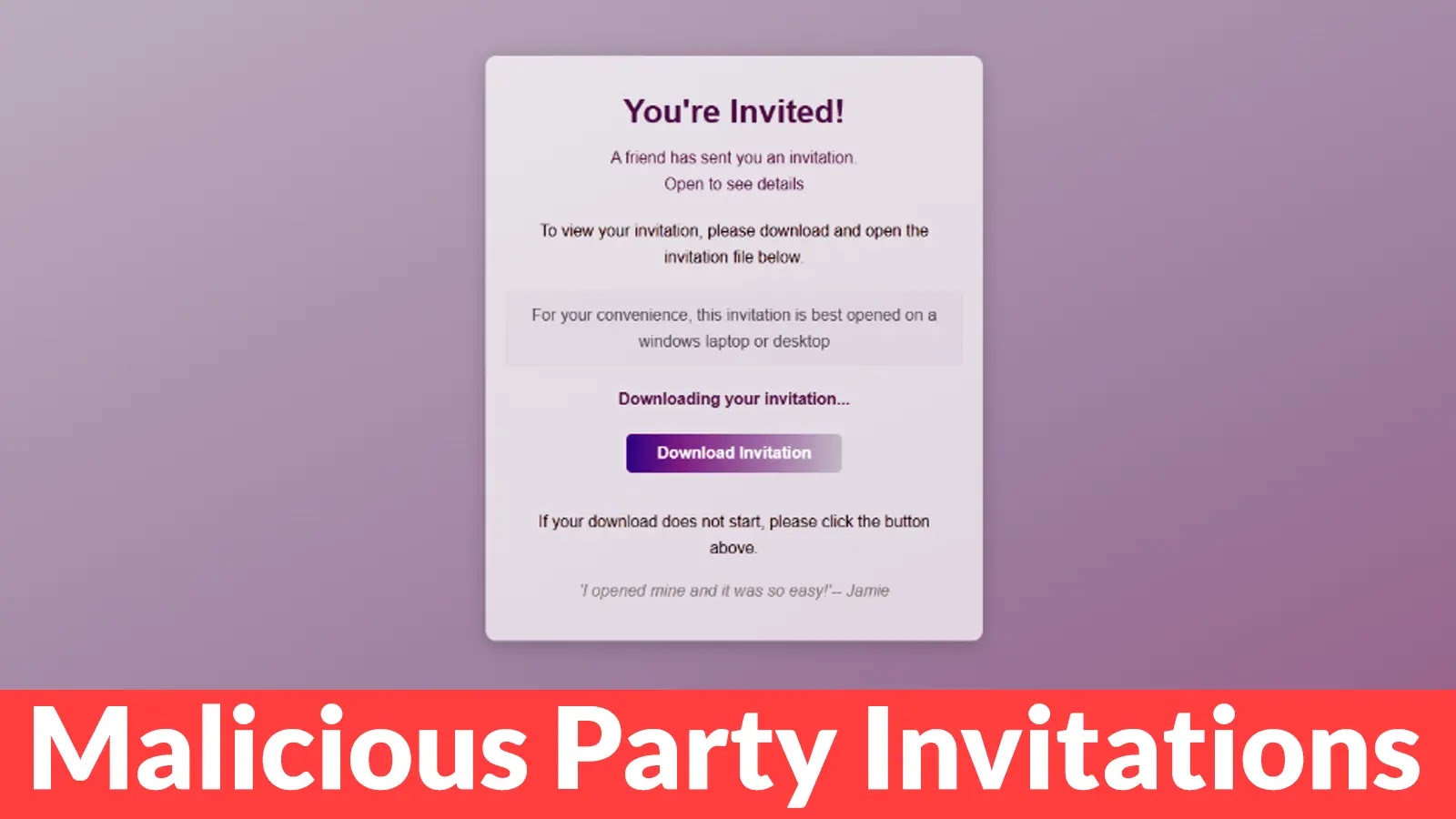
Upon clicking the link in the email, victims are directed to a meticulously designed webpage that mimics a genuine event invitation. The page features a prominent headline stating You’re Invited! along with messages suggesting a friend sent the invitation and that it should be viewed on a Windows device. A countdown timer creates urgency by indicating the invitation is already downloading, while social proof statements like I opened mine and it was so easy! push users toward executing the file.
Within seconds, the browser automatically downloads a file named RSVPPartyInvitationCard.msi.
The Silent Installation
The downloaded MSI file is not an invitation but an installer that launches Windows Installer (msiexec.exe) to silently deploy ScreenConnect Client on the victim’s computer. Malwarebytes analysts noted that the installation occurs without clear user-facing notifications, making it difficult for victims to realize what is happening.
The process installs ScreenConnect binaries under C:\Program Files (x86)\ScreenConnect Client\ and creates a persistent Windows service with randomized characters in its name, such as ScreenConnect Client 18d1648b87bb3023.
Establishing Remote Control
Once ScreenConnect is installed, it initiates encrypted HTTPS connections to ScreenConnect relay servers using a uniquely assigned instance domain. This connection grants attackers the same capabilities as a remote IT technician, including viewing the victim’s screen in real time, controlling the mouse and keyboard, uploading or downloading files, and maintaining access even after system restarts.
Since ScreenConnect is legitimate software commonly used for remote support, traditional security tools may not flag it as malicious. The first signs of compromise often appear as behavioral anomalies, such as unexplained cursor movements, windows opening without user input, or unfamiliar processes running in the background that victims do not remember installing.
Broader Implications
This campaign is part of a growing trend where cybercriminals exploit social engineering tactics to distribute malware. Similar strategies have been observed in other campaigns:
– Discord Invite Exploitation: Cybercriminals have hijacked expired Discord invite links to redirect users to malicious servers, distributing malware like AsyncRAT and cryptocurrency-stealing software. By claiming expired invite codes, attackers can register these for their own malicious servers, deceiving users into joining harmful communities. ([cybersecuritynews.com](https://cybersecuritynews.com/hackers-hijacked-discord-invite-to-inject-malicious-links/?utm_source=openai))
– Google Classroom Abuse: A large-scale phishing campaign exploited Google Classroom to distribute over 115,000 malicious emails to more than 13,500 organizations globally. Attackers created fake classrooms and sent invitations from the official [email protected] email address, leveraging the platform’s credibility to bypass security filters. ([cybersecuritynews.com](https://cybersecuritynews.com/google-classroom-phishing/?utm_source=openai))
– Zoom Meeting Phishing: Phishers have crafted emails resembling official Zoom meeting notifications, complete with familiar branding and urgent subject lines like Missed Zoom Call. These messages prompt recipients to click on malicious links, leading to credential harvesting. ([cybersecuritynews.com](https://cybersecuritynews.com/new-phishing-attack-mimic-as-zoom-meeting-invites/?utm_source=openai))
Protective Measures
To safeguard against such deceptive campaigns, consider the following precautions:
1. Verify Sender Authenticity: Scrutinize the sender’s email address for legitimacy.
2. Hover Over Links: Before clicking, hover over links to preview the actual URL.
3. Be Cautious of Urgency: Be wary of messages that create a sense of urgency or pressure to act quickly.
4. Keep Software Updated: Regularly update your operating system and security software to protect against known vulnerabilities.
5. Educate Yourself and Others: Stay informed about common phishing tactics and share this knowledge with friends and colleagues.
By remaining vigilant and adopting these practices, you can reduce the risk of falling victim to such sophisticated phishing campaigns.