nmapUnleashed: Revolutionizing Network Scanning for Security Professionals
In the ever-evolving landscape of cybersecurity, efficient and comprehensive network scanning is paramount. Enter nmapUnleashed, a cutting-edge command-line interface (CLI) wrapper designed to enhance the capabilities of Nmap, the renowned network scanning tool. Developed by Sharkeonix and released in late January 2026, nmapUnleashed aims to streamline complex scanning processes, making them more accessible and effective for penetration testers and network auditors.
Enhancing Nmap with Multithreading and Real-Time Monitoring
At its core, nmapUnleashed introduces multithreading to Nmap, allowing users to conduct multiple scans concurrently. By default, it supports up to four parallel threads, significantly reducing the time required to scan extensive networks. This feature is particularly beneficial for professionals dealing with large-scale environments where time efficiency is crucial.
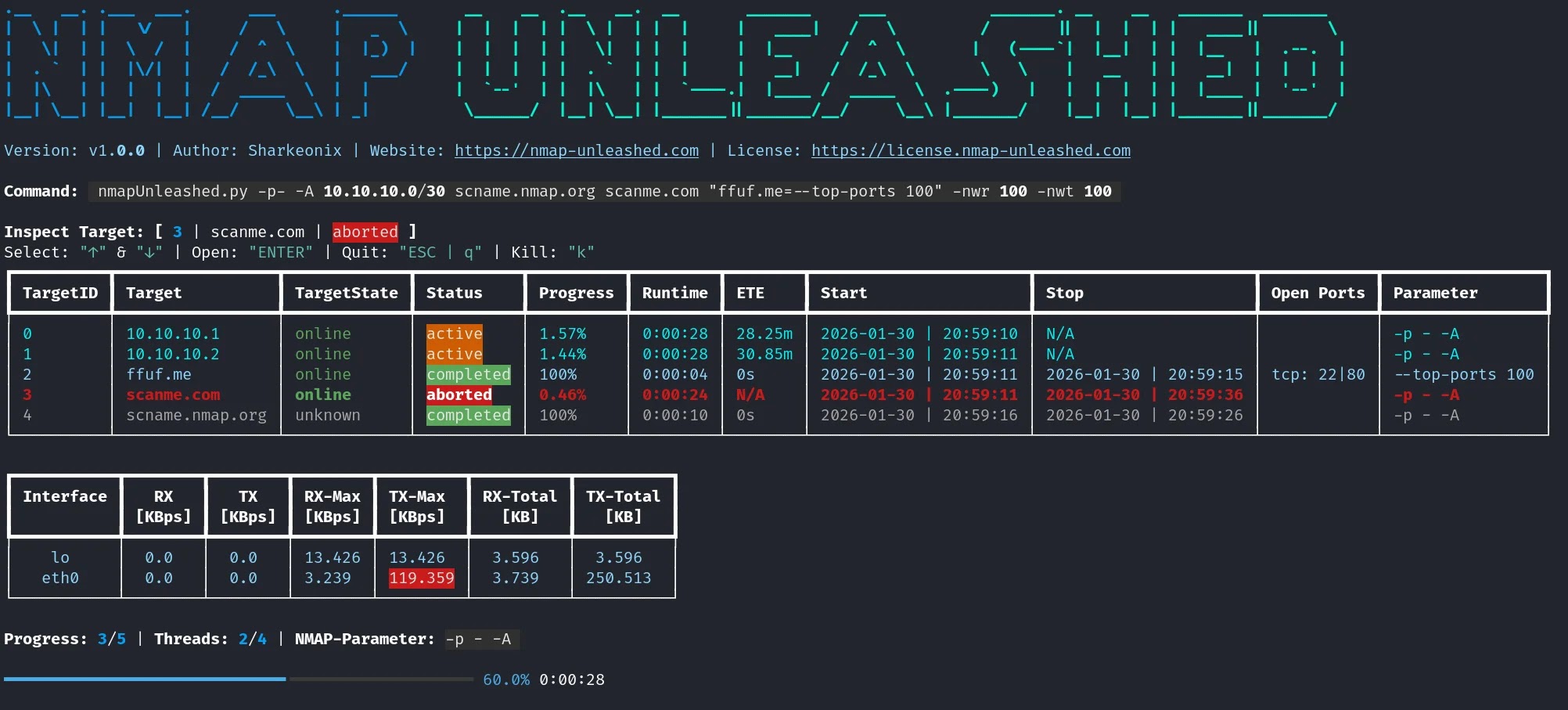
Complementing this is a persistent dashboard that provides real-time monitoring of scanning activities. Users can view queued, active, aborted, and completed scans, along with network throughput warnings to prevent bandwidth overload. This interactive interface ensures that users have a comprehensive overview of their scanning operations, enabling prompt adjustments and informed decision-making.
Advanced Target Specification and Preset Configurations
nmapUnleashed offers flexible target specification options, accommodating IP addresses, CIDR notations, hostnames, and files. Users can assign specific Nmap parameters to individual targets using a straightforward syntax. For example, specifying 10.10.1.0/24=–top-ports 100 -A allows for tailored scanning configurations per target, enhancing precision and control.
To further expedite repetitive tasks, the tool supports presets through the -ps flag. These predefined scan profiles, stored in configuration files, can be quickly loaded to apply consistent scanning parameters across multiple sessions. For instance, a basic preset might include -d -p- -A, ideal for comprehensive port and version detection.
Interactive Dashboard and Monitoring Features
A standout feature of nmapUnleashed is its interactive dashboard, which displays live progress and network receive/transmit rates. Users can set thresholds (e.g., -nwr 1000) to receive warnings when network usage approaches specified limits, preventing potential disruptions. The dashboard also allows for easy navigation through scans using arrow keys, and upon completion, generates a summary file (dashboard.txt) detailing all activities for audit purposes.
During scans, live results are presented, showing open ports and, upon completion, full service and version details. Options like -fs can be used to fix the dashboard size, ensuring a stable viewing experience across different terminal environments.
Customizable Options for Tailored Scanning
nmapUnleashed provides a range of customizable options to cater to diverse user needs:
– -th (Threads): Sets the number of parallel scans. Default is 4.
– -kt (Auto-Abort Timeout): Defines the duration (in minutes) after which a scan will automatically abort if unresponsive.
– -nwr/-nwt (Network Warning Thresholds): Establishes thresholds for network receive/transmit rates in KBps, with 0 disabling the feature.
– -ko (Keep Offline Target Files): Determines whether to retain files of targets that were offline during scanning.
– -ps (Parameter Preset): Loads predefined scan profiles for consistent configurations.
Installation and Basic Usage
Installing nmapUnleashed is straightforward, especially on Linux distributions like Kali. Ensure that Nmap, xsltproc, and grep are installed, then execute the following command:
“`bash
pipx install git+https://github.com/Sharkeonix/nmap-unleashed.git
“`
Once installed, basic usage mirrors that of Nmap. For example, to perform an aggressive scan on a target, use:
“`bash
nu -d -p- -A scanme.nmap.org
“`
For more advanced configurations, such as launching eight threads, setting an auto-abort timeout of 120 minutes, and establishing a network warning threshold of 1000 KBps, the command would be:
“`bash
nu -th 8 -kt 120 -nwr 1000 -p- -sV scanme.nmap.org
“`
Output management is also flexible, with options like -os to generate only merged files or -rf xml;html to clean up specific formats.
Conclusion
As the demands on penetration testers and network auditors continue to grow, tools like nmapUnleashed offer a significant advantage by enhancing efficiency and effectiveness. By integrating multithreading, real-time monitoring, and customizable configurations, nmapUnleashed positions itself as an essential upgrade for professionals seeking to optimize their network scanning processes.
For more information and to access the tool, visit the official GitHub repository.
Introducing nmapUnleashed: Elevate your network scanning with multithreading, real-time monitoring, and customizable presets. A must-have for security pros! #CyberSecurity #NetworkScanning #NmapUnleashed
nmapUnleashed network scanning tool
Article X Post:
Hashtags:
Article Key Phrase:
Category: Security News