Microsoft Defender Enhances Security by Extending URL Click Alerts to Microsoft Teams
In a significant move to bolster cybersecurity defenses, Microsoft has expanded its Defender for Office 365 (MDO) capabilities to include URL click alerts within Microsoft Teams. This enhancement provides security teams with critical visibility into potentially malicious activities occurring through Teams messages, addressing the growing trend of attackers targeting collaboration platforms.
Addressing the Shift in Cyber Threats
As organizations increasingly rely on Microsoft Teams for daily operations, cybercriminals have adapted their strategies to exploit this trust. By sharing malicious links in both internal and external chats, attackers aim to bypass traditional email security measures. The integration of click-time protection directly into Teams closes a significant security gap, helping prevent users from falling victim to phishing campaigns, credential theft, and malware distribution that might otherwise evade conventional filters.
Enhanced Threat Detection Mechanisms
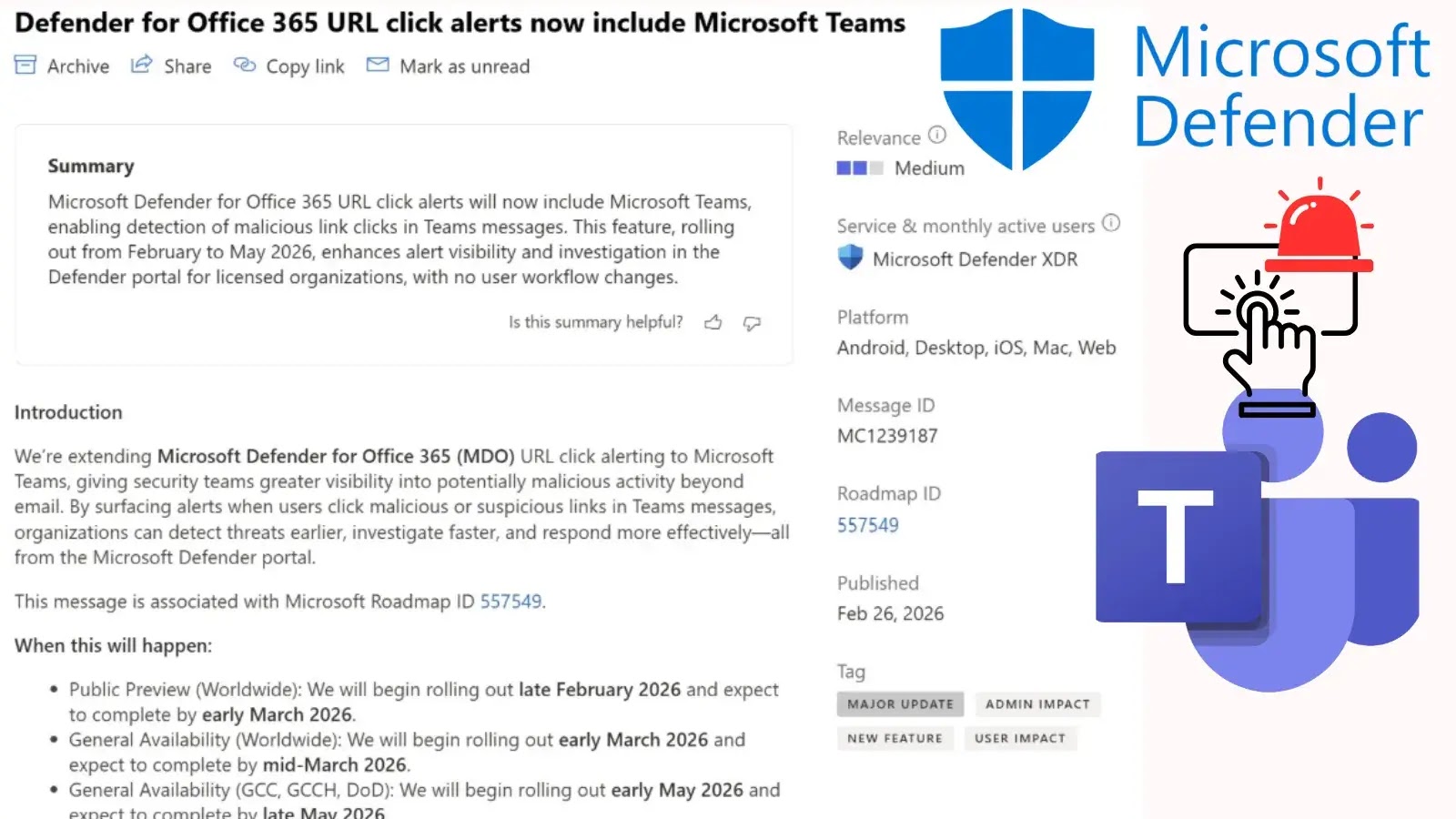
Identified under Microsoft Roadmap ID 557549 and Message ID MC1239187, the Defender portal now monitors and generates alerts for suspicious URL clicks within Microsoft Teams chats, shared channels, and meeting conversations. This update introduces several key features:
– Monitoring Scope: URL protection now extends to link clicks within Microsoft Teams chats, shared channels, and meetings.
– Alert Triggers: Existing malicious URL alerts automatically activate for Teams clicks, ensuring immediate notification of potential threats.
– Investigation Evidence: Security alerts now include the specific Teams message as direct evidence, providing richer context for investigations.
– Incident Correlation: Teams signals correlate with email data for unified threat tracking, enhancing the ability to detect and respond to coordinated attacks.
– Automated Response: While Automated Investigation and Response (AIR) is not yet supported for Teams URL click alerts, the integration lays the groundwork for future enhancements.
Two existing Defender alerts will now automatically trigger for Teams activity:
1. A user clicked through to a potentially malicious URL.
2. A potentially malicious URL click was detected.
When a user clicks a malicious link, Defender for Office 365 scans the URL to assess its threat level. The system includes a 48-hour lookback period to identify and alert security teams about any previous clicks on the same link before it was officially recognized as a threat.
Implementation Timeline and Platform Coverage
This feature is enabled by default for eligible tenants and requires no changes to user workflows. The rollout phases are as follows:
– Public Preview (Worldwide): Late February 2026 – Early March 2026
– General Availability (Worldwide): Early March 2026 – Mid-March 2026
– General Availability (GCC, GCCH, DoD): Early May 2026 – Late May 2026
The capability provides coverage across Android, iOS, Mac, Web, and Windows Desktop platforms, ensuring comprehensive protection regardless of the device used.
Impact on Security Operations
Eligible licenses include Microsoft Defender for Office 365 Plan 2 and Microsoft 365 E5. This expansion significantly enhances the efficiency of Security Operations Center (SOC) teams. Alerts will appear directly on the Defender alerts page and include the associated Teams message as evidence, offering richer context for investigations. Teams signals will be natively included in incident correlation, helping analysts connect related malicious activity across both email and Teams without switching investigation contexts.
For proactive threat hunting, security teams can utilize Advanced Hunting in Microsoft Defender XDR to track these specific alerts. Below is a sample Kusto Query Language (KQL) query to identify recent Teams-related malicious URL clicks:
“`kql
AlertEvidence
| where Timestamp > ago(1h)
| where ServiceSource == Microsoft Defender for Office 365
| where EntityType == Url
| where Title has Teams
“`
However, Automated Investigation and Response (AIR) will not be supported for Teams URL click alerts at this time.
Administrative Actions and Recommendations
Security administrators do not need to take any manual action to enable this feature, as it rolls out automatically. Organizations should review their alert workflows and update incident response playbooks to accommodate the new influx of Teams-based alerting. IT helpdesk and SOC teams should be informed about these new signals to ensure a rapid response to collaboration-based threats.
By extending URL click alerts to Microsoft Teams, Microsoft is proactively addressing the evolving landscape of cyber threats, providing organizations with the tools needed to detect and mitigate risks within their collaboration platforms.