LocalGPT: A Secure, Rust-Based AI Assistant for Localized Data Processing
In an era where cloud-based AI assistants like ChatGPT and Claude are prevalent, concerns about data privacy and security have become paramount. These platforms often process user data on remote servers, exposing sensitive information to potential breaches. Addressing these concerns, LocalGPT emerges as a robust, Rust-based AI assistant designed to operate entirely on local devices, ensuring that user data remains private and secure.
Introduction to LocalGPT
LocalGPT is a lightweight application, approximately 27MB in size, that runs exclusively on a user’s local machine. This design choice ensures that all data processing occurs within the device, eliminating the risks associated with transmitting sensitive information over the internet. By leveraging the OpenClaw framework, LocalGPT emphasizes persistent memory, autonomous operations, and minimal dependencies, making it an ideal solution for enterprises and individuals who prioritize data security.
Security Features and Architecture
The core of LocalGPT’s security lies in its use of the Rust programming language. Rust’s memory safety model effectively eliminates common vulnerabilities such as buffer overflows, which are prevalent in languages like C and C++. This choice enhances the application’s resilience against potential exploits.
Unlike many AI tools that rely on external dependencies like Node.js, Docker, or Python, LocalGPT operates without these, resulting in a reduced attack surface. This design minimizes the risk of package manager exploits or container escapes, further bolstering the application’s security posture.
Data Privacy and Local Processing
A standout feature of LocalGPT is its commitment to data privacy. All processing is confined to the user’s machine, ensuring that no data is transmitted externally. This local-first approach mitigates risks associated with man-in-the-middle attacks and data exfiltration, common concerns with Software as a Service (SaaS) AI solutions.
Persistent Memory Management
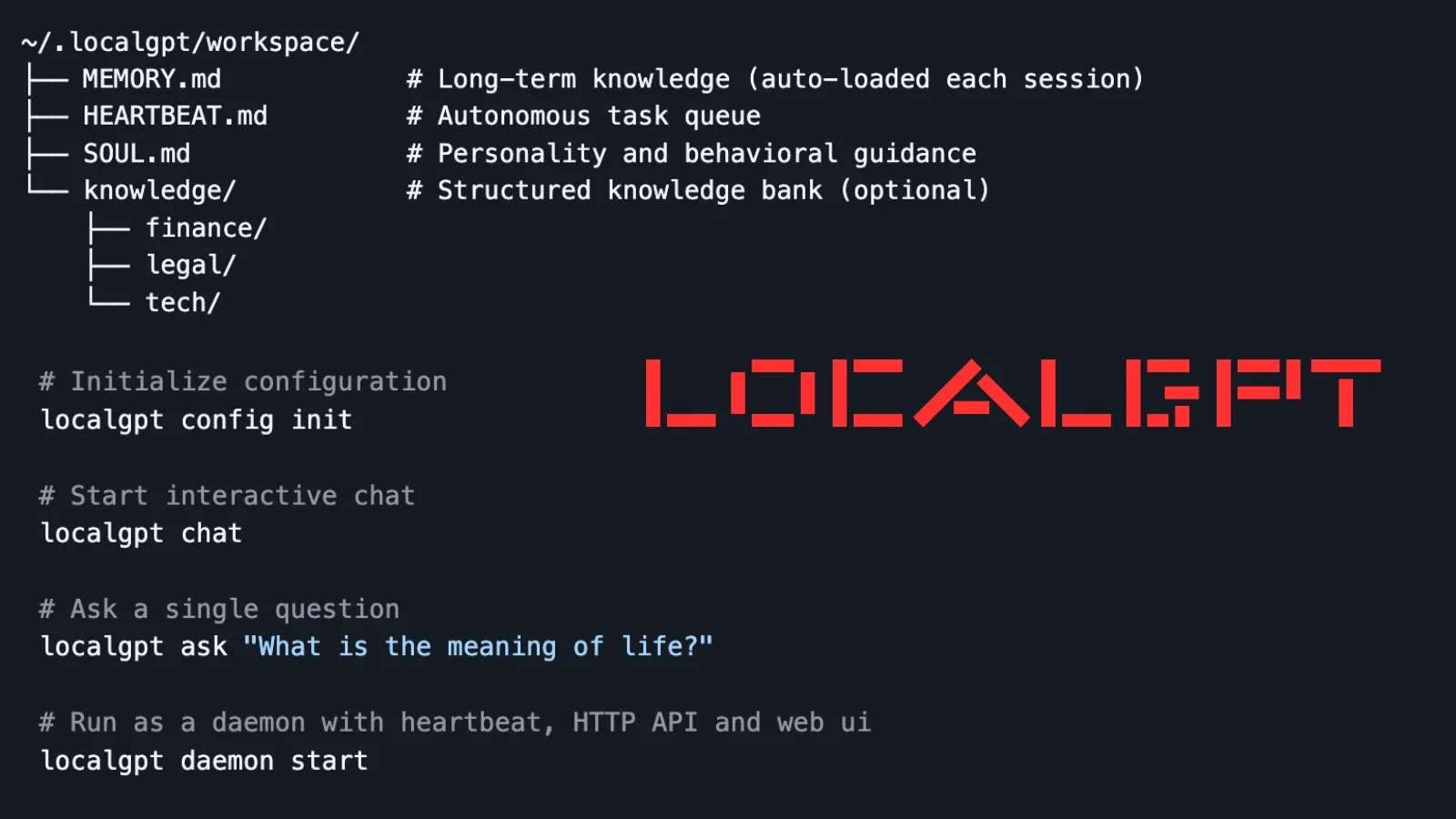
LocalGPT utilizes a structured approach to memory management by storing data in plain Markdown files within the `~/.localgpt/workspace/` directory. This includes:
– MEMORY.md: Stores long-term knowledge.
– HEARTBEAT.md: Manages task queues.
– SOUL.md: Contains personality guidelines.
– knowledge/: Houses structured data.
These files are indexed using SQLite’s FTS5 for efficient full-text search and sqlite-vec for semantic queries, utilizing local embeddings from fastembed. This setup eliminates the need for external databases or cloud synchronization, reducing potential persistence-related risks.
Autonomous Operations
LocalGPT features an autonomous heartbeat functionality, allowing users to delegate background tasks during specified active hours (e.g., 09:00–22:00), with a default interval of 30 minutes. This capability enables the offloading of routine tasks without supervision, all while ensuring that operations remain local to prevent potential lateral movement by malware.
Multi-Provider Support
The application supports multiple AI providers, including Anthropic’s Claude, OpenAI, and Ollama. Users can configure these via the `~/.localgpt/config.toml` file by inputting the necessary API keys. Despite this flexibility, core operations remain device-bound, maintaining the application’s commitment to local processing.
Installation and Usage
Installing LocalGPT is straightforward:
1. Use the command `cargo install localgpt` to install the application.
2. Initialize the configuration with `localgpt config init`.
3. Start an interactive session using `localgpt chat` or execute a one-off query with `localgpt ask Your question here`.
For continuous background service, the daemon mode can be activated with `localgpt daemon start`, providing HTTP API endpoints like `/api/chat` for integrations and `/api/memory/search?q=
Command-Line Interface and User Interfaces
LocalGPT offers a comprehensive command-line interface (CLI) for managing various functions:
– Daemon Management: Commands include `start`, `stop`, and `status`.
– Memory Operations: Commands include `search`, `reindex`, and `stats`.
– Configuration Viewing: Allows users to view current configurations.
Additionally, LocalGPT provides a web user interface (UI) and a desktop graphical user interface (GUI) built using eframe, catering to users who prefer visual interactions.
Technical Foundation
Built with Tokio for asynchronous efficiency, Axum for the API server, and SQLite extensions, LocalGPT is optimized for low-resource environments. Its compatibility with the OpenClaw framework supports modular, auditable extensions without vendor lock-in, enhancing its adaptability and security.
Security Implications and Industry Adoption
Security researchers commend LocalGPT’s SQLite-backed indexing for its tamper-resistant qualities, making it suitable for air-gapped forensic analyses or classified operations. In red-team scenarios, the application’s minimalistic design complicates reverse-engineering efforts.
With the rise of AI-driven phishing and prompt-injection attacks—reported to have increased by 300% in 2025 according to MITRE—LocalGPT offers a hardened baseline for secure AI interactions. Early adopters in the finance and legal sectors have noted that its structured data silos prevent cross-contamination and data leaks, further solidifying its position as a secure AI assistant.
Conclusion
While no system is entirely immune to issues like large language model (LLM) hallucinations or local exploits, LocalGPT represents a significant step toward reclaiming control over AI processing from large tech corporations. By prioritizing local processing, data privacy, and security, it offers a compelling alternative for those seeking a secure AI assistant.