iOS 26.4 Beta 1: A Comprehensive Look at the Latest Features and Enhancements
Apple has unveiled the first beta of iOS 26.4, introducing a suite of new features and improvements designed to enhance user experience across various applications. This update brings significant advancements to Apple Music, Messages, Podcasts, and more, reflecting Apple’s commitment to innovation and user satisfaction.
Apple Music Enhancements
Playlist Playground: A standout addition to Apple Music is the Playlist Playground, an AI-driven feature that allows users to create personalized playlists through text prompts or preset ideas. By specifying genres, moods, or time periods, users can generate 25-song playlists, which can be edited before finalization. Notably, this feature is accessible on older devices running iOS 18 or later, even without the latest AI hardware. ([techradar.com](https://www.techradar.com/audio/apple-music/apple-music-is-getting-two-upgrades-that-spotify-has-had-for-ages-and-thankfully-you-dont-even-need-apple-intelligence?utm_source=openai))
Concert Discovery: Apple Music now offers a feature akin to Spotify’s Live Events hub, enabling users to browse upcoming concerts and gigs directly within the app. While specific details on its interface are limited, it is expected to resemble the event discovery features found in Apple’s Shazam app. ([techradar.com](https://www.techradar.com/audio/apple-music/apple-music-is-getting-two-upgrades-that-spotify-has-had-for-ages-and-thankfully-you-dont-even-need-apple-intelligence?utm_source=openai))
Multiple Playlist Addition: Users can now add a song to multiple playlists simultaneously. In the Add to Playlist interface, a new list button allows for the selection of multiple playlists at once, streamlining the organization of music libraries. ([macrumors.com](https://www.macrumors.com/guide/ios-26-4-beta-features/?utm_source=openai))
Messages and Security
End-to-End Encryption for RCS: iOS 26.4 beta 1 introduces support for testing encrypted Rich Communication Services (RCS) messaging. Currently, this is limited to iPhone-to-iPhone communication for testing purposes, with plans to extend end-to-end encryption to iPhone-to-Android text message conversations in future updates. ([9to5mac.com](https://9to5mac.com/2026/02/16/ios-26-4-beta-1-heres-everything-new/?utm_source=openai))
Stolen Device Protection: The Stolen Device Protection feature is now enabled by default. This security measure requires biometric authentication when accessing sensitive areas of the iPhone, such as Passwords and Find My, especially when away from trusted locations like home or work. Certain actions may also require a time delay for a second biometric authentication, enhancing device security. ([tomsguide.com](https://www.tomsguide.com/phones/iphones/ios-26-4-beta-1-is-now-here-including-encrypted-rcs-better-security-video-podcasting-and-more?utm_source=openai))
Apple Podcasts Enhancements
Advanced Video Capabilities: The Apple Podcasts app has been upgraded with new advanced video podcast capabilities. This enhancement facilitates seamless switching between viewing a video podcast and listening to its audio counterpart. The feature utilizes Apple’s HLS technology to adjust quality based on network conditions, ensuring an optimal viewing experience. Additionally, support for dynamic video ads has been added. ([9to5mac.com](https://9to5mac.com/2026/02/16/ios-26-4-beta-1-heres-everything-new/?utm_source=openai))
Camera and CarPlay Updates
Audio Zoom: A new Audio Zoom option in the Camera app allows recorded audio to focus on the subject when the camera is zoomed during video recording. This feature can be toggled on or off in the Camera settings, providing flexibility based on user preferences. ([macrumors.com](https://www.macrumors.com/guide/ios-26-4-beta-features/?utm_source=openai))
CarPlay Integration: iOS 26.4 extends CarPlay’s functionality by integrating AI services like ChatGPT, Gemini, and Claude. This allows users to access voice-based apps hands-free while driving. However, these apps cannot control vehicle or iPhone functions, and there is no wake word option; users must open the app to use the chatbot. Once launched, a customizable voice control screen provides a vehicle-optimized chatbot experience. ([macrumors.com](https://www.macrumors.com/guide/ios-26-4-beta-features/?utm_source=openai))
User Interface and Accessibility
Wallpaper Gallery Redesign: The Wallpaper Gallery has been redesigned with a cleaner layout and clearer category separation. The interface responds faster to user input, improving navigation when browsing wallpaper options. This update aligns with broader visual enhancements across the system. ([macobserver.com](https://www.macobserver.com/news/ios-26-4-beta-everything-apple-changed-in-this-update/?utm_source=openai))
Reminders App: A new Smart List dedicated to tasks marked as Urgent has been added to the Reminders app. When a task is labeled as urgent, it is automatically added to this list, and an alarm reminder is set, enhancing task prioritization and visibility. ([macobserver.com](https://www.macobserver.com/news/ios-26-4-beta-everything-apple-changed-in-this-update/?utm_source=openai))
Home Screen Widget: A new Home Screen widget for Apple Music provides quick access to ambient music playlists, allowing users to start playback directly from the Home Screen without opening the full app. ([macobserver.com](https://www.macobserver.com/news/ios-26-4-beta-everything-apple-changed-in-this-update/?utm_source=openai))
Additional Features
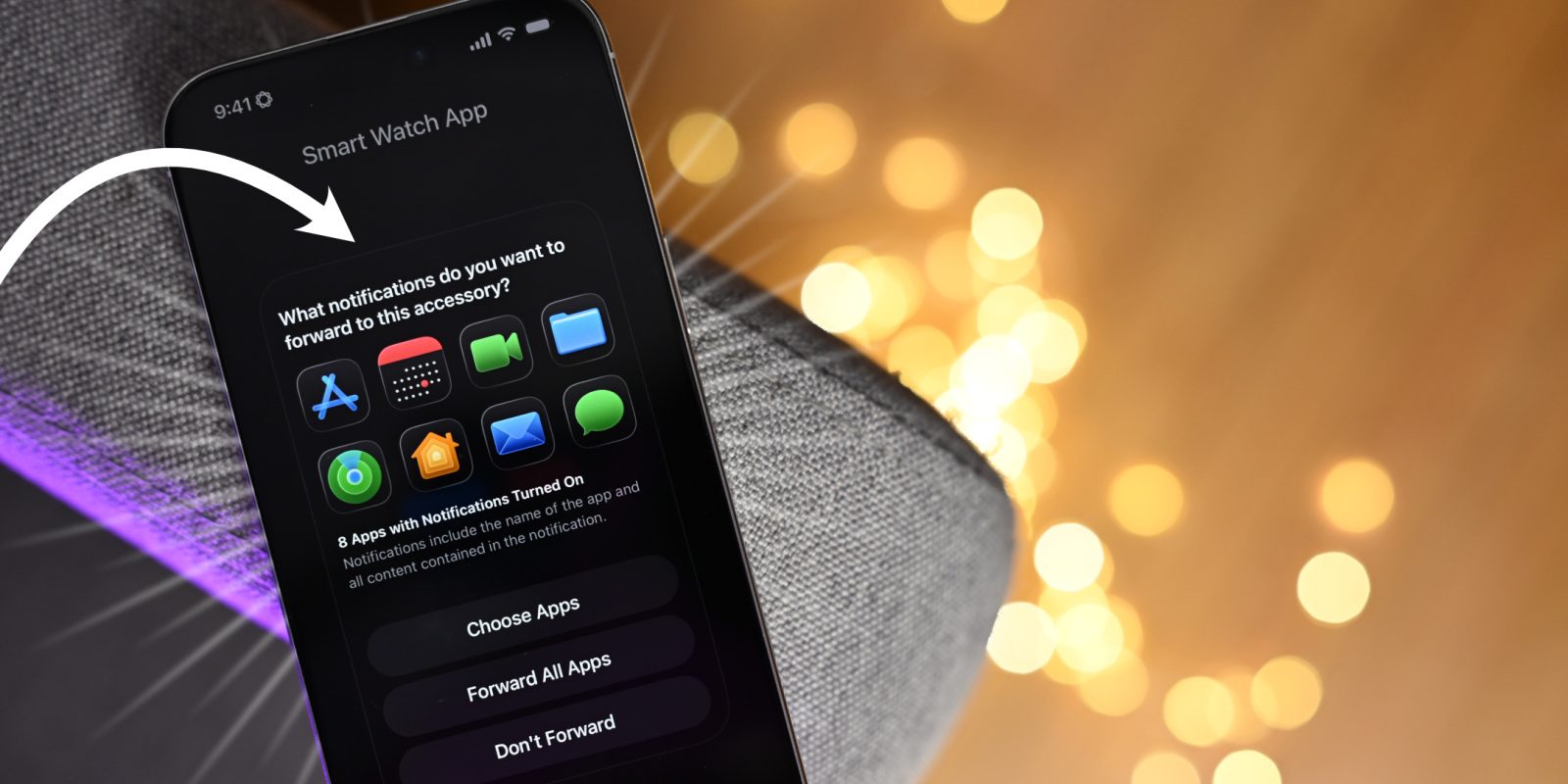
Notification Forwarding: iOS 26.4 beta 1 introduces the setup process for notification forwarding to third-party smartwatches and other hardware devices in the EU. The onboarding process is straightforward, similar to setting up new AirPods. Users can pair compatible Bluetooth devices and select which notifications to forward. Currently, this feature is limited to the EU and allows notification forwarding to a single device at a time. ([9to5mac.com](https://9to5mac.com/2026/02/18/ios-26-4-beta-1-notification-forwarding-onboarding-allow-search-on-icloud%E2%80%A4com-and-more-video/?utm_source=openai))
Search on iCloud.com: A new iCloud feature enables users to search for Photos and iCloud Drive content directly on iCloud.com. This setting can be enabled by navigating to Settings → User → iCloud → iCloud.com. Once activated, search fields appear in both the Photos and iCloud Drive sections of the website, facilitating easier content retrieval. ([9to5mac.com](https://9to5mac.com/2026/02/18/ios-26-4-beta-1-notification-forwarding-onboarding-allow-search-on-icloud%E2%80%A4com-and-more-video/?utm_source=openai))
Hotspot Data Usage: The location of hotspot data usage metrics has been moved. Instead of being under Cellular settings, data usage is now displayed directly in the Personal Hotspot section, providing more immediate access to this information. ([macrumors.com](https://www.macrumors.com/guide/ios-26-4-beta-features/?utm_source=openai))
Live Captions: Chinese (Taiwan) has been added as a new language option for Live Captions in the Accessibility settings, expanding the feature’s usability for a broader audience. ([macrumors.com](https://www.macrumors.com/guide/ios-26-4-beta-features/?utm_source=openai))
Conclusion
iOS 26.4 beta 1 introduces a range of features and enhancements aimed at improving user experience, security, and functionality across various applications. From AI-driven playlist creation in Apple Music to advanced video capabilities in Podcasts and enhanced security measures in Messages, this update reflects Apple’s ongoing dedication to innovation and user-centric design.