Google Enhances Chrome’s Address Bar with Integrated AI Mode Prompt Box
In a significant advancement for its desktop browser, Google has introduced a comprehensive AI Mode prompt box directly within Chrome’s address bar, commonly known as the Omnibox. This enhancement aims to streamline user interactions by embedding AI capabilities seamlessly into the browsing experience.
Evolution of AI Integration in Chrome
Previously, Chrome’s AI integration was manifested as a button located on the right side of the Omnibox. This button allowed users to send their input to AI Mode. For those who preferred a cleaner interface, the option to disable this feature was available by right-clicking the address bar and deselecting Always Show AI Mode Shortcuts.
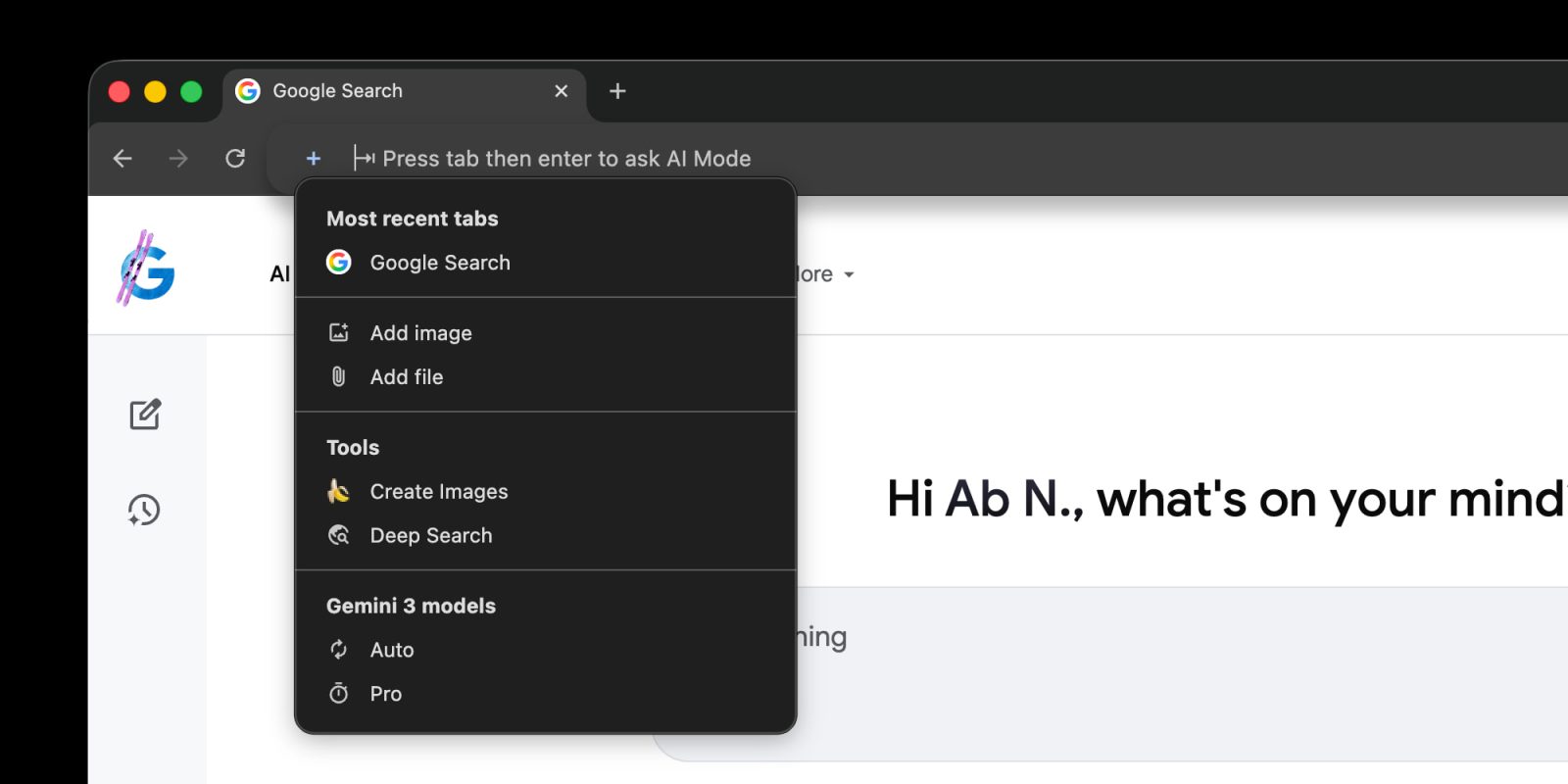
The latest update, however, introduces a ‘plus’ menu on the left side of the Omnibox, mirroring the design found on google.com/ai. This menu provides users with a suite of options to enhance their browsing and research activities.
Key Features of the New ‘Plus’ Menu
– Most Recent Tabs: This feature allows users to share the contents of their open pages with AI Mode. It facilitates tasks such as posing questions, summarizing websites, and more, akin to the functionalities offered by Gemini in Chrome.
– Add Image: Users can now upload images directly into AI Mode, enabling the AI to analyze and provide insights or descriptions related to the visual content.
– Add File: This option permits the uploading of various file types, allowing AI Mode to process and extract relevant information, thereby assisting in tasks like document summarization or data extraction.
– Tools: This section includes advanced functionalities such as:
– Create Images (Nano Banana): An AI-driven tool designed to generate images based on user prompts, expanding creative possibilities directly within the browser.
– Deep Search: This feature conducts in-depth searches, providing comprehensive results and insights beyond standard search capabilities.
– Gemini 3 Models: Users have the flexibility to select between different AI models:
– Auto: Automatically selects the most suitable model based on the task at hand.
– Pro: Utilizes a more advanced model for complex queries and tasks, offering enhanced performance and accuracy.
Enhanced User Interaction
Upon selecting an option from the ‘plus’ menu, the address bar dynamically expands into a prompt box. This box provides users with intuitive hints such as Ask anything, Describe your image, and Research anything, guiding them to effectively utilize AI Mode’s capabilities. A distinctive four-color glow around the input field adds a touch of visual appeal, indicating the active AI integration.
Availability and Version Information
This expanded AI Mode integration is being rolled out with version 145 of Chrome’s desktop browser. Users are encouraged to update their browsers to access these new features and enhance their browsing experience.
Additional Updates
In conjunction with the address bar enhancements, Google has also introduced Canvas as one of the available tools in the ‘plus’ menu. This feature is designed to assist users in organizing information and building plans over multiple sessions within a dynamic side panel that updates in real-time.
Implications for Users
The integration of AI Mode directly into Chrome’s Omnibox signifies a shift towards a more proactive and intelligent browsing experience. By embedding AI capabilities at the forefront of user interaction, Google aims to transform the browser from a passive tool into an active assistant that understands and anticipates user needs.
Future Prospects
As AI technology continues to evolve, it is anticipated that Chrome will further enhance its AI integrations, offering users more sophisticated tools and features. This progression aligns with Google’s broader vision of creating a more intuitive and efficient digital environment for its users.
Conclusion
The introduction of the AI Mode prompt box within Chrome’s address bar represents a significant milestone in the fusion of AI and web browsing. By providing users with direct access to powerful AI tools, Google is not only enhancing the functionality of its browser but also redefining the way users interact with the web.