Google’s Pixel ‘Now Playing’ Feature Receives a Major Redesign with Material 3 Expressive
Google has unveiled a significant redesign of its ‘Now Playing’ feature for Pixel devices, introducing a dedicated application available through the Play Store. This update brings a modernized interface and enhanced functionality, aligning with Google’s Material 3 Expressive design principles.
Revamped Interface and Navigation
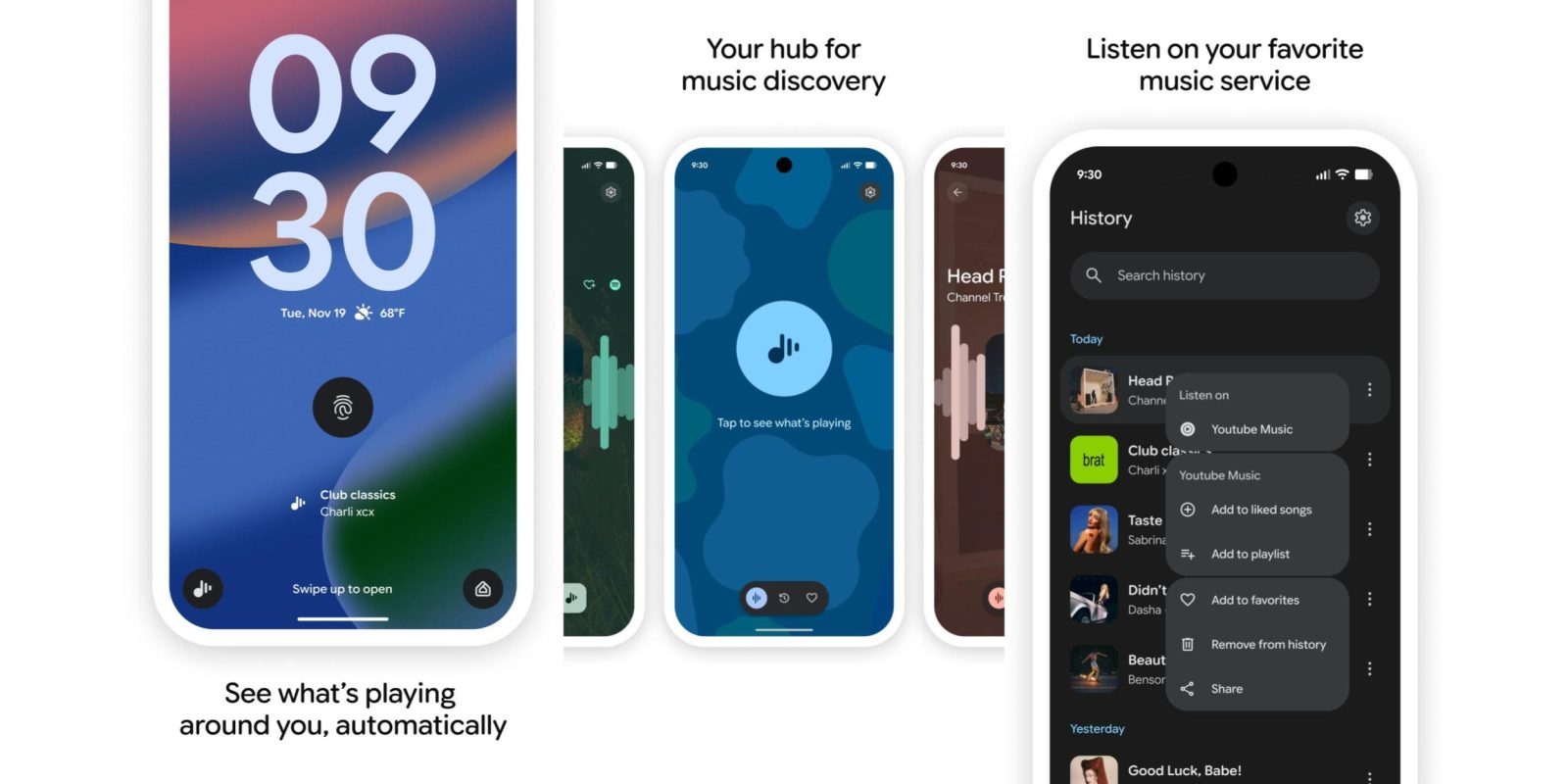
The previous ‘Now Playing’ interface, integrated within Android System Intelligence, has been overhauled to offer a more intuitive user experience. The new design features a three-tab layout with a floating toolbar, providing seamless navigation between different sections.
– Identify Music: The first tab allows users to tap and identify songs playing in their surroundings. Once a song is recognized, a floating action button (FAB) appears, enabling users to initiate another search effortlessly.
– History: The second tab presents a reverse-chronological list of previously identified songs. A search bar at the top facilitates quick access to specific tracks. Each entry includes options to share, add to favorites, or listen on connected music services. For YouTube Music users, additional actions like adding to liked songs or playlists are available.
– Favorites: The final tab compiles all favorited tracks, allowing users to curate and revisit their preferred songs easily.
Enhanced Accessibility Features
To improve accessibility, ‘Now Playing’ introduces several new features:
– Lockscreen Shortcut: A shortcut on the lockscreen provides quick access to the feature, with identified songs displayed prominently at the bottom of the screen.
– Quick Settings Tile: A customizable Quick Settings Tile shows the last identified song and offers a 2×1 configuration for easy access. Tapping the tile initiates a new search, while a long-press opens the History tab directly.
Seamless Integration and Availability
Users can update to the new ‘Now Playing’ experience by visiting the Play Store and selecting the ‘Update’ option. This update introduces a new app icon that aligns with the modern Pixel blue aesthetic, ensuring consistency across the device’s interface.
This redesign reflects Google’s commitment to enhancing user experience through thoughtful design and functionality improvements. By adopting the Material 3 Expressive design language, ‘Now Playing’ offers a more engaging and user-friendly interface, solidifying its position as a standout feature for Pixel users.