Google Photos Unveils Advanced Video Editing Features for Enhanced User Creativity
Google Photos has introduced a suite of new video editing tools designed to simplify the creation of professional-quality highlight reels and enhance the overall user experience. These updates include specialized templates with preset music and text overlays, as well as a redesigned video editor, marking a significant advancement in the app’s capabilities.
Specialized Templates for Effortless Highlight Reels
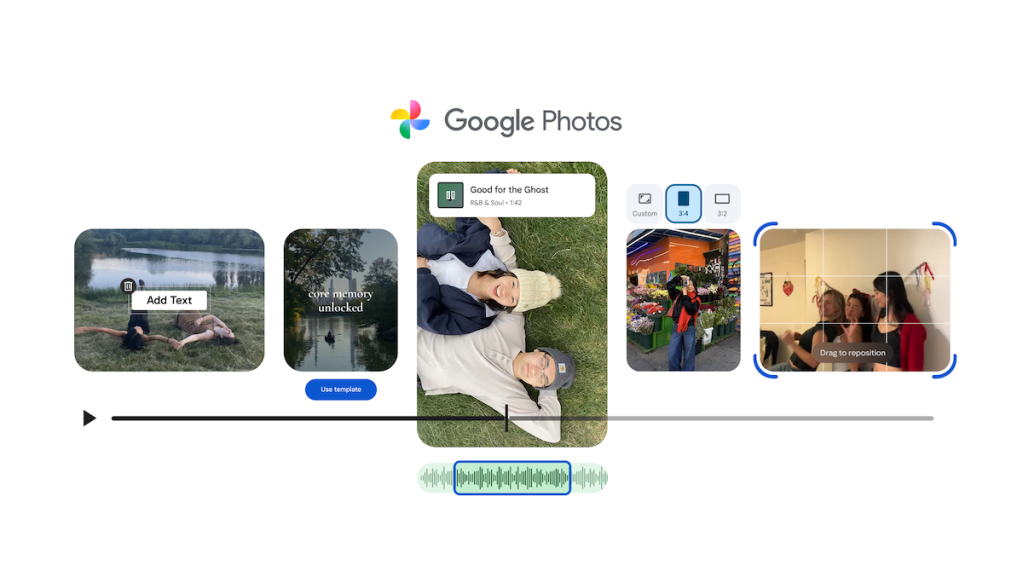
The newly introduced templates are currently being rolled out to Android devices, offering users a streamlined approach to crafting highlight reels. By selecting a template and choosing desired photos and videos, Google Photos automatically generates a video that synchronizes with the beat of the selected music. This feature enables users to produce polished videos in seconds, capturing memorable moments such as vacations or celebrations with ease.
Redesigned Video Editor for Enhanced Usability
In addition to the templates, Google Photos has unveiled a redesigned video editor available on both Android and iOS platforms. This new editor boasts a universal timeline, allowing users to view all video clips and content in a single, organized space. The adaptive canvas feature adjusts the editing interface to suit the user’s specific project needs, providing a more intuitive and user-friendly experience. Users can now seamlessly incorporate music and text into their videos, enhancing storytelling capabilities. This redesigned editor is set to become the default video editing tool on Android devices.
Expanded Music Library and Customizable Text Overlays
To further personalize highlight videos, Google Photos has expanded its music library, enabling users to select the perfect soundtrack for their creations. This feature is accessible on both Android and iOS devices. Additionally, Android users can now add custom text overlays to their videos, with options to choose from various fonts, colors, and backgrounds, allowing for greater creative expression.
Integration of AI-Powered Features
These enhancements build upon Google Photos’ ongoing integration of AI-powered tools aimed at simplifying the editing process. Earlier this year, the app introduced features like Reimagine, which uses generative AI to transform objects and backgrounds in photos based on text prompts, and Auto Frame, suggesting different ways to frame a photo. The addition of these new video editing tools signifies Google’s commitment to providing users with advanced, yet accessible, creative capabilities.
Availability and Future Updates
The new video editing features are currently rolling out to Android users, with plans to extend availability to iOS users in the near future. Google Photos continues to evolve, offering users innovative tools to enhance their photo and video editing experiences.