Google Introduces ‘AppFunctions’ to Enhance Gemini’s Integration with Android Apps
In a significant advancement for Android’s AI capabilities, Google has unveiled ‘AppFunctions,’ a feature designed to deepen the integration between its AI assistant, Gemini, and various Android applications. This initiative aims to streamline user interactions by enabling Gemini to perform tasks directly within apps, enhancing both functionality and user experience.
Understanding AppFunctions
AppFunctions is an Android 16 platform feature accompanied by a Jetpack library that allows applications to expose specific functions for execution by agent apps like Gemini. This local, on-device functionality mirrors the Model Context Protocol (MCP) used for server-side tools but operates entirely within the user’s device, ensuring privacy and security.
Practical Applications of AppFunctions
The introduction of AppFunctions opens up a myriad of possibilities for seamless interactions between Gemini and Android apps. For instance:
– Task Management and Productivity: Users can instruct Gemini to set reminders or create tasks. For example, saying, Remind me to pick up my package at work today at 5 PM, prompts Gemini to interact with a task management app to schedule the reminder with the specified details.
– Media and Entertainment: Commands like Create a new playlist with the top jazz albums from this year enable Gemini to collaborate with music apps to generate and play curated playlists instantly.
– Cross-App Workflows: Complex tasks involving multiple applications become more straightforward. A user might say, Find the noodle recipe from Lisa’s email and add the ingredients to my shopping list, leading Gemini to extract information from an email app and populate a shopping list app accordingly.
– Calendar and Scheduling: Scheduling events is simplified by commands such as Add Mom’s birthday party to my calendar for next Monday at 6 PM, allowing Gemini to create calendar entries without manual input.
Integration with Samsung Devices
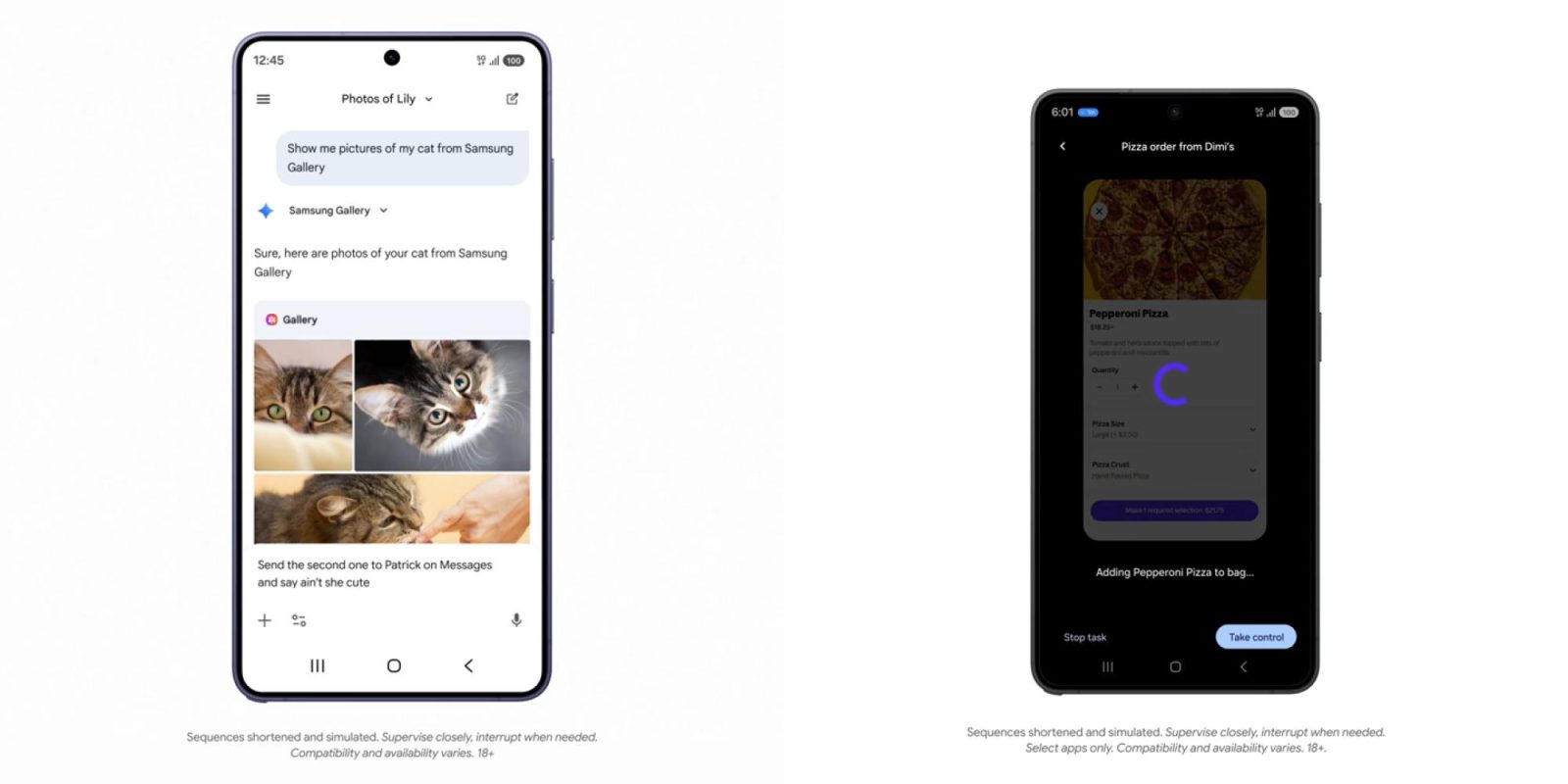
Samsung’s collaboration with Google brings AppFunctions to its devices, starting with the Galaxy S26 and extending to models running OneUI 8.5 and higher. This integration allows users to perform tasks like retrieving specific photos by voice command. For example, asking Gemini to Show me pictures of my cat from September would prompt the Samsung Gallery app to display the relevant images.
Privacy and Security Considerations
Google emphasizes that AppFunctions are designed with privacy and security at their core. By operating entirely on-device, these functions ensure that user data remains private and secure, addressing potential concerns about data transmission and storage.
Developer Engagement and Future Prospects
Google is actively encouraging developers to integrate AppFunctions into their applications, providing comprehensive documentation and support. This initiative is expected to foster a more cohesive and intelligent app ecosystem, where AI assistants like Gemini can perform a broader range of tasks, enhancing user productivity and engagement.
Conclusion
The introduction of AppFunctions marks a significant step forward in the evolution of AI integration within the Android ecosystem. By enabling Gemini to interact more deeply with applications, Google is paving the way for a more intuitive and efficient user experience. As developers adopt this feature, users can anticipate a future where their AI assistant seamlessly manages tasks across various apps, making daily interactions more streamlined and effective.