Google has introduced the Notification Organizer feature for Pixel devices, enhancing how users manage and interact with notifications. This feature, part of the Android 16 QPR2 update, is designed to streamline the notification experience by categorizing alerts into specific groups, making it easier for users to prioritize and respond to them.
Enabling the Notification Organizer
To activate the Notification Organizer on your Pixel device:
1. Open the Settings app.
2. Navigate to Notifications.
3. Select Notification Organizer near the top of the list.
Unlike the AI Summaries feature introduced earlier, the Notification Organizer is enabled by default. However, to utilize this feature, ensure that your device’s primary system language is set to English. The feature is currently available in the following countries:
– Australia
– Canada
– Germany
– Japan
– United Kingdom
– United States
Notification Categories and Management
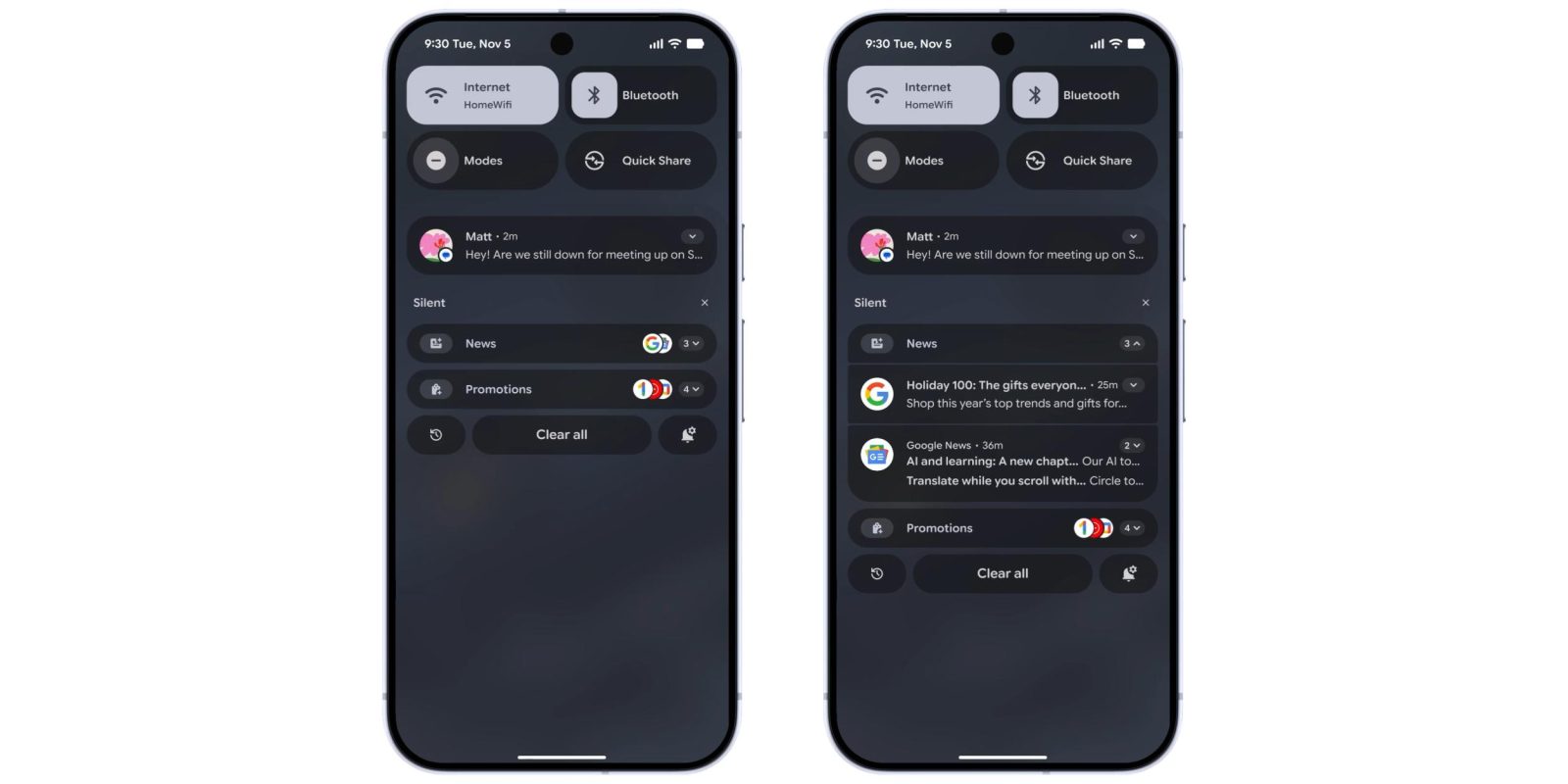
The Notification Organizer classifies incoming alerts into four categories:
1. Promotions: Notifications related to promotional content.
2. News: Updates from news applications or services.
3. Social: Alerts from social media platforms.
4. Suggested: Notifications that the system deems relevant based on user behavior.
By default, the Promotions and News categories are active. To enable the Social and Suggested categories:
1. Go to Settings > Notifications > Notification Organizer.
2. Toggle on the desired categories.
Additionally, there’s an option to Always expand bundles, allowing users to view grouped notifications in an expanded format automatically.
Accessing Organized Notifications
Organized notifications appear under the Silent section of the notification shade. Each category is represented by an icon adorned with an AI sparkle, indicating the use of artificial intelligence in sorting. App icons are stacked on the right side of each category. Tapping on a category expands the bundle, allowing users to view and interact with individual notifications.
Troubleshooting and Availability
If the Notification Organizer hasn’t appeared on your device after updating to Android 16 QPR2, a simple restart may prompt its activation. Currently, the feature is available on the Pixel 9 (excluding the 9a) and Pixel 10 series.
Integration with AI Summaries
The introduction of the Notification Organizer follows the rollout of AI Summaries in the November 2025 Feature Drop. AI Summaries utilize on-device artificial intelligence to condense lengthy message notifications from popular messaging apps like Google Messages and WhatsApp. This feature is particularly useful for managing extensive conversations, providing concise summaries directly in the notification shade.
User Experience and Feedback
Early adopters have noted that the combination of AI Summaries and the Notification Organizer significantly enhances the notification management experience. By reducing clutter and prioritizing important alerts, users can respond more efficiently to messages and updates. The AI sparkle icon serves as a visual cue, indicating notifications that have been processed and organized by the system’s artificial intelligence.
Future Developments
Google continues to refine and expand its notification management features. Future updates may include additional categories, support for more languages, and further integration with other AI-driven functionalities. Users are encouraged to provide feedback through the Pixel Community forums to help shape the evolution of these features.
Conclusion
The Notification Organizer represents a significant step forward in how Pixel devices handle notifications. By intelligently categorizing and summarizing alerts, Google aims to provide a more streamlined and user-friendly experience. As these features continue to evolve, Pixel users can look forward to even more efficient ways to manage their digital communications.