Google Docs Introduces Gemini-Powered Audio Summaries for Enhanced Productivity
Google Docs has unveiled a groundbreaking feature: audio summaries powered by its advanced AI, Gemini. This innovation aims to streamline document review processes by providing concise, verbal overviews of content, enhancing user efficiency and accessibility.
Accessing Audio Summaries
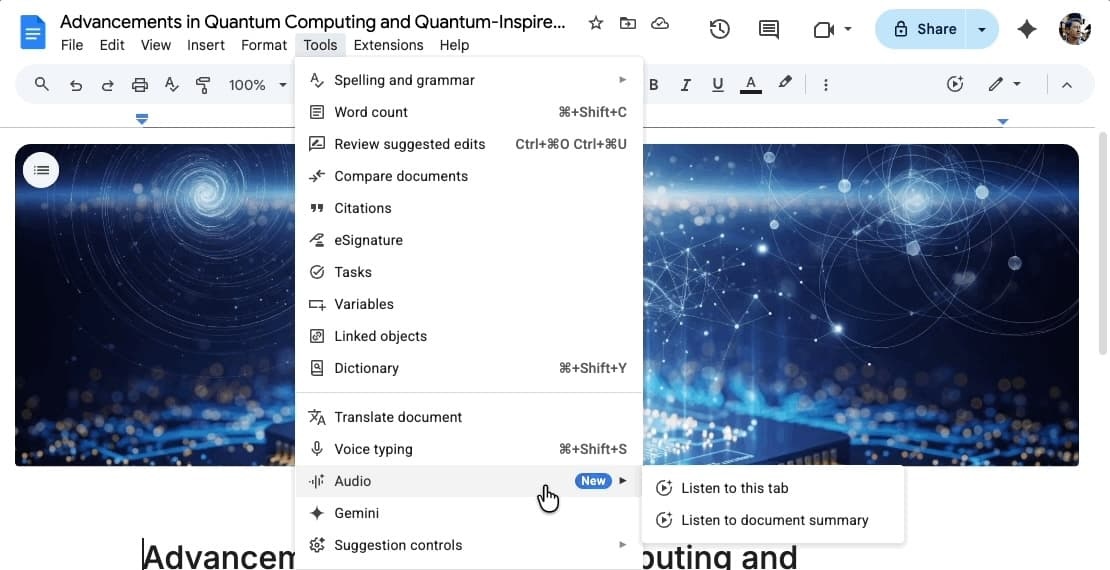
To utilize this feature on the web version of Google Docs, navigate to the Tools menu and select Audio. Here, you’ll find two options: Listen to this tab and the newly introduced Listen to document summary. Choosing the latter activates an audio player equipped with a timeline scrubber and adjustable playback speeds ranging from 0.5x to 2x. Additionally, users can select from various voice profiles, including narrator, persuader, and coach, to tailor the listening experience to their preferences.
Functionality and Benefits
The Gemini-powered audio summaries offer succinct verbal synopses of document contents, encompassing multiple tabs when applicable. Typically lasting just a few minutes, these summaries employ a natural speaking style, enabling users to quickly grasp essential information. This feature is particularly beneficial for professionals needing to review meeting notes or lengthy reports efficiently, allowing them to extract key points without reading through extensive text.
Availability and Rollout
The audio summaries are being gradually introduced over the coming weeks and will be accessible to subscribers of the following Google Workspace tiers:
– Business Standard and Plus
– Enterprise Standard and Plus
– Google AI Ultra for Business add-on
– Google AI Pro for Education add-on
– Google AI Pro and Ultra
Integration with Other Google Services
This development is part of Google’s broader initiative to integrate AI-driven audio features across its suite of services. For instance, Google Drive has incorporated Gemini to generate audio overviews of PDFs, providing users with concise, podcast-style summaries of lengthy documents. Similarly, the Gemini app has expanded its capabilities to include audio overviews, allowing users to generate podcast-style discussions from uploaded documents or slideshows. These integrations underscore Google’s commitment to enhancing user productivity through AI-powered audio functionalities.
Enhancing Accessibility and Efficiency
The introduction of audio summaries in Google Docs aligns with Google’s ongoing efforts to make information more accessible and digestible. By converting text-heavy documents into brief, spoken summaries, users can stay informed and prepared, even when time is limited. This feature is particularly advantageous for individuals who prefer auditory learning or need to multitask, as it allows them to absorb information without being tethered to a screen.
User Experience and Customization
Google has prioritized user experience by offering customization options within the audio summaries feature. The ability to adjust playback speed and select different voice profiles ensures that users can tailor the experience to their preferences. This personalization enhances engagement and comprehension, making the feature more effective for a diverse user base.
Future Prospects
As Google continues to refine and expand its AI capabilities, users can anticipate further enhancements to the audio summaries feature. Potential developments may include support for additional languages, integration with other Google Workspace applications, and more advanced customization options. These advancements will further solidify Google’s position as a leader in AI-driven productivity tools.
Conclusion
The rollout of Gemini-powered audio summaries in Google Docs marks a significant advancement in document management and accessibility. By providing concise, verbal overviews of content, this feature empowers users to process information more efficiently, catering to the needs of today’s fast-paced work environments. As this feature becomes available to more users, it is poised to become an indispensable tool for professionals seeking to optimize their workflow and stay informed with minimal effort.