Gemini App Enhances User Experience with New ‘Labs’ Section and Personal Intelligence Toggle
Google’s Gemini app has introduced significant updates to its web interface, focusing on improved organization and user customization. The latest enhancements include a dedicated ‘Labs’ section within the Tools menu and a ‘Personal Intelligence’ toggle, aiming to streamline access to features and personalize user interactions.
Revamped Tools Menu with ‘Labs’ Section
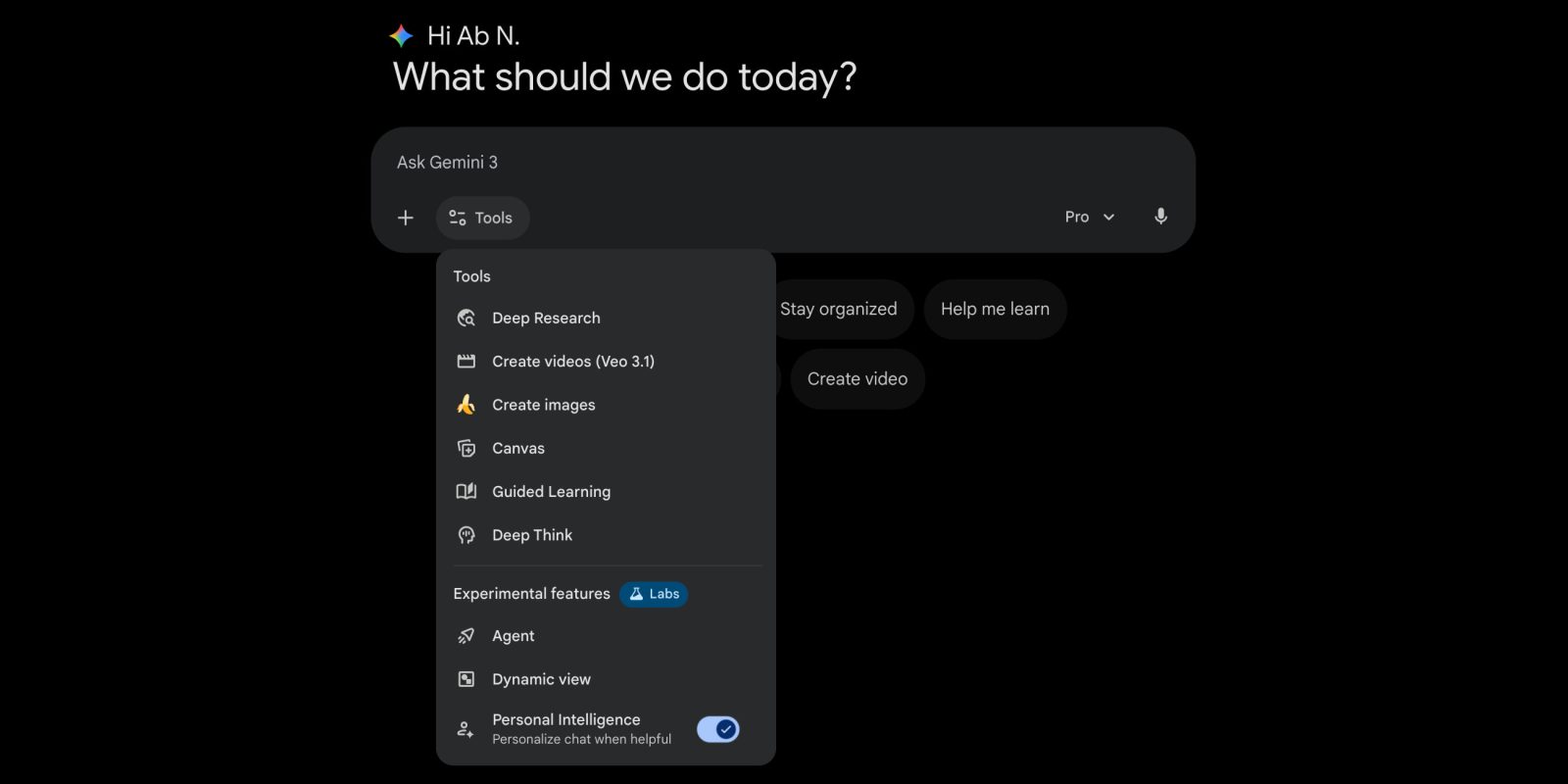
Previously, the Tools menu on the Gemini web app presented a single, extensive list of features, which could be overwhelming for users. The recent update restructures this menu into two distinct sections: ‘Tools’ and ‘Experimental features,’ the latter labeled as ‘Labs.’
The ‘Tools’ section encompasses established functionalities such as:
– Deep Research: Provides in-depth answers to complex queries.
– Create Videos (AI Plus): Enables video creation using advanced AI capabilities.
– Create Images: Allows users to generate images through AI.
– Canvas: Offers a platform for writing documents and code.
– Guided Learning: Facilitates structured learning experiences.
– Deep Think (AI Ultra): Supports advanced analytical thinking tasks.
The ‘Experimental features’ section, marked with the ‘Labs’ beaker icon, includes:
– Agent (AI Ultra): An experimental feature for advanced AI interactions.
– Dynamic View or Visual Layout: Available to all users, this feature enhances visual presentation.
– Personal Intelligence: Accessible to paid subscribers, this feature personalizes chat experiences by integrating connected apps.
This bifurcation not only declutters the interface but also clearly distinguishes between stable tools and those still under development, allowing users to make informed choices about the features they engage with.
Introduction of ‘Personal Intelligence’ Toggle
A notable addition is the ‘Personal Intelligence’ toggle within the ‘Labs’ section. This feature empowers users to control the extent to which Gemini accesses their connected applications to personalize chat responses.
By enabling this toggle, users allow Gemini to incorporate data from their connected apps, enhancing the relevance and personalization of responses. Conversely, disabling it ensures that interactions remain general, without drawing from personal data. This setting applies to the current conversation and resets to the default enabled state when a new chat begins, offering flexibility and control over privacy and personalization.
User-Centric Design Enhancements
These updates reflect Google’s commitment to refining user experience by:
– Simplifying Navigation: The organized menu structure reduces cognitive load, making it easier for users to locate and utilize desired features.
– Enhancing Personalization: The ‘Personal Intelligence’ toggle provides users with autonomy over their data usage, aligning with diverse privacy preferences.
– Encouraging Exploration: The ‘Labs’ section invites users to experiment with emerging features, fostering engagement and feedback that can drive future developments.
Availability and Future Prospects
As of now, these enhancements are available on the Gemini web app, with plans to extend them to mobile platforms in subsequent updates. This phased rollout ensures stability and allows for user feedback to inform further refinements.
In summary, the Gemini app’s latest updates signify a thoughtful approach to user interface design and personalization. By introducing the ‘Labs’ section and the ‘Personal Intelligence’ toggle, Google not only enhances functionality but also empowers users to tailor their experiences, balancing innovation with user control.